 3
Weather Enhanced
WeatherDependable weather on any watchface that reads weather, from your own provider, held inside its free plan so it never runs dry partway through the day. Weather Enhanced counts every call it makes and keeps each provider inside its plan's limits, so a free key lasts the whole day, every day. When your provider has a bad moment, it keeps showing the last good reading, then switches to Open-Meteo until your provider is back. It serves weather the same way the Pebble app's own Weather plugin does, so a watchface written for it reads this with nothing to change, and picking it as your preferred source feeds the watch's own Weather app too. - Never spends past a provider's free plan, with a Paid Plan switch for a key on a paid plan. - Keeps the last good reading through a bad moment, then falls back to Open-Meteo. - Works with Open-Meteo, with no account or key, or your own free OpenWeatherMap or WeatherAPI.com key. - Adds pressure, dew point, and a fuller forecast for faces that show them. - Also works with watchfaces that show your coordinates, such as LCARS Stardate. - Fetches the first place in the Pebble app's weather list, or up to five. - Follows the Pebble app's units, or your own. - Refreshes every 15 minutes to 2 hours, your choice. Weather data by Open-Meteo.com under CC BY 4.0. Weather data © OpenWeather. Powered by WeatherAPI.com. To use it, turn on plugins in the Pebble app under Settings, Plugins, Plugins / permissions preview. Then pick Weather Enhanced as your Weather source. ----- I mostly build things in my spare time, and your support helps keep that going. It usually finds its way into more green coffee beans, a few roasting experiments, and plenty of late-night coding sessions working on Pebble projects like this one. If you've found something useful here, or simply enjoy following along with what I'm building, you can support my projects here: https://ko-fi.com/nullsyntax
 2
Stocks + Crypto
FinanceStock and crypto prices on any watchface that reads stocks, from Yahoo with no key, or your own Finnhub, Twelve Data, or Alpha Vantage key. Stocks + Crypto serves prices the same way the Pebble app's own Stocks plugin does, so a watchface written for it reads these with nothing to change. Build one watchlist of up to 8 stocks and 8 crypto pairs, and put the ones you most want on your wrist at the top, since a watchface may only show the first few. - Works with Yahoo the moment it is installed, with no account or key. - Takes your own free Finnhub, Twelve Data, or Alpha Vantage key, with a Paid Plan switch for a key on a paid plan. - Keeps a free key inside its plan's limits for the minute and the day. - Prices crypto from Yahoo, whatever source you pick for stocks. - Keeps the last good price for a ticker the provider could not price for a moment. - Keeps your API keys in the phone's encrypted secure storage. - Refreshes every 5 minutes to an hour, your choice. Prices can be delayed. They are for information only, not financial advice. To use it, turn on plugins in the Pebble app under Settings, Plugins, Plugins / permissions preview. Then pick Stocks + Crypto as your Stocks source, and as your Crypto source too if your watchface reads crypto. ----- I mostly build things in my spare time, and your support helps keep that going. It usually finds its way into more green coffee beans, a few roasting experiments, and plenty of late-night coding sessions working on Pebble projects like this one. If you've found something useful here, or simply enjoy following along with what I'm building, you can support my projects here: https://ko-fi.com/nullsyntax
 6
Calendar + iCal
CalendarYour phone's calendars and your iCal links, together in one agenda on any watchface that reads calendars. Calendar + iCal builds on the Pebble app's own Calendar plugin and adds up to two iCal links beside it. Add a work calendar you can't sync to your phone, a shared family or team calendar, a sports schedule, or a school timetable. Every event comes through once, in order, with the calendar it came from. - Shows today and the next six days, up to 20 events, with up to 10 from the phone's own calendars. - Works with any watchface that reads calendar plugins, with nothing to change on the face. - Keeps your iCal links in the phone's encrypted secure storage, since a private link works like a password. - Needs no account and no API key, and your calendars never leave your phone. - Refreshes each link every 5 minutes to an hour, your choice. To use it, turn on plugins in the Pebble app under Settings, Plugins, Plugins / permissions preview. Then pick Calendar + iCal as your calendar source. ----- I mostly build things in my spare time, and your support helps keep that going. It usually finds its way into more green coffee beans, a few roasting experiments, and plenty of late-night coding sessions working on Pebble projects like this one. If you've found something useful here, or simply enjoy following along with what I'm building, you can support my projects here: https://ko-fi.com/nullsyntax
 18
Sketchbook Horizon
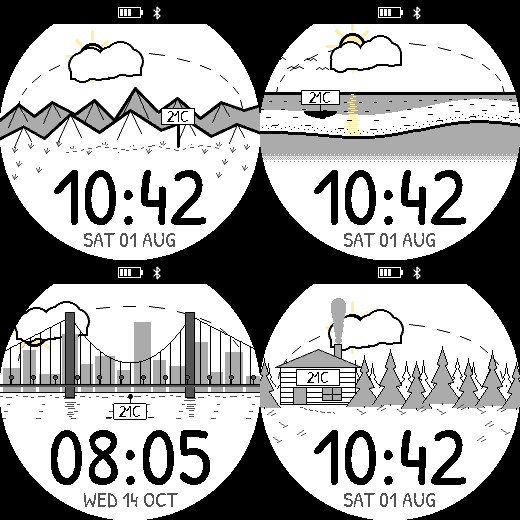
FacesSketchbook Horizon is a hand-drawn style watchface for the Pebble Time 2 and Pebble Round 2. It carries four scenes in one face, a mountain ridge, a shoreline, a city bridge, and a forest clearing. Pick one in settings and the whole face redraws around it. Live weather, a sun that tracks your real sunrise/sunset times, the moon phase, heart rate, steps, and Bluetooth and Quiet Time status are drawn right into the scene. 🏞️ Scenes - Ridgeline, two mountain ridges standing under an open sky. - Shoreline, a beach with a boat riding the tide, the wet sand widening as the water pulls back. - Skyline, a city set back behind a suspension bridge, its lamps coming on at dusk and strung across the water after dark. - Treeline, a forest clearing with a log cabin, a lit window, and chimney smoke leaning on the wind. 🎨 Appearance - Eight hand-drawn style palettes, each with its own night sky, flexible time and date formats, and Swatch Internet Time (.beats). - The sun follows the arc between your real location's sunrise and sunset, and the moon phase appears after dark. Stars come out at night, and on the water scenes the sun and moon cast a reflection. - Palette modes to suit how you wear it: keep one palette fixed, shuffle through them all from every fifteen minutes to once a day, or keep one by day and swap to another after dark or while Quiet Time is on. 🌤️ Weather - Weather drawn directly into the sky, from drifting cloud and overcast to drizzle, rain, snow, showers, fog, and thunderstorms, with rougher going as the weather turns. Powered by your preferred Pebble app weather plugin, or by Open-Meteo, OpenWeatherMap, or WeatherAPI using automatic GPS or a manual location. ❤️ Health & Activity (Pebble Time 2 Only) - Heart rate, step count, and traversal distance in steps, miles, or kilometres. ⏰ Extras - Bluetooth connection alerts, plus Bluetooth and Quiet Time status indicators. - Hourly vibration with None, Short, Long, and Double patterns, automatically silenced during Quiet Time. - On the Pebble Time 2, a Layout setting trades the readouts for a larger clock. 🔎 Features at a Glance mountains, ridge, beach, ocean, sea, coast, boat, tide, city, skyline, bridge, forest, trees, cabin, landscape, nature, scenic, hand drawn, illustrated, digital, round, 12 hour, 24 hour, Swatch Internet Time, live weather, weather plugin, Pebble app plugins, animated weather, rain, snow, fog, thunderstorm, sunrise, sunset, sun position, moon phase, night sky, stars, heart rate, steps, step counter, pedometer, distance, Bluetooth, Bluetooth disconnect alert, Quiet Time, Do Not Disturb, DND, hourly chime, four in one, scene picker, Pebble Time 2, Pebble Round 2 ----- I mostly build things in my spare time, and your support helps keep that going. It usually finds its way into more green coffee beans, a few roasting experiments, and plenty of late-night coding sessions working on Pebble projects like this one. If you've found something useful here, or simply enjoy following along with what I'm building, you can support my projects here: https://ko-fi.com/nullsyntax
 110
Sidereel
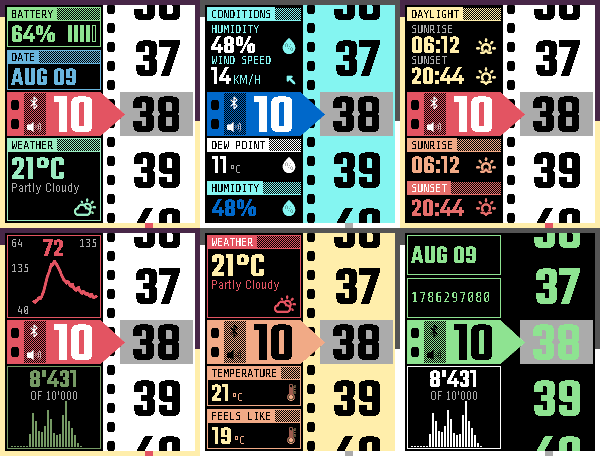
FacesSidereel is a customizable modular watchface for the Pebble Time 2, with a scrolling minute reel and hour pointer beside a dashboard of heart rate, steps, sleep, weather, phone battery, Quiet Time, Bluetooth, battery, moon phase, sunrise/sunset, and time zone complications. 🧩 Layout - A two-column panel field to the left of the reel, split into a top band and a bottom band by the hour pointer. Drag-and-drop editing, one-tap presets, and import/export work the same way as Gridlock, but tall panels sit above or below the pointer, never across it. - A library of four layouts, all built in the same editor and reached from the tabs above it. Everything you place is kept as you go, so there is nothing to save by hand. - Assign any two of them as your Day and Night screens. The watch swaps between the pair on its own, at the sunrise and sunset your weather provider reports or at times you set yourself. - Customizable pointer and reel colours let you tint both independently on top of any theme. 🎨 Appearance - Four colour themes, including Mono, Mono Inverse, and Vibrant, plus a Custom theme where you colour every module's header, value, icon, and caption yourself. - A choice of eight header fonts and a Classic or Rounded panel style to set the tone. - A perforated film sprocket strip separates the panel field from the reel, tying the whole face together. ❤️ Health & Activity - Heart rate, steps, distance, calories, sleep, and activity panels, with graph panels for steps and recent heart rate. 🔌 Pebble App Plugins - Reads the Pebble app plugins you choose for weather and phone battery. Pick Pebble App: Preferred Source and the face follows the weather plugin you prefer, with no key to set up. - A list on the settings page shows the plugins tested with Sidereel and which ones are on your phone. ⚙️ System - Battery level panel, and Connection and Quiet Time glyphs also appear directly on the hour pointer. - Phone Battery panels show your phone's charge, and Battery Battery shows the watch and the phone side by side. - Optional vibrations when Bluetooth disconnects or reconnects. 📅 Dates & Counters - Date, Week Number, Weeks Left, Day of Year, and Days Left panels for keeping an eye on how the year is going. - Weekday Dots, Julian Date, and a Unix Epoch panel, with a Week Starts On setting for Sunday or Monday. 🌤️ Weather - Weather from your preferred Pebble app weather plugin, or from Open-Meteo, OpenWeatherMap, or WeatherAPI. - A full suite: temperature, feels like, humidity, wind, pressure, dew point, UV index, high and low, precipitation chance, and a conditions panel in several sizes. - A day and night tracker counting down to the next sunrise or sunset, plus individual sunrise and sunset panels and a daylight progress panel. - A Moon panel showing the current phase and a Next Moon panel counting down to the next full or new moon. 🕐 Time - Swatch .beats and an alternate time zone panel sit alongside the reel, and the reel itself supports 12-hour and 24-hour formats. ⏰ Extras - A Goal Met Vibe that celebrates when you hit your steps, calories, distance, or active minutes target, with Short, Long, Double, five celebration rhythms, and a Custom pattern you can type in yourself. - An hourly vibration option with None, Short, Long, and Double patterns, silent during Quiet Time. 🔎 Features at a Glance modular, customizable, configurable, dashboard, complications, drag and drop, scrolling time, rolling minutes, 12 hour, 24 hour, world clock, dual time, second time zone, Swatch Internet Time, weather, weather plugin, plugins, Pebble app plugins, phone battery, temperature, humidity, wind, UV index, rain chance, sunrise, sunset, daylight, moon phase, health, fitness, heart rate, HRM, steps, step counter, pedometer, distance, calories, sleep, step goal, battery, Bluetooth, Bluetooth disconnect alert, Quiet Time, Do Not Disturb, DND, hourly chime, week number, day of year, Julian date, Unix time, day and night themes, Pebble Time 2 ----- I mostly build things in my spare time, and your support helps keep that going. It usually finds its way into more green coffee beans, a few roasting experiments, and plenty of late-night coding sessions working on Pebble projects like this one. If you've found something useful here, or simply enjoy following along with what I'm building, you can support my projects here: https://ko-fi.com/nullsyntax
 559
Gridlock
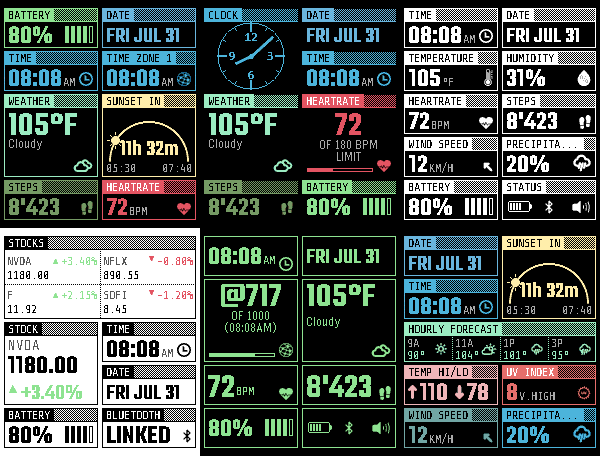
FacesGridlock is a customizable modular dashboard watchface for the Pebble Time 2, with calendar, weather, stocks, now playing, phone battery, heart rate, heart rate variability (HRV), steps, sleep, Quiet Time, Bluetooth, battery, moon phase, sunrise/sunset, and forecast complications on a drag and drop grid around a digital or analog clock. 🧩 Layout - A grid engine with drag-and-drop editing, up to five rows, and both symmetric and asymmetric panel arrangements. One-tap presets get you started, and import/export lets you save and share a layout. - A library of four layouts, all built in the same grid and reached from the tabs above it. Everything you place is kept as you go, so there is nothing to save by hand. - Assign any two of them as your Day and Night screens. The watch swaps between the pair on its own, at the sunrise and sunset your weather provider reports or at times you set yourself. 🎨 Appearance - Several colour themes, including Vibrant and two Mono looks, plus a Custom theme where you colour every module's header, value, icon, and caption yourself. - Nine Analog Face dial styles and a choice of eight header fonts to set the tone of the whole face. - Per-module control over borders and header strips, from bold panels to a clean frameless look, with bulk toggles to change them all at once. 🕐 Time - Digital and analog time panels, an alternate time zone, and Swatch Internet Time (.beats). - Big Hour, Big Minutes, and a full-width Big Time panel with oversized readouts when you want the clock readable at a glance. ❤️ Health & Activity - Heart rate, steps, distance, calories, sleep, and activity panels, with graph panels for steps and recent heart rate. - BPM Today charts your heart rate through the day by the hour, and a Heart panel pairs your heart rate and its range over the last hour with your HRV. - Heart rate variability panels show how much the gap between your heartbeats changes, a number that tends to rise when you are rested. Pick from the latest reading, a trend, Night HRV, the last two hours, and today by the hour, plus Still vs Walking to compare readings taken at rest, while busy, and on the move. - An HRV Tuning panel lists each reading with how much you moved, your steps, and whether it counted, so you can set the Still Up To and Walking From settings from your own numbers. 🔌 Pebble App Plugins - Reads the Pebble app plugins you choose for weather, calendar, stocks, phone battery, and now playing. Pick Pebble App: Preferred Source and the face follows the plugin you prefer, with no key or link to set up. - A list on the settings page shows the plugins tested with Gridlock and which ones are on your phone, and a panel that needs a plugin you lack says so. 🎵 Now Playing - Now Playing panels show the song your phone is playing, with its title, artist, and album art, and the wide size adds whether it is playing or paused. They read the Pebble app's music plugin, built in on Android. ⚙️ System - At-a-glance panels for battery, Bluetooth connection, and Quiet Time status, or a single combined Status panel showing all three together. - A Phone Battery panel shows your phone's charge beside the watch's own. - Optional vibrations when Bluetooth disconnects or reconnects. 📅 Calendar - Read your phone's calendars through a Pebble app calendar plugin, or connect any iCal (.ics) feed from Google, Apple iCloud, Outlook, or another provider. Feeds are parsed with ical.js, so recurring events, time zones, and cancelled or rescheduled exceptions all come through correctly. - Next Event, Agenda, and Timeline panels in several sizes show what is coming up, with optional reminders at 15 minutes, 5 minutes, or on start that respect Quiet Time. 🗓️ Dates & Counters - A month grid with today highlighted, plus Week Number, Weeks Left, Day of Year, and Days Left panels for keeping an eye on how the year is going. - Weekday Dots, Julian Date, and a Unix Epoch panel, with a Week Starts On setting for Sunday or Monday. 🌤️ Weather - Weather from your preferred Pebble app weather plugin, or from Open-Meteo, OpenWeatherMap, or WeatherAPI. - A full suite: temperature, feels like, humidity, wind, pressure, dew point, UV index, high and low, precipitation chance, and hourly and daily forecast panels in several sizes. - A day and night tracker counting down to the next sunrise or sunset, a Moon panel showing the current phase, and a Next Moon panel counting down to the next full or new moon. 📈 Markets - A single-ticker Stock panel and a four-ticker Watchlist, using a stock plugin from the Pebble app store or your own free Finnhub, Alpha Vantage, Yahoo, or Twelve Data key. ⏰ Extras - A Goal Met Vibe that celebrates when you hit your steps, calories, distance, or active minutes target, with Short, Long, Double, five celebration rhythms, and a Custom pattern you can type in yourself. - An hourly vibration option with None, Short, Long, and Double patterns, silent during Quiet Time. 🔎 Features at a Glance modular, customizable, configurable, dashboard, complications, drag and drop, grid, digital, analog, big time, world clock, dual time, second time zone, Swatch Internet Time, weather, forecast, hourly forecast, temperature, humidity, wind, UV index, rain chance, sunrise, sunset, moon phase, calendar, agenda, iCal, Google Calendar, iCloud, Outlook, event reminders, stocks, stock ticker, watchlist, plugins, Pebble app plugins, weather plugin, calendar plugin, stock plugin, now playing, music, album art, phone battery, health, fitness, heart rate, HRM, HRV, heart rate variability, steps, step counter, pedometer, distance, calories, sleep, step goal, battery, Bluetooth, Bluetooth disconnect alert, Quiet Time, Do Not Disturb, DND, hourly chime, week number, day of year, Julian date, Unix time, day and night themes, Pebble Time 2 ----- I mostly build things in my spare time, and your support helps keep that going. It usually finds its way into more green coffee beans, a few roasting experiments, and plenty of late-night coding sessions working on Pebble projects like this one. If you've found something useful here, or simply enjoy following along with what I'm building, you can support my projects here: https://ko-fi.com/nullsyntax
 75
Runtime
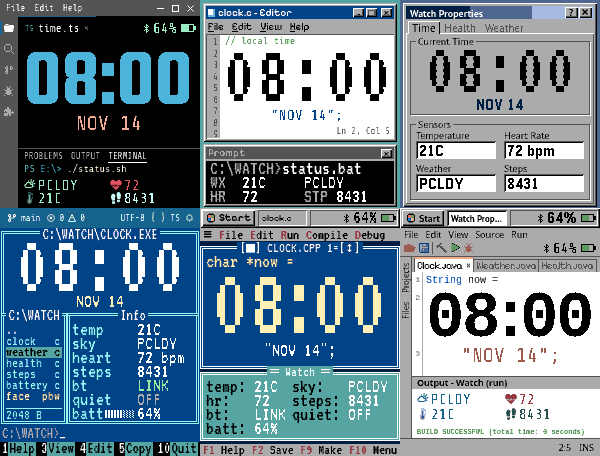
FacesRuntime is a retro computing watchface for the Pebble Time 2 that puts the time on six old and new desktops, from a VS Code editor to a DOS prompt. Pick one in settings and the whole face redraws around it, with weather, heart rate, steps, battery, and Bluetooth and Quiet Time status built right into each screen. Formerly IDE VSCode, it updates in place and keeps your settings. 🖥️ Desktops - VSCode IDE, a code editor with the time in the editor and your readouts in the terminal panel. - Desktop 95, a teal desktop with a code editor window and a prompt running status.bat. - Desktop 2000, a Watch Properties dialog with the time and a Sensors panel. - DOS Norton Commander, blue file manager panels with an Info panel for your readouts. - DOS Turbo C++ IDE, a blue code editor with a Watch window for your readouts. - NetBeans IDE, a Java editor with your readouts in the Output window. 🎨 Appearance - Six themes for VSCode IDE: Dark, Light, Terminal, Cyberpunk, Synthwave '84, and Mono. - Classic, Dark, and green on black Terminal looks for every other desktop. - Flexible time and date formats, and Swatch Internet Time (.beats). - A matching retro settings page, with a picture of each look. 🌤️ Weather - Temperature, conditions, and weather glyphs with night icons after dark. Powered by Open-Meteo, OpenWeatherMap, or WeatherAPI via automatic GPS or manual location, or by your preferred Pebble app weather plugin. ❤️ Health & Activity - Heart rate and step count, with traversal tracked in steps, miles, or kilometres. ⏰ Extras - Configurable battery readout. - Bluetooth connection alerts, plus Bluetooth and Quiet Time status indicators. - Hourly vibration with None, Short, Long, and Double patterns, silent during Quiet Time. 🔎 Features at a Glance retro, retro computing, weather plugin, Pebble app plugins, desktop, operating system, OS, 95, 2000, DOS, MS-DOS, Norton Commander, Turbo C++, NetBeans, VS Code, Visual Studio Code, IDE, code editor, programmer, developer, coding, terminal, green screen, CRT, dark mode, nostalgia, 90s, digital, 12 hour, 24 hour, Swatch Internet Time, weather, temperature, heart rate, steps, step counter, pedometer, distance, battery, Bluetooth, Bluetooth disconnect alert, Quiet Time, Do Not Disturb, DND, hourly chime, six in one, theme picker, Pebble Time 2 ----- I mostly build things in my spare time, and your support helps keep that going. It usually finds its way into more green coffee beans, a few roasting experiments, and plenty of late-night coding sessions working on Pebble projects like this one. If you've found something useful here, or simply enjoy following along with what I'm building, you can support my projects here: https://ko-fi.com/nullsyntax
 61
Radar Array
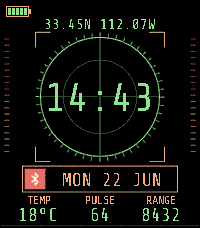
FacesRadar Array is a tactical radar-inspired digital watchface for the Pebble Time 2. It shows weather, live GPS coordinates, heart rate, steps, and Bluetooth status, with the hourly vibration silenced during Quiet Time. 🎨 Appearance - Seven radar themes with flexible time and date formats, and Swatch Internet Time (.beats). 🌤️ Weather - Current temperature with live coordinate readouts. Powered by Open-Meteo, OpenWeatherMap, or WeatherAPI via automatic GPS or manual location. ❤️ Health & Activity - Heart rate and step count with range tracked in steps, miles, or kilometres. ⏰ Extras - Bluetooth connection alert, plus a Bluetooth status indicator. - Hourly vibration with None, Short, Long, and Double patterns, silent during Quiet Time. 🔎 Features at a Glance radar, military, tactical, HUD, sci-fi, digital, 12 hour, 24 hour, Swatch Internet Time, weather, temperature, GPS coordinates, latitude, longitude, heart rate, steps, step counter, pedometer, distance, Bluetooth, Bluetooth disconnect alert, Quiet Time, hourly chime, Pebble Time 2 ----- I mostly build things in my spare time, and your support helps keep that going. It usually finds its way into more green coffee beans, a few roasting experiments, and plenty of late-night coding sessions working on Pebble projects like this one. If you've found something useful here, or simply enjoy following along with what I'm building, you can support my projects here: https://ko-fi.com/nullsyntax
 323
LCARS Stardate
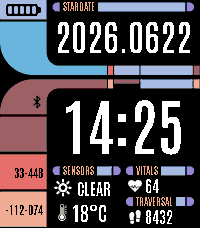
FacesLCARS Stardate is a Star Trek inspired LCARS digital watchface for the Pebble Time 2, with a live stardate under the clock. Pick four panels from 26 readouts, including weather, heart rate, steps, battery, moon phase, sunrise and sunset, a second time zone, and Bluetooth and Quiet Time status. 🧩 Panels - Four pickable panels under the clock and stardate banner, two per column. Any of the 26 readouts can go in any of them, so the same four slots read six or more ways depending on what you care about. - Drag and drop them in the settings page, which previews the watchface as you build and is styled to match it. A Default button restores the arrangement the face ships with, and Clear empties all four. - Panel bars are drawn by the watchface and take their word, glyph, and colour from whatever you pick, so a panel always looks like it belongs to the theme you are on. - The left column can instead hold a single tall Sensors block, a condition glyph over an oversized temperature at a size the ordinary rows cannot give it. 🎨 Appearance - Five LCARS themes with Mono variants, flexible time and date formats, and Swatch Internet Time (.beats). ❤️ Health & Activity - Heart rate, steps, calories, sleep, and active minutes readouts, with traversal tracked in steps, miles, or kilometres. 🌤️ Weather - Temperature, conditions, humidity, wind, UV index, and the day's high and low. Powered by your preferred Pebble app weather plugin, or by Open-Meteo, OpenWeatherMap, or WeatherAPI via automatic GPS or manual location. 🌙 Sun & Moon - Sunrise, sunset, length of day, and a countdown to whichever comes next. - Moon illumination, phase name, and a countdown to the next full or new moon. 🗓️ Dates & Counters - Julian Date, Day of Year, and Week Number readouts for keeping an eye on how the year is going. - An Epoch Clock showing the raw Unix time, and a Swatch Beats readout so you can see internet time without setting the main clock to it. - An Alternate Time Zone readout. Search for a city under Location Settings and the panel shows that city's time under its name. ⏰ Extras - Battery level as a panel, plus a Bluetooth connection alert and indicators for Bluetooth and Quiet Time status. - Hourly vibration with None, Short, Long, and Double patterns, silent during Quiet Time. 🔎 Features at a Glance LCARS, Star Trek, stardate, sci-fi, digital, customizable, drag and drop, 12 hour, 24 hour, world clock, dual time, second time zone, Swatch Internet Time, weather, weather plugin, Pebble app plugins, temperature, humidity, wind, UV index, sunrise, sunset, day length, moon phase, moon illumination, heart rate, HRM, steps, step counter, pedometer, calories, sleep, active minutes, battery, Bluetooth, Bluetooth disconnect alert, Quiet Time, Do Not Disturb, DND, hourly chime, week number, day of year, Julian date, Unix time, Pebble Time 2 ----- I mostly build things in my spare time, and your support helps keep that going. It usually finds its way into more green coffee beans, a few roasting experiments, and plenty of late-night coding sessions working on Pebble projects like this one. If you've found something useful here, or simply enjoy following along with what I'm building, you can support my projects here: https://ko-fi.com/nullsyntax