 39
Pointer Planetarium
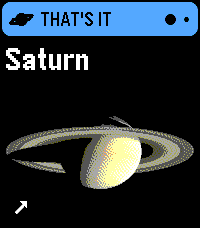
Tools & UtilitiesPoint at almost anything in the sky, and Pointer Planetarium will tell you what it is, and often includes an interesting fact. Categories the app knows about: Planes (private, commercial, military) Planets (with images for all of them) Satellites (Hubble, Starlink trains, comms satellites) Space Stations (ISS & Tiangong) Space junk (e.g. rocket boosters still in orbit) Stars (~3,000 named & unnamed) Constellations (all 88) Don't know where to look? It can guide you, with a "Find It" mode. Anything you find is recorded in the Logbook, in Pointer Planetarium's settings page in the Pebble phone app. Pointer Planetarium stands on the work of many astronomers, agencies and open-data projects: Stars: Yale Bright Star Catalogue, 5th Revised Edition (Hoffleit and Warren 1991, CDS VizieR V/50). Star names from the IAU Working Group on Star Names (WGSN, CC BY), as mirrored by E. Mamajek. Star distances from Hipparcos (ESA 1997, VizieR I/239). Constellations: boundaries from N. G. Roman (1987, PASP 99, 695; VizieR VI/42). Stick figures from Marc van der Sluys, ConstellationLines (CC BY 4.0, adapted). The Moon and planets: positions after Paul Schlyter's "How to compute planetary positions"; Mercury and Venus brightness after Mallama and Hilton (2018). Pictures: public domain NASA images: Mercury (MESSENGER, PIA11364), Venus (Mariner 10, PIA23791), Mars (Hubble Heritage Team), Jupiter (Cassini, PIA02873), Saturn (Cassini, PIA06193), Uranus and Neptune (Voyager 2, PIA18182 and PIA01492), and the Moon (NASA's Scientific Visualization Studio). Their use doesn't imply NASA's endorsement. Magnetic north: the World Magnetic Model 2025 (NOAA NCEI and the British Geological Survey, public domain), evaluated with code ported from magvar (MIT, Darren Yeates). Satellites: orbits from CelesTrak (from Space-Track.org data), computed with satellite.js (MIT). Planes: live positions from adsb.lol (ODbL) and adsb.fi (non-commercial use). Airlines, airports, aircraft types and routes from Virtual Radar Server's standing data (CC0). Places in the logbook: Natural Earth populated places (public domain). Fun facts are written for this app, with numbers from NASA fact sheets, the IAU and aircraft makers. PRIVACY: Aiming in PLANES or ANYTHING mode sends your location, rounded to about half a mile, to the plane data service (adsb.lol or adsb.fi). Turn planes off in the settings and your location never leaves your phone. Satellites and plane names are downloaded without your location. Your location is also kept on the watch so it can work without the phone. It stays on the watch. The logbook stays on your phone, with places rounded to about 6 miles. There are no accounts, ads, analytics or tracking of any kind. The code is free, open-source, and MIT-licensed.
 29
Gate Nine
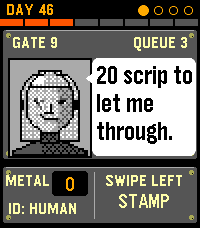
GamesANVIL HOLDINGS TETHYS DEEP MINING COLONY NOTICE OF ASSIGNMENT: GATE NINE You have been assigned to Gate Nine. Do not ask about the previous inspector. Each shift, mine workers queue at your booth. Check their papers against their faces, against each other, and against daily Anvil Directives. The Directives change often to meet the needs of the company. Adherence to the Directives is mandatory. Crew, contractors and colonists use this gate. So do cyborgs, drones, and things that only look human. Some even tell you the truth. Use the tools available to you to vet their stories. Your parents and your child live with you in Anvil housing. They depend on you alone. Your partner was shipped to another colony to better support the Company. Anvil reminds you that they graciously waived the transfer fee. One salary fits most. Anvil sets all prices. Your appreciation is expected. A topside transfer out of the mines may be offered. The fee will be posted in advance. Anvil accountants have determined the fee is feasible. Report to the Gate, inspector.
 6
Parallax Weather
FacesBig, visible numbers - and configurable live weather backgrounds that move as you tilt your wrist (during backlight only, to save battery). Also includes a live moonphase background and several configuration options. This free and open-source watch face was built with licensed font and images. Image credits (full list and licenses in CREDITS.md in the github repo): Partly cloudy texture: adapted from Clouds and blue sky in Russia by Dmitry Makeev, CC BY-SA 4.0 Cloudy texture: adapted from Altocumulus clouds (mackerel sky) by James St. John, CC BY 2.0 Rain texture: adapted from Raindrops on the glass by BogTar201213, CC BY-SA 4.0 Sun (NASA/SDO), storm (NOAA) and moon (NASA's Scientific Visualization Studio): public domain Digits: Inter Display Black, SIL Open Font License 1.1
 9
Clock Dude
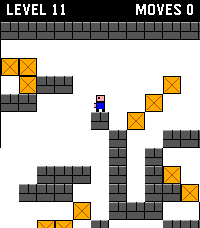
GamesThis is a Time 2 / Round 2 touch-input port of Block Dude, a block-pushing puzzle game written by Brandon Sterner for the TI-83 in 1999, and the reason many of us failed Calculus. The eleven levels included here are his original designs. You are stuck in a walled maze with a door somewhere in it. You can walk, climb a single step, and carry one crate at a time. Getting out means stacking crates into stairs, and the crates you need are rarely where you want them. This port was made from Block Dude CE, the TI-84 Plus CE version by Shaun McFall of Merthsoft Creations, whose non-asset code is released under the Unlicense. For full attribution, credits, and license info, please see the project's github repo.
 5
DownTime: Voice Crosswords
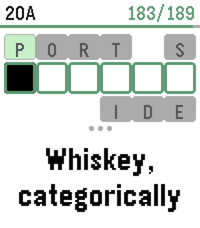
GamesDownTime is an offline collection of 200 new crossword puzzles (9,000+ clues), supporting dictation for speech-to-text, or bespoke on-watch typing. It uses a custom crossword engine which displays one clue at a time to maximize legibility, and a tuned voice interpreter to increase dictation accuracy. Includes two crossword sizes: Mini (7x7) Regular (15x15) And two difficulties: Peaceful Challenging For maximum accuracy, it's recommended to use the Cloud provider for Pebble speech recognition (available in the Pebble app settings). However, we also support spelling out individual letters via voice dictation, which is easier for local models to parse. Or, use the on-screen swiping to type text! Special thanks to Nicole Feng (nzfeng on Github) for providing the "MsFit Crossword Dataset"!
 36
Wrist In Peace
GamesA city has fallen to the dead, and the whole thing lives on your watch. Wrist In Peace is an online-only survivor-vs-zombie survival horror MMORPG in the tradition of a long-running text game that kept players hooked for 2 decades. Play a survivor scavenging for weapons and eradicating the dead, or a zombie hunting the living. The people you fight, heal, and infect are real players on their own watches. Computer-controlled survivors and zombies fill out both sides with realistic movement, horde surges & sieges, so the streets are never empty. Every action costs action points, and you earn those by walking in the real world. Search buildings for gear, fight, unlock skills, and climb skill trees for both factions. Death is not the end here: survivors rise as zombies, zombies can be revived, and the siege never really stops. A key design tenet is readability and ease-of-use on the small watch screen. As such, we've offloaded several information screens to the app's settings page on the phone, to aid in extended planning & review on a larger screen. In the app's settings, there are tabs for Status, Maps, Settings, & Help. However, the game is fully playable without referencing the phone. Regarding data privacy - the game server only knows the tokenized / anonymized identity of your Pebble account (or watch if no account is found). Your raw step count never leaves the watch, but the game server can often infer your step count within 50-100 steps, for the purposes of granting action points. Your IP is handled by Cloudflare to route requests and block abuse, as with any other service routed through them. Everything else received by or stored on the server is game-state only, and you can initiate a complete account deletion from the app’s settings page whenever you like. Your data is never sold, and playing is always free. Join the fight, and if you die - wrist in peace!