 5
ČHMÚ Weather
WeatherCzech station observations and local ALADIN forecasts for your Pebble. ČHMÚ Weather is an unofficial weather plugin that runs inside the Pebble phone app. Choose it as your weather provider for Pebble Weather, the timeline and compatible readings in Dynamic, Halftone, Dashboard and other apps. - Use your saved Pebble locations and units. - Find a nearby station automatically or choose a fixed Czech station. - See station temperature, with humidity and wind when available. - Get hourly and daily ALADIN forecasts. - Add missing forecast fields, rain probabilities, forecast UV and later days through Open-Meteo completion. It is enabled by default and can be turned off in settings. - Configure the plugin in English or Czech. Covers Czech locations. Nearby station observations may differ from conditions at your exact location. Cached readings keep their original age; Pebble controls native Weather update timing. Requires internet access and plugin support enabled in the official Pebble phone app. This is a phone plugin with no watch app to open. Free. Part of XOCE. No additional account, API key, ads, analytics or developer-operated server. Requests go to ČHMÚ and, when enabled, Open-Meteo. Independent of ČHMÚ, Open-Meteo and Core Devices. Source and privacy: https://github.com/xefensor/pebble-chmu-weather
 28
Dynamic
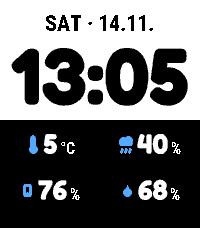
FacesA Pebble watchface that makes room for your day. Keep a clear clock above your chosen readings. When music or a countdown is active, Dynamic rearranges the space to show it alongside the time. - Choose Columns, Stacked rows or Four when idle. The four-reading grid keeps your selected pair when an activity or Timeline Peek needs room. - Set separate colours for the clock and details, with day and night palettes. - Hide reading titles or enable shake to switch your reading pair. - Show music with its title, artist and available artwork. - Choose and order your Activities: ongoing updates such as a Timer countdown. A smaller secondary summary appears when space allows. - Adjust text size and clock format, with animated layout and track transitions. Start a countdown in Timer, then return to Dynamic to keep it in view. Timer runs the countdown and alarm; open Timer to pause or change it. Open Activity can provide an optional Quick Launch shortcut back. For Pebble Time 2 and Round 2. Shared readings and Activities require a connected phone, plugin support enabled in the official Pebble phone app, and permissions for the chosen sources. Built-in music and notifications require Android. Notification summaries and message text are separate opt-in settings. Free. Part of XOCE. No XOCE account, ads or analytics. Selected providers have their own requirements and privacy practices.
 11
Dashboard
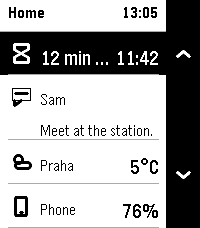
Tools & UtilitiesYour activity, notifications and pinned readings in one Pebble overview. Open Dashboard for a quick look at one activity, a notification panel and two pinned items. Browse the full collections when you need more detail. - Hold Up to browse Activities: ongoing updates such as a running Timer. - Open Pinned to browse your chosen readings and shortcuts. - Choose what each pin displays, its Select action and its Hold Select app shortcut, where supported by the source. - Confirm actions when required by the source or your pin settings. - Choose text size and a Light or Dark watch appearance. Available in 17 interface languages. Start a countdown in Timer, then see its remaining time in Dashboard. Timer keeps control of the countdown and alarm; open Timer to pause or resume it. Available actions depend on the selected source. For Pebble Time 2 and Round 2. Shared readings and Activities require a connected phone, plugin support enabled in the official Pebble phone app, and permissions for the chosen sources. Built-in music and notifications require Android. Pinned items here are Dashboard readings and shortcuts, separate from Pebble timeline pins. Free. Part of XOCE. No XOCE account, ads or analytics. Selected providers have their own requirements and privacy practices.
 8
Open Activity
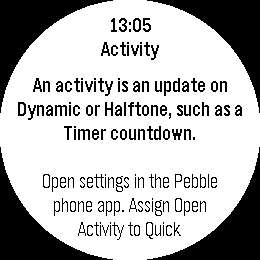
Tools & UtilitiesA button shortcut from your watchface to the app behind its activity. See a Timer countdown on Dynamic or Halftone, then use a Quick Launch shortcut to open Timer. Open Activity uses recent activity information from your chosen watchface. - Choose Dynamic or Halftone as the source watchface. - Bind supported Quick Launch shortcuts to its large Primary activity or smaller Secondary row. - Open the helper from the watch app list to read its setup guidance. - Choose text size and a Light or Dark watch appearance in phone settings. Assign Open Activity to the same shortcuts in Pebble's Quick Launch settings. If you switch between Dynamic and Halftone, update the source watchface in Open Activity too. The shortcut opens the associated app, not a particular timer, song or notification. Timer's controls stay in Timer. When no valid activity destination is available, the helper returns to the watchface. For Pebble Time 2 and Round 2, with one connected watch. Requires Dynamic or Halftone, a connected phone, plugin support enabled in the official Pebble phone app, and Launch Apps permission. The activity must provide an installed app to open. Free. Part of XOCE. No XOCE account, ads or analytics.
 7
Timer
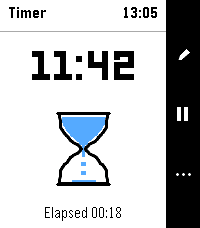
Tools & UtilitiesReusable countdowns, right on your Pebble. Save up to eight timers and control them with the watch buttons. Choose hours, minutes and seconds, start a countdown, then keep its duration ready for next time. Saved timers survive closing and reopening the app. - Set a duration from five seconds to 24 hours. - Pause, resume, reset or delete a timer on the watch. - See the remaining time on a large countdown screen. - Snooze a finished timer for one minute, or choose Done to dismiss it. - Use vibration, with optional sound on Time 2. Round 2 uses vibration; sound respects system mute and Quiet Time. - Choose text size and a Light or Dark watch appearance. Available in 17 interface languages. Countdowns run on the watch. A scheduled alarm does not need a connected phone. Want to keep a countdown on your watchface? Dynamic and Halftone can display Timer as an Activity, an ongoing update with the time remaining. Dashboard can display it too. This optional sharing needs a connected phone and plugin support enabled in the official Pebble phone app. Open Timer to pause, resume or change it. Free. For Pebble Time 2 and Round 2. Part of XOCE. No XOCE account, ads or analytics.
 39
Halftone
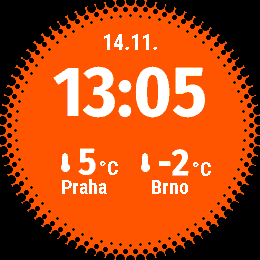
FacesA bold Pebble clock with a halftone dot border. Halftone puts a distinctive clock and two useful readings on your wrist. Choose weather, battery or other compatible Pebble readings, then make the face your own with colour, depth and shadow. - Keep the time, date and two readings together. - Customize the colours and dot-border appearance. - Adjust depth, shadow, Bigger Text and text size. - See a Timer countdown or music with its title, artist and available artwork. - Choose your Activities and their order. A smaller secondary summary appears when space allows. - Show Timeline Peek alongside the clock. Activities are ongoing updates from other apps. Start a countdown in Timer, then return to Halftone to see the time remaining. Timer handles its controls and alarm. Open Activity can add an optional Quick Launch shortcut back to Timer. For Pebble Time 2 and Round 2. Shared readings and Activities require a connected phone, plugin support enabled in the official Pebble phone app, and permissions for the chosen sources. Built-in music and notifications require Android. Notification summaries and message text are separate opt-in settings. Free. Part of XOCE. No XOCE account, ads or analytics. Selected providers have their own requirements and privacy practices.