 3
3Yard Waste Week
DailyYard Waste Week is a simple application that quickly informs you if "this week" is yard waste week. Using the Yard Waste Schedule published by the Region of Waterloo, you have the option to select one of three regions: Waterloo, Kitchener, and Cambridge.
 31
31Weather-O-Graph
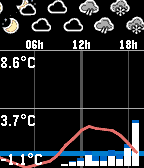
DailyThis app displays current weather forecast in a graph form, from one of the following services: * aladin (Czech republic)
 4
4Handball Referee
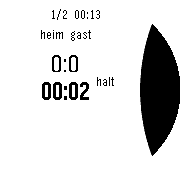
Tools & UtilitiesA stopwatch for handball referees.
 30
30Linux commands
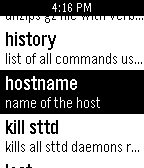
Tools & UtilitiesThis app is a list of the most essential and useful commends for aline operating system with definations for commends. Over 50 essential commends. A must for any linux owner or computer genius.
 45
45Paris Transilien
DailyParis Transilien is an unofficial app for checking SNCF Transilien™ trains on your wrist. Transilien™ is the brand name of the suburban railway service of the SNCF-owned railway network operating within the Île-de-France. Main features: 1. This app lets you search Transilien train timetables. 2. Information includs departure / pass time, destinations, "Delayed / Canceled" status, stops, and the time of each stop. 3. Search a station name by choosing letters directly on your wrist. For example, you can find Saint-Lazare by only searching "AZA". 4. Long select the search result to add a destination. 5. You can reverse the direction in case you want a return trip. 6. By selecting a train, you can check its schedules and stops. 7. Add your daily itineraries into favorites. 8. Long select a favorite to edit or reorder. 9. The connection indicator in the status bar lets you know if it's ready to load timetables. 10. A soft vibration tells you the loading is finished and successful. 11. "Low Memory" warning with a triple vibration let you know there's not enough memory to open a new window. If you have any questions / requests / suggestions, please contact me by mail, or leave an issue in the GitHub project page. If you'd like to participate in the project, welcome to fork the repository on GitHub. Thanks!
 4
4Ethicker
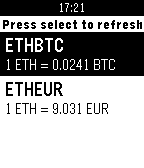
DailyEasily get current Ether or Bitcoin value on your watch! Supported tickers: BTCEUR, BTCHKD, BTCUSD, ETHBTC, ETHEUR, ETHUSD, REPBTC. Data is fetched from Gatecoin public API. Please note that since Gatecoin does not provide ETHUSD ticker, it is an estimation based on ETHBTC and BTCUSD tickers.
 3
3Get Bearing
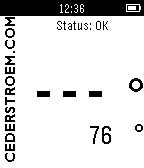
Tools & UtilitiesUse the compass to get your bearings. Take a sighting along the side of your pebble, wait for the signal, snap your fingers on your watch-hand (or click the set-button) and the bearing is shown with large numbers in the display. If the compass needs calibration, GetBearing asks you to shake. Dance, if you feel like it. After initial calibration, GetBearing shows the compass heading. The calibration continues in the background and the status message "Optimizing!" is shown. Visit www.cederstroem.com for more info.
 111
111Currently
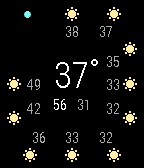
DailyCurrently provides a summary of today's weather forecast at a glance. See the current temperature, high and low temperature for the day, and a 10-hour forecast of the temperature and weather conditions. Blue dot indicates current hour. An API key from Weather Underground is required. Instructions on how to get one are here: https://opensprinkler.freshdesk.com/support/solutions/articles/5000017485-getting-a-weather-api-key
 21
21Counter
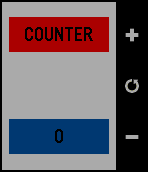
Tools & UtilitiesA simple app to count anything you need to! NEW FEATURES - Counter stays the same even if you exit the app and come back! - New UI Instructions: Up Button: Add by 1 Select Button: Reset Down Button: Decrease by 1 Coming Soon: -Pebble and Pebble Steel Support -Animated number entry -Much, much, more!
 54
54Connect Alert
NotificationsRuns a background app that checks if your pebble is connected to your phone. If your pebble gets disconnected, it alerts you by saying: "Remember your phone!". The service can be turned on and off in the app on your pebble. Useful if you tend to leave your phone at random places.
 1.8K
1.8KSteps - stopwatch with step counter (ped
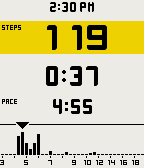
Health & FitnessRunning stopwatch that measures your step count and pace (pace being the time per 1000 steps) with built-in pedometer, all that without a smartphone! Precise histogram of pace times, so that you can see exactly what was your peak, mean and rest tempo. Be free, run like a wind with no device other than your faithful Pebble! Love it? Please heart it! :) PS: No tracking to cloud - your data is for your eyes only :). PPS: Redit thread: http://www.reddit.com/r/pebble/comments/2qrs35/app_steps_standalone_stopwatch_for_runners_with/
 245
245My Bus
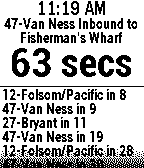
NotificationsReal-time arrival predictions for up to 8 bus and metro stops provided by NextBus! Works for over 60 US and Canadian public transit districts. Shows arrival times for all routes at a given stop. Or, repeatedly press select button to choose your preferred route at that stop. Check out my other transit apps for the following regions and agencies: SF Bay Area (10 Agencies), BART, New York MTA Bus, WMATA Bus & Rail, and Vancouver BC Bus.
 489
489Custom Workout Timer
Health & FitnessEasily create custom interval timers (with names) for your workouts. This app will time you and alert you when to change moves based on your own workout program. Example: Plank for 2 minutes, 10 biceps curls, pushups for 45 seconds... etc. You can add create workouts and add moves from your phone or your computer. Moves can be time (plank for 1 minute) or rep based (10 pullups). In a time move, you set the length and Pebble will advance to the next move when the countdown timer ends. On a rep move, you can manually advance when you are done with a set/rep. Pebble will advance when you've done all the reps. After installing, locate this app on the phone's Pebble app, then click on the settings icon. You can add workouts and moves from there.
 8
8EAT Club
DailyIs it lunchtime yet? Browse what EAT Club is delivering today to your office and order something quickly with your Pebble! *Not affiliated with EAT Club in any way.
 33
33Amicudar
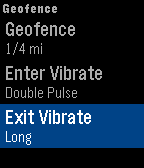
Tools & UtilitiesTrack your friends and family using Amicudar, a radar display on your wrist! Personalize with one of the included avatars and create a geofence to be notified when others are nearby. SETUP 1) Install Amicudar. 2) Open Settings on your phone and enter a user and group name. 3) Send your friends and family your group name. Then use Amicudar's menu system to choose an avatar, select metric/imperial, define a geofence, select an update interval, and show/hide the time. USAGE • The up/down buttons zoom in/out • Shake to activate the display for 1 minute. The compass will show your actual heading and the progress bar will countdown to the next update. • Joining and leaving the group is as simple as opening and closing Amicudar. You'll automatically be removed from the group after a little while once you switch to a watchface or another app. • The status bar turns red if an update fails. We're currently in beta and we would appreciate your feedback!