AgroWeather (now with radar!)
NorthCypress
Watchapp
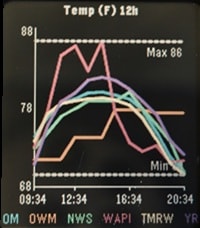
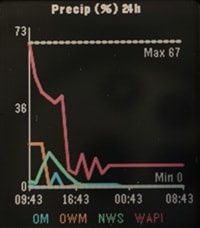
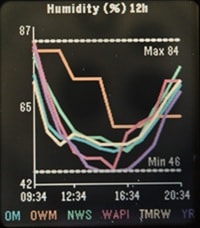
Description
AgroWeather - Aggregate Weather

I was tired of inaccurate weather and wasn't sure what service to believe. One moment a weather service could be spot on and the next be way off. To solve for this I made AgroWeather, a multi API weather app. It displays weather info from multiple sources on the same graph so you can estimate for yourself what is likely to happen. All 6 APIs are free but you may need to create an account/api key for some. Use as many or as few as you would like.

***Note: This app is still in early alpha testing. Any suggestions appreciated.

APIs Currently supported: (I may add more if I get enough hearts)
Open-Meteo
OpenWeatherMap
NOAA / NWS
WeatherAPI.com
Tomorrow.io
Yr.no

Graphs: (Please suggest others if you have a need)
Temperature
Feels Like
Humidity %
Precipitation %
Precipitation amount
Cloud %
Pressure
Wind Speed
Gust Speed

New Feature:
Weather Radar - This feature is not an aggregate of data but still useful. It fetches global radar coverage from RainViewer composited over an OpenStreetMap base map tile, using GPS or the geocoded manual location. The watch stores 4 frames, picked as 4 evenly-spaced points across whatever recent frames RainViewer's metadata endpoint returns. Frames are fetched and sent to the watch sequentially and looped. The animation starts as soon as the first frame arrives and keeps incorporating older frames as they arrive; it automatically stops when you navigate away from the Radar screen and restarts when you navigate back onto it. This all happens using just Pebble C and Pebble JS. There are no special companion apps or external servers to draw and send the radar to the watch :).

How to use:
1. Go into the pebble app and click on AgroWeather.
2. Click the Settings button.
3. Check the box to use GPS or Enter your location info
4. Select your units.
5. Check the box of the APIs you would like to use
6. If using one of the APIs that require a key, enter your key in the appropriate field

Pebble Controls:
UP / DOWN = Cycle through the Graphs / Weather Radar
SELECT = Cycle through the times (3hr, 6hr, 12hr, 24hr, 2 day, 3 day)
BACK = Exit
- DeveloperNorthCypress
- CategoryTools & Utilities
- PlatformsTime 2
- Updated2026-09-06
- Version8.3