Alpha Binary Clock
TMunz
Watchface
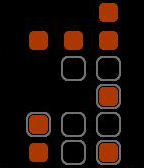
Description
The picture above shows the watchface of the Alpha Binary Clock. The orange dots display the time, the grey borders the date. The time can be simply calculated by summing up their values, which are represented in binary. The following explanation shows how to calculate the time and date for the moment shown in the image. The binary dots values are from the bottom to the top: 1, 2, 4, 8, 16, 32. Hour: 1 + 2 + 16 = 19; Minute: 16 = 16; Seconds: 1 + 4 + 16 + 32 = 53; => 19:16:53; Day: 2 = 2; Month: 1 + 2 + 8 = 11; Year: 1 + 2 + 3 + 4 = 15; => 2.11.(20)15 (Year is shown with modulo 50)
- DeveloperTMunz · Is this you? Claim your app ›
- CategoryFaces
- PlatformsOG Pebble, Steel, Time/Time Steel, 2, 2 Duo, Time 2 (scaled)
- Updated2015-11-02
- Version1.1