 53
53Trivia for Pebble
❓Pebble Trivia
A trivia game for Pebble smartwatches. Questions pulled live from the Open Trivia Database - completely free, no account or API key needed.

🕹️How to Play
1. Pick a category
When you open the app you get a category menu. Choose what you want to be quizzed on:
🌍 All Topics - random questions from everything
🧠 General - general knowledge
🗺️ Geography - countries, capitals, landmarks
📜 History - historical events and figures
🔬 Science - physics, chemistry, biology, and more
🎬 Entertainment - movies, TV, music, books
🏆 Sports - athletes, teams, records
🐾 Animals - wildlife and nature
✅ True / False - quick true-or-false questions
⭐ Easy (Kids) - family-friendly easy questions

2. Pick a difficulty
After choosing a category, pick how hard you want it:
🎲 Any Difficulty - mix of everything
🟢 Easy - beginner friendly
🟡 Medium - a solid challenge
🔴 Hard - for trivia nerds only

3. Select your answer
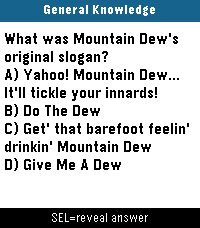
The question appears on screen with four shuffled answer choices (A, B, C, D) - or just True / False for that category.
Use UP / DOWN to highlight an answer, then press SELECT to lock it in. The app automatically checks your answer — no self-reporting needed.
On Pebble Time 2 and Pebble Round 2, you can also swipe up/down to move the highlight and tap to confirm.

4. See your result
The screen immediately shows whether you were right or wrong:
Correct - green flash, short buzz, score goes up
Wrong - red flash, double buzz, correct answer highlighted in green
The result auto-advances after 2 seconds. Press any button (or tap) to skip ahead.

🎮 Controls
Category and difficulty menus:
UP / DOWN - move the highlight
SELECT - confirm selection
Swipe up / down - move the highlight (Time 2 and Round 2 only)
Tap - confirm selection (Time 2 and Round 2 only)

Question screen:
UP / DOWN - move the answer highlight
SELECT - lock in your answer
Swipe up / down - move the answer highlight (Time 2 and Round 2 only)
Tap - lock in your answer (Time 2 and Round 2 only)
BACK - return to the difficulty menu

Features
Live questions - fetched fresh from the internet every session, so you never run out
Automatic scoring - the app checks your answer, no self-reporting
Score display - shown in the label bar as Geography 5/8 x3 (correct/total + streak)
Category colors - each category gets its own color on color-screen Pebbles
Difficulty filter - fine-tune how hard the questions are per category
True / False mode - a quick-fire category with simple yes-or-no questions
Marquee scrolling - long answer choices scroll horizontally after a 1-second pause, then repeat
Question auto-scroll - questions too long to fit scroll up automatically, pause, and repeat
Touch support - swipe and tap to navigate on Pebble Time 2 and Pebble Round 2
Round screen support - layout is adjusted for round Pebble displays
All platforms - runs on every Pebble ever made
No account needed - completely free, no API key, no login
 53
53Pebble Fidget App
Fidget Pebble turns your wrist into a fidget toy — 7 satisfying minigames, all powered by haptic feedback.
If you need to focus, decompress, or just keep your hands busy, it has you covered

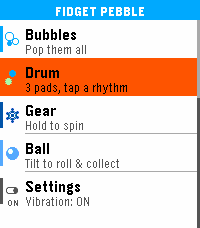
Pop It — Navigate a 5×5 bubble grid and pop them all. Tap to pop, hold to move back. Clears with a celebration animation.
Pusher — Two cylinders take turns rising. Press the right button at the right moment to keep the rhythm going. Choose your vibe pattern with SELECT.
Screw — Tighten and loosen a hex bolt with UP and DOWN. Feel the thread with every turn. SELECT snaps to the nearest end.
Bubbles — Three screen zones, three buttons. Pop bubbles and watch your history fill up.
Drum — Three pads, three distinct vibration patterns. Tap out your own rhythm.
Gear — Two interlocked gears fill the screen. Hold UP or DOWN to spin them, release and feel the haptic pulse. SELECT cycles vibration intensity.
Ball — Tilt your wrist to roll a ball around the screen. Collect targets laid out like dice faces — 1 dot, then 2, then 3, up to 6.

Controls vary by minigame — all intuitive, no instructions needed.
Settings — Toggle vibration on/off globally from the main menu. The setting persists across restarts.
Supported Platforms: Emery
 52
524-Across
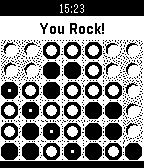
4-Across, the classic "Connect Four" style game, is now available on the Pebble Watch. The game is implemented as you against the computer on a 7x6 grid. The computer is no slouch. It knows every solution that you can play to win the game and will actively block your pursuits while also analyzing the board and taking the best position.
 52
52Better Dice
The better dice roller app for tabletop RPGs.

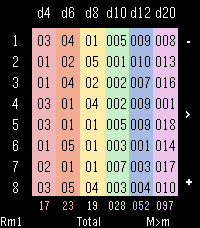
I made this for myself after being frustrated with other dice apps during my weekly D&D game. No menus, just pick how many dice you want, roll everything at once, and add on formulas that do the math for you.

Use top and bottom buttons to add or remove rows on the roll table, and press the middle button to roll everything. Supports a max of 8 dice per type per reroll to accomodate a regulation fireball.

Long press the buttons to cycle between modes that affect the dice pool and results.

Result Formulas
Long press the middle button to cycle between formulas for the result row - Total, Highest, Lowest, Remove Highest, Remove Lowest.

Reroll Modes
Toggle Reroll modes via long press of the bottom button.
This lets the app accommodate "Brutal" rolls and other similar logic.
Rerolls are handled before everything else in the logic chain.
Reroll Modes (shown in bottom left when active):
Rm1: Reroll dice showing the minimum value once
RmX: Reroll any dice showing the minimum value recursively until no min value dice are rolled
RM1: Reroll dice showing the maximum value once
RMX: Reroll any dice showing the maximum value recursively until no max value dice are rolled

Replace Modes
Toggle Replace modes via long press of the top button.
This lets the app accommodate "Confidence and Desperation" rules found in some PbtA systems, and similar logic.
Replacements are handled after all Rerolls are completed, but before the selected formula is calculated.
Replace Modes (shown in bottom right when active):
m>M: Replace Min value rolls with Max value
M>m: Replace Max value rolls with Min value

Quick Reset
A quick press of the top button when only one row of dice is active will reset all formula, reroll, and replace modes to their default values, letting you "clear the table" and start fresh.

Color Themes
Exclusive to Time 2 - press down when all 8 rows are visible to cycle between color palettes.

Future plans: Add shake/touch functionality. I don't personally like shake-to-roll because it can accidentally trigger and make you lose your last roll, but I'm experimenting with using a shake gesture to highlight any dice from your last roll that were affected by formulas, rerolls, etc.

Other ideas for functionality are welcome and appreciated, I want this app to be the best it can be.
 52
52Magic Dict8-Ball
Should you run for President? Should you have another drink? Is that person next to you really annoying or do they just look annoying?

Stop answering life's hard questions and let the mystical powers of the Magic Dict8-Ball decide for you!

Simply speak your question into your Pebble's mic and let the power of the Random Number Generator decide your fate...

Features all 20 of the iconic responses for the original Magic 8-Ball.

Think this app is ridiculous? You should check out my watch faces!
 51
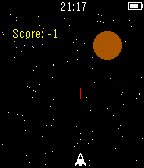
51Asteroids
A refreshing take on a simple classic.
 51
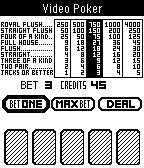
51Video Poker
Play Video Poker on your Pebble.
Bet from 1 to 5, and win from 1 to 4,000!!!
 51
51Fireplace
This app was written for using in long winter evenings...
 50
50Alice's Mom's Rescue
This is the "runner" version of Alice's Mom's Rescue platformer game for Windows & Android.
The giant raven has captured Alice's mother.
Help Alice save her mother through the 3 worlds and 6 levels!
Change Alice's height by jumping on the magic mushrooms to get through the tiny spaces.
If you like the game, please get the full version with 25 levels on Android store or Steam !
 50
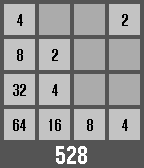
502048
2048, The addictive computer game made specifically for your wrist! How to play Back button to go left Select button to go right Up button to go up Down button to go down Hold select button to exit and save game NEVER LONG PRESS THE BACK BUTTON!!! (unless you want to not save and lose progress) Please heart it!!!
 50
50A Micro Western
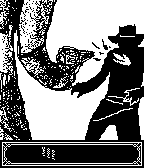
Enter "A Micro Western"! A fun, simple reaction game.

Press SELECT to draw and shoot!
Features 20 levels of difficulty, from slow loras to cheetah.
Your current level is saved when you quit!

Artwork by Kirby Evers.
 49
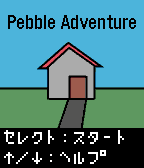
49Pebble Adventure
Pebble Adventure:
An adventure game like Japanese home computer games in 1980s.

Language : Japanese
------
1980年代のホビーパソコンのようなアドベンチャーゲームです。あなたはこの家から脱出して、感動のエンディング見ることができるか?!
 49
4910 Second Ninja X Challenge
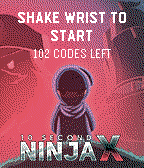
Count to ten and instantly win a copy of 10 Second Ninja X on Steam

Four Circle Interactive and Curve Digital unveil a brilliant new initiative which will reward anyone with a Pebble smartwatch and the ability to count to 10 with a free PC copy of 10 Second Ninja X.

There’s a catch, of course: You need to be able to count to 10 exactly, to within 100th of a second.


10 Second Ninja X on PC and consoles distils the puzzle platformer down to its purest form. Players assume control of a highly nimble and deadly ninja, tasked with destroying an army of hostile robots using cunning, speed and lots and lots of throwing stars.

Don’t let the title seduce you too much – reaching the end of the game won’t be easy. The game’s smartly designed to ensure that each level is a puzzle in itself. With just 10 seconds (maximum) to destroy all enemies, players will need to combine brain with throwing stars in order to meet each level’s objectives, with lightning-fast reactions required to be rewarded with a perfect score.

10 Second Ninja X boasts 100 immaculately designed levels. Whilst much of the challenge comes from demonstrating the dexterity and reactions necessary to traverse each level – players with real skill will want to complete each quickly.

It’s out now on PC, Xbox One, PlayStation 4 and Vita.
www.10second.ninja


Instructions:

Shake wrist to start timer
Shake wrist to stop.

Up button - about the game
Middle button - retrieve prize if you've won it already
Down button - further information
 48
48Starfield Graphics Demo
This is a simple graphics demo showing randomly generated stars flying across the display at 30 FPS
 48
48Peball
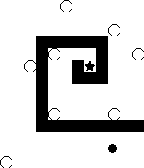
Peball is the classic game where you control a ball by tilting a labyrinth.
Collect all the stars. But watch out! Don't fall in the holes!


If you like Peball, please click the like-button.
and never forget:
keep pebbeling ;)