 15
15Workout Zone
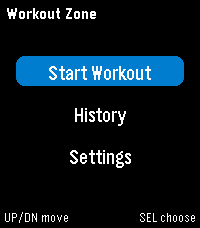
Workout Zone is a Pebble heart-rate workout app built for quick readability during cardio. It shows your live heart rate, current zone, and workout time on a simple full-screen display, then saves a summary with time-in-zone stats, a zone-over-time graph, and workout history.
 24
24Golf with Pebble
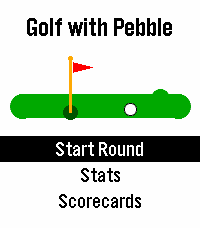
Golf with Pebble is a golf scorekeeping app for Pebble watches. Track strokes and putts on every hole, with par and tee-box yardage shown when available.

Nearby courses are found using GPS, and you can switch to ZIP code or city/state search at any time.

The app supports limited offline use, so you can keep scoring even when your phone is disconnected. Your scorecards sync automatically when your phone reconnects.

Course data comes from GolfCourseAPI and OpenStreetMap. GolfCourseAPI is prioritized for richer tee-box details, including men’s and women’s tees. If course data is missing, Golf with Pebble attempts to reconstruct hole information from OpenStreetMap, including par and yardage when available.

Built for golfers everywhere, worldwide, prestige style!
 0
0PT2SwimPool
TESTING APP * PLEASE DO NOT USE IT
 4
4BearBell
This app might serve as an alternative to a bear bell.

Bear bells are known as an effective preventive measure for alerting bears to human presence through sound and preventing unexpected encounters.

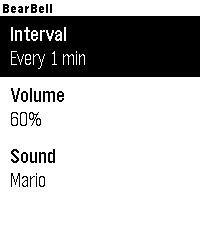
This app also emits sounds at regular intervals. It is compatible with models that have speakers (as of May 2026, it is only compatible with the “Pebble 2 duo” and “Pebble Time 2*” (I have confirmed it works on the Pebble 2 duo. I haven’t received the Pebble Time 2* yet, but I plan to test it as soon as it arrives).

Since a real bear bell likely carries further, this app is unnecessary if you have one. However, I created it as a substitute for when you don’t have one or have forgotten it.

Please note that bear bells are a preventive measure to deter bears from approaching you; they are not intended to scare bears away after an encounter. Additionally, they may not be effective depending on the bear species or individual differences.

Furthermore, for bears that view humans as prey, using a bell may actually alert them to your presence. Therefore, please do not use this if there have been reports of bears attacking people.

Please exercise extreme caution when entering bear habitats.

This watch face is free. There are no additional charges. If you'd like to make a donation, please use the link below:
https://square.link/u/R4JNLUWs

-- Japanese instructions are below --

熊よけ鈴の代わりになるかもしれないアプリです。

熊よけ鈴は、熊に人間の存在を音で知らせ、不意の遭遇(出会い頭)を防ぐための有効な予防策として知られています。

本アプリも、定期的に音を出すアプリになります。スピーカーに対応したモデル(2026/05現在だと、「Pebble 2 duo」と「Pebble Time 2*」にのみ対応しています(Pebble 2 duoで動作確認はしています。Pebble Time 2*はまだ手元に来てないので、到着次第、動作確認予定です)

本物の熊よけ鈴の方が、より広範囲に響くであろうことから、本物があるなら不要ですが、持っていなかったり忘れたりしたときの代用に利用できるかと思って作りました。

注意すべきは、熊よけ鈴は、熊の方から近づかないようになる予防策であり、遭遇した後追い払うものでもなく、また熊の種類や個体差などにより有効でない可能性もあります。

また、人間を餌と思っている熊の場合、逆に人間の場所を知らせてしまうようなので、人が熊に襲われた情報がある場合は使用しないでください。

熊の生息域に行くときは、十分に気をつけてください。

本ウォッチフェイスは無料です。特に追加料金も不要です。もし寄付したくなったら下記リンクからお願いします
https://square.link/u/R4JNLUWs
 3
3Can's HR Sender for Pebble
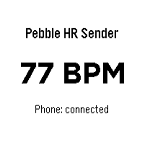
Can's HR Sender for Pebble is a Pebble watch app that reads live heart-rate data from the watch and sends it to the Android companion app Can's Pebbleton HR Bridge.

Together, the two apps make the Pebble heart-rate sensor available as a standard Bluetooth Low Energy Heart Rate Service for compatible fitness equipment and apps.

Support the project

This project is free to use.

If it works well for you and you would like to support future development, you can buy me a coffee:

☕ https://buymeacoffee.com/koprulucan

Companion App (NEEDED):

Can's Pebbleton HR Bridge is currently going through the Google Play testing process.

Until the public Google Play release is available, download the latest Android APK from GitHub Releases:

https://github.com/koprulucan/Cans_Pebbleton_HR_Bridge/releases

Android project repository:

https://github.com/koprulucan/Cans_Pebbleton_HR_Bridge

The current Android application ID is:

de.cankoprulu.pebbletonhrbridge
 18
18Heartrate2Pebble
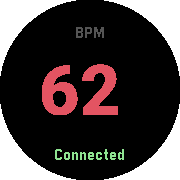
Turn any Pebble watch into a heartrate monitor. This app is designed for owners of Pebble watchs without builtin heart rate monitor but own standalone Bluetooth wearables and want to view their heartrate without constantly checking their phone.

The Android companion app can be found at:
https://github.com/meerkat42/heartrate2pebble/releases

Please dont hesitate to report Bugs and Feature Requests at:
https://github.com/meerkat42/heartrate2pebble/issues
 30
30Breathing Meditation
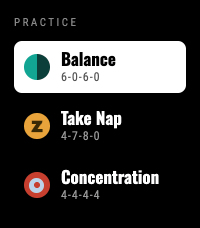
3 Breathing Patterns: Balance (6-0-6-0), Take Nap (4-7-8-0), and Concentration (4-4-4-4).
Now supports touch

Press Heart  ❤️  if you like it

Features:
Flexible Timers: Choose session length from 1 to 30 minutes.
Fluid Visuals: Water level gently rises and falls with your natural breath.
Haptic Feedback: Short vibrations guide your inhale and exhale so you can practice with closed eyes.

Select a practice, set your minutes, and follow the flow to start breathing.
 11
11Cardia
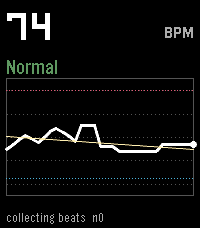
A PebbleOS watchapp that watches your heart rate more closely than the system does by default and flags three things: sustained high rate, sustained low rate, and irregularly-irregular rhythm (the pattern linked to atrial fibrillation).
 13
13RingView
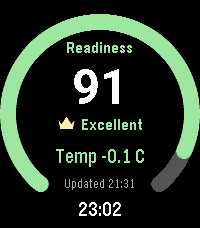
RingView brings selected Oura readiness, sleep, activity, heart-rate, and stress/recovery summaries to Pebble in a focused native watch app.

Move between full-screen metric overviews with the hardware buttons or touch gestures. Each overview shows the latest value, a glanceable progress or range ring, and the last successful update. Open a detail view for seven-day score history, last-night sleep stages, an intraday heart-rate graph, or recent stress and recovery durations.

RingView connects directly to Oura from PebbleKit JS on the paired phone. The access token remains phone-side and is never sent to the watch. API failures retain the last valid display, and refreshes are intentionally conservative. RingView has no backend, accounts, advertising, analytics, or trackers.

An Oura account and compatible Oura data are required. RingView is an independent companion and is not affiliated with or endorsed by Oura Health Oy. It is not a medical device and should not be used for medical decisions.
 136
136PebbleTrail Map
PebbleTrail Map: Your Adventure Companion
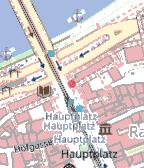
Explore the outdoors with confidence using PebbleTrail Map, the ultimate GPS and map app for your Pebble smartwatch. Track your real-time location, load and follow GPX trails, and navigate with ease - all from your wrist.

Key Features:
 - Real-time GPS tracking and map rendering
 - Load and display GPX tracks from URLs or text
 - Customizable map styles and settings
 - Simple button controls for zooming
 - Supports multiple map providers for color and black-and-white displays

Perfect for hikers, runners, and adventurers, PebbleTrail Map keeps you on track and informed.

Note: Requires an active internet connection for map and track loading.

Maps provided by:
© Stadia Maps, © OpenMapTiles, © OpenStreetMap contributors
 18
18Pacelet
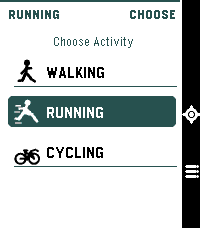
A simple activity tracker, using phone GPS
 15
15Breathing
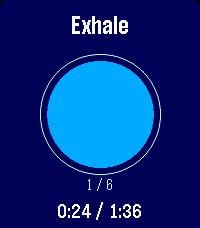
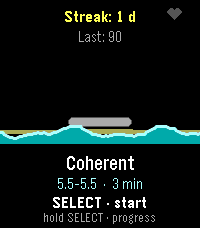
Guided breathing for Pebble: follow an animated circle through inhale/hold/exhale with per-phase vibrations. Choose a rhythm (Box, 4-7-8, Coherent…) and the number of cycles, see the time it takes, and track cycles and elapsed/total time. Add your ime. Add yourown rhythms from thenguages.
 32
32Cairn
Breathe with the tide.

A guided breathing coach with live heart rate. Inhale and the water rises, exhale and it falls. Finish a session, lay a stone.

Cairn turns a breathing exercise into a tide. Start a session and the waterline
rises while you inhale and falls while you exhale, uncovering a cairn of stones
on the shore — no counting, no timer to stare at, just a rhythm to follow. A
pulse on your wrist marks every phase change — a nudge to breathe in, a double
tick to hold, a longer pull to breathe out — so you can follow the rhythm with
your eyes closed.

While you breathe, the watch reads your heart rate every second. Afterwards you
get a calm score out of 100 built from completion, how far your heart rate came
down, how strongly it rose and fell with your breathing — real physiology,
respiratory sinus arrhythmia — and, on watches that deliver it, your actual
heart rate variability (RMSSD, the beat-to-beat detail behind true HRV). It is
the difference between a session you were present for and one you merely sat
through.

Finish a session and a stone is added to your cairn. Keep it up day after day
and the stack grows, badges unlock, and the progress screen shows where your
calm score and resting heart rate are heading over the last week and month —
with one line of coaching drawn from that history.

FEATURES
• Four patterns: Coherent (5.5 s in / 5.5 s out), Box, 4-7-8, and a Custom
  rhythm you set in half-second steps.
• Sessions of 1, 2, 3, 5, 10 or 15 minutes.
• Live heart rate, sampled every second, with a priming screen so the starting
  reading is a real baseline.
• A calm score from completion, heart-rate drop, breath-linked heart-rate
  swing and — where the watch supports it — real heart rate variability
  (RMSSD), with an honest fallback when there is no reading at all.
• A growing cairn, six badges, a personal best and your last 20 sessions.
• 7- and 30-day trends for calm score and resting heart rate, plus a coaching
  line.
• A distinct haptic pulse per breathing phase, and soft chimes at four volume
  levels; backlight, vibration and heart-rate display all switchable.
• Settings on the watch or from the phone (Clay).
• Made for the Pebble Time 2 (Emery) colour screen; works without the phone.
• Available in English, Nederlands, Français, Deutsch and Español, following
  your watch's system language.
 38
38Iron
Iron - Workout Companion for Pebble
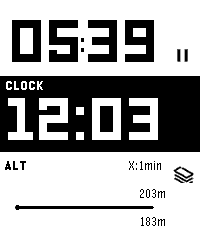
Iron is a high-performance, open-source sports tracker for your Pebble smartwatch. Designed for runners and fitness enthusiasts, it tracks your real-time metrics and seamlessly bridges the gap between your Pebble and modern Android health ecosystems.
⚠️ Important Note: This watch app will not function at all unless used in combination with the Android companion app of "Iron". Also, while designed to support all Pebble platforms, it has not been fully tested on every single model. If you encounter any issues, your feedback is greatly appreciated!
📱 Companion App (Android)
To unlock the full potential of Iron, install the companion Android app from Google Play. The companion app runs a stable background service during your workout and securely syncs your Pebble's health data directly to Google Health Connect.
 Download on Google Play:
https://play.google.com/store/apps/details?id=hag1987haaa.pebble.iron&pcampaignid=web_share
 Zero ads, zero tracking analytics.
 Requires Location permissions (including background access) to accurately track your GPS routes while your phone is in your pocket.
 Only writes data to Health Connect with your explicit permission.
✨ Key Features
By combining the Pebble app with the Android companion app, you can unlock:
 Music Control: Intuitively control your music playback directly from the workout screen. Supports swipe gestures on touchscreen models or long-press physical button mapping.
 Smart Notifications: Get vibration alerts on your wrist for distance laps (e.g., every 1km) or time intervals.
 Advanced Data Export: Supports both GPX and TCX formats. TCX includes heart rate, calories, and smoothed cadence data—perfect for uploading to Strava or Garmin Connect.
 Detailed Analytics Charts: View graphs for speed, elevation, heart rate, and steps on your phone.
 Powerful Automation: Broadcasts intents based on Pebble interactions or app state changes. Fully compatible with automation apps like Tasker.
 Health Connect Integration: Seamlessly syncs your recorded workout data directly to Android's Health Connect.
 Voice Assistant Integration: Long-press a button on your Pebble to trigger your phone's default digital assistant (the same one that launches when you hold your phone's power button). Note: Please speak your commands into your phone's or earbuds' microphone.
⚙️ Installation
1. Install this watch app.
2. Download the Iron Companion App for Android from Google Play.
3. Grant the necessary permissions (Location, Health Connect & Notifications) in the Android app. Note: Setting Location permission to "Allow all the time" is highly recommended for stable GPS tracking while your phone screen is off.
4. Start a workout on your Pebble!
🤝 Support & Credits
Iron is completely free and open-source. There are no paywalls or locked features. This app was proudly developed with the assistance of Google's AI, Gemini!
If you find this app useful for your daily runs, consider supporting the project:
 ☕ Support me on Ko-fi:
https://ko-fi.com/1987haaa

🇯🇵日本語版 (Japanese)
Iron - Pebble用ワークアウトコンパニオン
Ironは、Pebbleスマートウォッチ用の高性能でオープンソースなスポーツトラッカーです。ランナーやフィットネス愛好家のために設計されており、リアルタイムの数値を追跡しながら、Pebbleと最新のAndroidヘルスケアエコシステムをシームレスに連携させます。
⚠️ 重要な注意点: 本ウォッチアプリは、Android版『Iron』アプリとセットで使用しない限り機能しません。また、すべてのPebbleプラットフォームで動作するように開発したつもりですが、全モデルでの動作テストは完了していません。もし動かない場合はフィードバックをいただけると非常に嬉しいです!
📱 コンパニオンアプリ (Android)
Ironの真の力を引き出すため、Android用のコンパニオンアプリをインストールしてください。安定したバックグラウンドサービスとして稼働し、PebbleのヘルスケアデータをGoogle Health Connectへ安全に同期します。
 Google Playストアでダウンロード:
https://play.google.com/store/apps/details?id=hag1987haaa.pebble.iron&pcampaignid=web_share
 広告ゼロ、トラッキング解析ゼロ。
 スマートフォンをポケットに入れた状態でも正確にGPSルートを追跡するため、位置情報(バックグラウンド含む)へのアクセス権限を使用します。
 ユーザーの明示的な許可がある場合にのみHealth Connectへデータを書き込みます。
✨ 主な機能
PebbleアプリとAndroidコンパニオンアプリを組み合わせることで、以下の機能を利用できます。
 ミュージックコントロール: ワークアウト画面から直感的に音楽を操作可能。タッチスクリーンでのスワイプ操作や、物理ボタンの長押しに対応しています。
 スマート通知機能: 距離ラップ(例:1kmごと)や時間インターバルを振動でお知らせ。
 高度なデータ出力: GPX に加え TCX 出力に対応。心拍数、カロリー、平滑化されたケイデンス情報を含み、StravaやGarmin等へのアップロードに最適。
 詳細な分析チャート: 速度、高度、心拍数、歩数をスマホでグラフ化。
 強力な自動化連携: Pebbleの操作やアプリの状態変化をインテント送信。Tasker等の自動化アプリと連携可能。
 Health Connect 完全対応: ウォッチで記録したデータをAndroidのヘルスコネクトへシームレスに同期。
 ボイスアシスタント連携: Pebbleのボタン長押しで、スマホの「デフォルトのデジタルアシスタント」(電源ボタン長押しで起動する設定中のアシスタント)を呼び出せます。※アシスタントへの音声指示は、スマホ本体またはイヤホンのマイクで行ってください。
⚙️ インストール方法
1. 本ウォッチアプリをインストールします。
2. Google PlayからAndroid用Ironコンパニオンアプリをダウンロードします。
3. Androidアプリ内で必要な権限(位置情報、Health Connect、通知)を許可します。 ※画面オフ時にも安定してGPSを追跡するため、位置情報権限は「常に許可」に設定することを強く推奨します。
4. Pebbleでワークアウトを開始してください!
🤝 開発者のサポートとクレジット
Ironは完全に無料でオープンソースです。有料の壁はありません。なお、このアプリの開発にはGoogleのAI「Gemini」を活用しています!
毎日のランニングに役立ったと感じていただけた場合は、プロジェクトのサポートをご検討ください。皆様の支援が力になります。
 ☕ Ko-fiでサポートする:
https://ko-fi.com/1987haaa
 12
12Velo
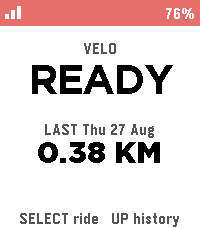
Biking/Cycling Companion for your Pebble, local to your pebble.

Download the companion app for your phone and click select to start tracking, currently tracks the following metrics:

 -Current speed
 -Distance
 -Ascent
 -Ride History

Works natively on your phone and watch with no accounts required, no cloud needed.