 26
26Pebble Golf
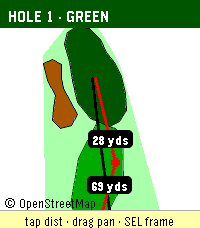
Pebble Golf turns your watch into a golf rangefinder, digital scorecard, and tap-to-measure course map, all live on your wrist.

Supported languages: English, Français, Deutsch, Español, Italiano, Português.

Pebble Golf turns your Pebble into a golf rangefinder and digital scorecard. Pick a nearby course, choose your tee, and see live distance to the front, center, and back of every green, right on your wrist. Keep score hole-by-hole with par, handicap, strokes, and putts; view a hole map drawn from OpenStreetMap (tap to measure to any point on the touchscreen Pebble Time 2); and browse, edit, or delete your past rounds offline. Playing somewhere that isn't listed? Create a custom course by name and hole count. Finished rounds pin to your Pebble timeline and can export as CSV or to a webhook.

Distances come from OpenGolfAPI and OpenStreetMap geometry, with an honest fallback when full data isn't available (a card-yardage number is never shown as a live measurement). Your phone handles GPS and networking; the watch keeps working offline for scoring, the map, and history.

Course and map data (c) OpenStreetMap contributors and OpenGolfAPI, under the Open Database License (ODbL).

Found a bug, or want to tell me the greens read too fast? Report it or leave feedback on GitHub: https://github.com/chrissnyder2337/pebble-golf. Feedback is genuinely welcome (yes, even the picky kind).

And if this app saved you from pacing off yardage like it's 1995, you can buy me a coffee: https://www.buymeacoffee.com/ChrisSnyder. It helps support my time. Even a fraction of what you'd tip the beer-cart person is hugely appreciated, and let's be honest, that's a rounding error next to your green fee.

Français

Pebble Golf transforme votre Pebble en télémètre de golf et carte de score numérique. Choisissez un parcours à proximité, sélectionnez votre té, et voyez la distance en direct jusqu'à l'avant, au centre et à l'arrière de chaque green, directement à votre poignet. Notez votre score trou par trou avec le par, le handicap, les coups et les putts ; consultez un plan du trou tiré d'OpenStreetMap (touchez pour mesurer vers n'importe quel point sur la Pebble Time 2 tactile) ; et parcourez, modifiez ou supprimez vos parties passées hors ligne. Vous jouez sur un parcours absent de la liste ? Créez un parcours personnalisé par nom et nombre de trous. Les parties terminées s'épinglent à votre timeline Pebble et peuvent s'exporter en CSV ou vers un webhook.

Les distances proviennent d'OpenGolfAPI et de la géométrie OpenStreetMap, avec un repli honnête lorsque les données complètes ne sont pas disponibles (un yardage de carte n'est jamais présenté comme une mesure en direct). Votre téléphone gère le GPS et le réseau ; la montre continue de fonctionner hors ligne pour le score, le plan et l'historique.

Données de parcours et de carte (c) les contributeurs d'OpenStreetMap et OpenGolfAPI, sous la licence Open Database License (ODbL).

Deutsch

Pebble Golf macht aus deinem Pebble einen Golf-Entfernungsmesser und eine digitale Scorecard. Wähle einen Platz in der Nähe, wähle deinen Tee und sieh die Live-Distanz zum vorderen, mittleren und hinteren Teil jedes Grüns, direkt am Handgelenk. Zähle Loch für Loch mit Par, Handicap, Schlägen und Putts; sieh dir eine aus OpenStreetMap gezeichnete Lochkarte an (auf der Pebble Time 2 mit Touch zum Messen antippen); und durchsuche, bearbeite oder lösche deine früheren Runden offline. Du spielst auf einem Platz, der nicht gelistet ist? Lege einen eigenen Platz per Name und Lochzahl an. Beendete Runden werden an deine Pebble-Timeline geheftet und lassen sich als CSV oder an einen Webhook exportieren.

Die Distanzen stammen von OpenGolfAPI und der OpenStreetMap-Geometrie, mit einem ehrlichen Rückgriff, wenn keine vollständigen Daten verfügbar sind (eine Karten-Yardage wird nie als Live-Messung dargestellt). Dein Handy übernimmt GPS und Netzwerk; die Uhr funktioniert offline weiter für Score, Karte und Verlauf.

Platz- und Kartendaten (c) OpenStreetMap-Mitwirkende und OpenGolfAPI, unter der Open Database License (ODbL).

Español

Pebble Golf convierte tu Pebble en un telémetro de golf y una tarjeta de puntuación digital. Elige un campo cercano, selecciona tu tee y ve la distancia en directo a la parte delantera, central y trasera de cada green, directamente en tu muñeca. Anota hoyo a hoyo con par, hándicap, golpes y putts; consulta un mapa del hoyo dibujado a partir de OpenStreetMap (toca para medir a cualquier punto en la Pebble Time 2 táctil); y revisa, edita o borra tus rondas pasadas sin conexión. ¿Juegas en un sitio que no está en la lista? Crea un campo personalizado por nombre y número de hoyos. Las rondas terminadas se fijan en tu timeline de Pebble y se pueden exportar como CSV o a un webhook.

Las distancias provienen de OpenGolfAPI y la geometría de OpenStreetMap, con un respaldo honesto cuando no hay datos completos disponibles (un número de yardas de tarjeta nunca se muestra como una medición en directo). Tu teléfono gestiona el GPS y la red; el reloj sigue funcionando sin conexión para la puntuación, el mapa y el historial.

Datos de campo y de mapa (c) colaboradores de OpenStreetMap y OpenGolfAPI, bajo la Open Database License (ODbL).

Italiano

Pebble Golf trasforma il tuo Pebble in un telemetro da golf e una scorecard digitale. Scegli un campo vicino, seleziona il tuo tee e guarda la distanza in tempo reale dalla parte anteriore, centrale e posteriore di ogni green, direttamente al polso. Segna buca per buca con par, handicap, colpi e putt; consulta una mappa della buca tracciata da OpenStreetMap (tocca per misurare verso qualsiasi punto sul Pebble Time 2 touch); e sfoglia, modifica o elimina i tuoi giri passati offline. Giochi in un posto non in elenco? Crea un campo personalizzato per nome e numero di buche. I giri completati si fissano alla tua timeline Pebble e si possono esportare in CSV o verso un webhook.

Le distanze provengono da OpenGolfAPI e dalla geometria di OpenStreetMap, con un ripiego onesto quando non sono disponibili dati completi (un numero di iarde da scorecard non viene mai mostrato come misura in tempo reale). Il telefono gestisce GPS e rete; l'orologio continua a funzionare offline per il punteggio, la mappa e la cronologia.

Dati di campo e di mappa (c) collaboratori di OpenStreetMap e OpenGolfAPI, con licenza Open Database License (ODbL).

Português

O Pebble Golf transforma o teu Pebble num telémetro de golfe e num cartão de pontuação digital. Escolhe um campo próximo, seleciona o teu tee e vê a distância em direto até à frente, ao centro e às costas de cada green, diretamente no pulso. Marca buraco a buraco com par, handicap, tacadas e putts; consulta um mapa do buraco desenhado a partir do OpenStreetMap (toca para medir até qualquer ponto no Pebble Time 2 tátil); e percorre, edita ou apaga as tuas voltas anteriores offline. A jogar num sítio que não está na lista? Cria um campo personalizado por nome e número de buracos. As voltas terminadas são fixadas na tua timeline Pebble e podem ser exportadas como CSV ou para um webhook.

As distâncias vêm do OpenGolfAPI e da geometria do OpenStreetMap, com um recurso honesto quando não há dados completos disponíveis (um número de jardas do cartão nunca é mostrado como uma medição em direto). O teu telemóvel trata do GPS e da rede; o relógio continua a funcionar offline para a pontuação, o mapa e o histórico.

Dados de campo e de mapa (c) colaboradores do OpenStreetMap e OpenGolfAPI, sob a Open Database License (ODbL).
 26
26Run Estimate
Run without your phone.

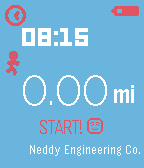
Run Estimate is a simple app that uses your stride length and the number of steps you've taken since opening the app to give you an estimate of how far you've run.
To use it, just open the app and start running!

Run Estimate remembers the furthest distance you have run and gives you a nice notification whenever you beat that distance. It also gives you a few friendly messages along the way.

Both Metric and Imperial units are supported and you can customize the colors from the configuration page within the Pebble app on your phone.

From the configuration page you will also need to set your stride length in order for the app to give you a good estimation.
 28
28Ventoo SE
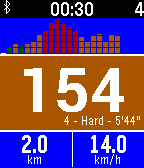
Ventoo SE is a GPS sports tracker for your Pebble. It uses your phone's GPS to send speed, distance and altitude data to your Pebble. Integration with Strava and Map My Tracks.

It's a premium version of Ventoo, which works with iOS and Android without installing a companion app.

After the trial period, you will have to pay 0.99$ (+taxes if needed).

Features:
* 2 configurable screens with fields: instant speed, average speed, max speed, distance, altitude, positive ascent, bearing, duration, steps
* Upload your track to Strava. Automatically at the end of the track or manually from the settings (Phone > Pebble App > Ventoo SE > Settings)
* Auto-detect stops
* Map of current track
* Live tracking with Map My Tracks. This service can also be used to export tracks to GPS files
* Multiple units (Metric/Imperial/Nautical)
* Heart rate (Pebble 2 sensor)

This app has no affiliation with the Swiss rights holder named Ventoo GmbH.
 35
35Respire
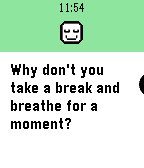
Respire will guide you through a series of deep breaths, and will remind you to take some time to breathe during the day.

[Respire is currently in BETA. Please report any bug or feature request.]

😌 Start a session 😌
1) Open the app.
2) Press up or down to select the duration of the session.
3) When you're ready to start, press the select button.
4) Follow the on screen instructions. Inhale when the circle grows, and exhale when it shrinks. The watch will also vibrate to guide the session without looking at it.
5) Keep breathing until the session ends.
6) You can repeat the session or exit the app.

😌 Reminders 😌
Respire will remind you to take some time to breathe during the day. By default you'll receive reminders every 4 hours. The reminder frequency can be changed in the configuration page of the app.

NOTE: The purpose of this app is to guide you through breathing sessions. If you feel anxious or unwell you should contact a specialist for advice.
 54
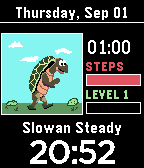
54Step-O-Saur
Walk your way through colorful characters to get to your daily step goal.
Capture the elusive Step-O-Saur and achieve your goal!
 27
27HR Stopwatch
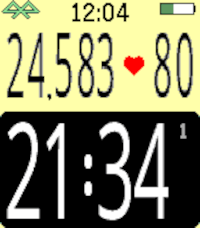
Here it is - a stopwatch that you can read while exercising! No more squinting or stooping to see the little numbers.

HR Stopwatch displays the elapsed time, number of steps, and (if available) your heartrate.

Use the bottom button to start or stop the stopwatch, the top button for resets, and the middle button to see the menu of custom setting. These custom settings include interval alerts, screen format, vibration alerts, battery display, and more.

Want to keep the stopwatch going in the background? No problem. You can switch to another watchface or app and the elapsed time will continue to accumulate.
 35
35Heart Beat
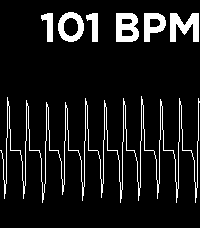
Heart Beat uses the new Heart Rate Sensor in Pebble 2 to provide a pretty visualization, well, of your heart beat. HR is sampled every 5 seconds to not destroy battery life.
 56
56KOERS
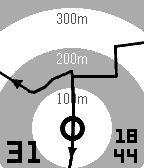
Explore new roads with your Pebble: select a GPS route on your phone and start riding. Quickly select existing routes nearby, routes and segments from you and your friends on Strava. Or import a route in GPX or TCX from your favourite route builder.

Features:
- Course navigation on Pebble: show current location on your route.
- Show distance and direction to route when not on screen.
- Map rotation based on heading (default) or device orientation.
- Offline import of GPX and TCX files. iOS only
- Search for existing routes nearby you.
- Connect with Strava to select routes, activities and segments.
- Show current speed and time.
- Turn backlight always on.

You can try KOERS for free while in beta.
KOERS has proven its practice for me on the bike, let me know if you find it useful during your activities.
 9
9PantaMazi
This is a Pebble Watchapp of PantaMazi, the assisted living platform of BioAssist S.A. The application currently presents reminders to the users as well as the current weather conditions.
Stay tuned for more exciting features!
 5
5First 5km
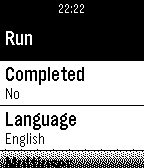
Can you run 5km? With this app you can. The First 5km app can be found in the Pebble AppStore.

This app tracks your progress over 16 weeks with three days of running per week. A run day is usually a combination of running and walking.

Day 1, f.ex. is:

1. Run for 2 minutes and 30 seconds
2. Walk for 2 minutes and 30 seconds
3. Run for 3 minutes
4. Walk for 2 minutes and 30 seconds
5. Run for 2 minutes and 30 seconds

You should run 3 times a week and preferably the same days and having at least one day of rest between to run days. So something like monday-wednesday-friday is good.

Multiple users can share the app on the same watch. Each user is tracked individually.
 2
210-20-30
10-20-30 is a way to spice up your running giving you good results. This app tracks an entire run.
 97
97Kiezel Health
This is a paid app. You can purchase this app individually for $0.99. Purchases are via KiezelPay.

If you love the app, give us a heart to let us know!

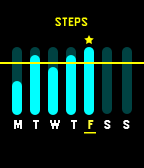
KiezelHealth was built to help you live a healthier life by reaching your goals. Along with our collection of goal focused watch-faces, we wanted to a simple way for you to view the progress of your goals daily and weekly. We also are bringing healthy notifications to your wrist to help you get up and move when you need to, and to drink more water throughout your day. We have tons of plans for this app and can’t wait to bring more healthy notifications to help you live a healthy lifestyle.

Top Features:
Weekly Overview of Step & Sleep Progress
Daily Overview of Step & Sleep Progress
Get Up and Move Notification
Drink Water Notification

More to come!

Enjoy!

Kiezel Team-
 5
5Wim Hof timer
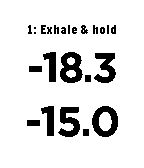
Wim Hof  (Iceman) breathing method timer

TWIST gesture or single press on any of the 3 right buttons advances to next phase.
PUNCH gesture or long press on any of the 3 right buttons resets both timers and returns to phase-0.
 12
12Tennis Score
Do you play tennis? Now you can keep track of the score in your Pebble!

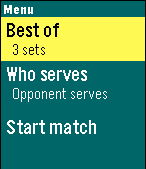
Tennis Score for Pebble tracks points, games, sets and who is serving. Update the score by pressing a button; undo available. Choose between best of 3 or 5 sets; tiebreak for all sets. Shows current time and match duration.

Features:

+ Menu:
	- Select best of 3 or best of 5 sets
	- Select who starts serving
	- Start match!

+ Match:
Use buttons to track the score.
	- Up: point to your opponent
	- Down: point to you
	- Select: undo last point; as many times as you want
	- Back: exit to main menu

+ Score:
	- Upper row: your opponent score
	- Lower row: your score
	- Left time: current time
	- Right time: match duration in minutes
	- Asterisk: who is serving

+Statistics:
Scroll down at the end of the match.
	- Match score
	- Number of points won
	- Match and set duration

Give it a <3 if you like it! Thank you!
 21
21Golf GPS range finder
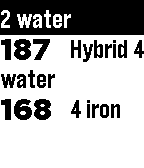
Show distances to the green; front, middle and back.
Show distances to doglegs
Show distances to hazards like water, bunkers.

Track how far you hit with your clubs.
Show club suggestions.

Settings
Hide certain hazards
Automatically go to next hole
Course search radius


Coming features:
Automatic swing detection
Scoring: First strokeplay and later stableford.
Statistics

This is a beta release, please send me your feature request to pieteroskam@gmail.com