 51
51Iron
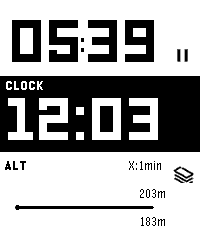
Health & FitnessIron - Workout Companion for Pebble Iron is a high-performance, open-source sports tracker for your Pebble smartwatch. Designed for runners and fitness enthusiasts, it tracks your real-time metrics and seamlessly bridges the gap between your Pebble and modern Android health ecosystems. ⚠️ Important Note: This watch app will not function at all unless used in combination with the Android companion app of "Iron". Also, while designed to support all Pebble platforms, it has not been fully tested on every single model. If you encounter any issues, your feedback is greatly appreciated! 📱 Companion App (Android) To unlock the full potential of Iron, install the companion Android app from Google Play. The companion app runs a stable background service during your workout and securely syncs your Pebble's health data directly to Google Health Connect. Download on Google Play: https://play.google.com/store/apps/details?id=hag1987haaa.pebble.iron&pcampaignid=web_share Zero ads, zero tracking analytics. Requires Location permissions (including background access) to accurately track your GPS routes while your phone is in your pocket. Only writes data to Health Connect with your explicit permission. ✨ Key Features By combining the Pebble app with the Android companion app, you can unlock: Music Control: Intuitively control your music playback directly from the workout screen. Supports swipe gestures on touchscreen models or long-press physical button mapping. Smart Notifications: Get vibration alerts on your wrist for distance laps (e.g., every 1km) or time intervals. Advanced Data Export: Supports both GPX and TCX formats. TCX includes heart rate, calories, and smoothed cadence data—perfect for uploading to Strava or Garmin Connect. Detailed Analytics Charts: View graphs for speed, elevation, heart rate, and steps on your phone. Powerful Automation: Broadcasts intents based on Pebble interactions or app state changes. Fully compatible with automation apps like Tasker. Health Connect Integration: Seamlessly syncs your recorded workout data directly to Android's Health Connect. Voice Assistant Integration: Long-press a button on your Pebble to trigger your phone's default digital assistant (the same one that launches when you hold your phone's power button). Note: Please speak your commands into your phone's or earbuds' microphone. ⚙️ Installation 1. Install this watch app. 2. Download the Iron Companion App for Android from Google Play. 3. Grant the necessary permissions (Location, Health Connect & Notifications) in the Android app. Note: Setting Location permission to "Allow all the time" is highly recommended for stable GPS tracking while your phone screen is off. 4. Start a workout on your Pebble! 🤝 Support & Credits Iron is completely free and open-source. There are no paywalls or locked features. This app was proudly developed with the assistance of Google's AI, Gemini! If you find this app useful for your daily runs, consider supporting the project: ☕ Support me on Ko-fi: https://ko-fi.com/1987haaa 🇯🇵日本語版 (Japanese) Iron - Pebble用ワークアウトコンパニオン Ironは、Pebbleスマートウォッチ用の高性能でオープンソースなスポーツトラッカーです。ランナーやフィットネス愛好家のために設計されており、リアルタイムの数値を追跡しながら、Pebbleと最新のAndroidヘルスケアエコシステムをシームレスに連携させます。 ⚠️ 重要な注意点: 本ウォッチアプリは、Android版『Iron』アプリとセットで使用しない限り機能しません。また、すべてのPebbleプラットフォームで動作するように開発したつもりですが、全モデルでの動作テストは完了していません。もし動かない場合はフィードバックをいただけると非常に嬉しいです! 📱 コンパニオンアプリ (Android) Ironの真の力を引き出すため、Android用のコンパニオンアプリをインストールしてください。安定したバックグラウンドサービスとして稼働し、PebbleのヘルスケアデータをGoogle Health Connectへ安全に同期します。 Google Playストアでダウンロード: https://play.google.com/store/apps/details?id=hag1987haaa.pebble.iron&pcampaignid=web_share 広告ゼロ、トラッキング解析ゼロ。 スマートフォンをポケットに入れた状態でも正確にGPSルートを追跡するため、位置情報(バックグラウンド含む)へのアクセス権限を使用します。 ユーザーの明示的な許可がある場合にのみHealth Connectへデータを書き込みます。 ✨ 主な機能 PebbleアプリとAndroidコンパニオンアプリを組み合わせることで、以下の機能を利用できます。 ミュージックコントロール: ワークアウト画面から直感的に音楽を操作可能。タッチスクリーンでのスワイプ操作や、物理ボタンの長押しに対応しています。 スマート通知機能: 距離ラップ(例:1kmごと)や時間インターバルを振動でお知らせ。 高度なデータ出力: GPX に加え TCX 出力に対応。心拍数、カロリー、平滑化されたケイデンス情報を含み、StravaやGarmin等へのアップロードに最適。 詳細な分析チャート: 速度、高度、心拍数、歩数をスマホでグラフ化。 強力な自動化連携: Pebbleの操作やアプリの状態変化をインテント送信。Tasker等の自動化アプリと連携可能。 Health Connect 完全対応: ウォッチで記録したデータをAndroidのヘルスコネクトへシームレスに同期。 ボイスアシスタント連携: Pebbleのボタン長押しで、スマホの「デフォルトのデジタルアシスタント」(電源ボタン長押しで起動する設定中のアシスタント)を呼び出せます。※アシスタントへの音声指示は、スマホ本体またはイヤホンのマイクで行ってください。 ⚙️ インストール方法 1. 本ウォッチアプリをインストールします。 2. Google PlayからAndroid用Ironコンパニオンアプリをダウンロードします。 3. Androidアプリ内で必要な権限(位置情報、Health Connect、通知)を許可します。 ※画面オフ時にも安定してGPSを追跡するため、位置情報権限は「常に許可」に設定することを強く推奨します。 4. Pebbleでワークアウトを開始してください! 🤝 開発者のサポートとクレジット Ironは完全に無料でオープンソースです。有料の壁はありません。なお、このアプリの開発にはGoogleのAI「Gemini」を活用しています! 毎日のランニングに役立ったと感じていただけた場合は、プロジェクトのサポートをご検討ください。皆様の支援が力になります。 ☕ Ko-fiでサポートする: https://ko-fi.com/1987haaa
 15
15It's Time
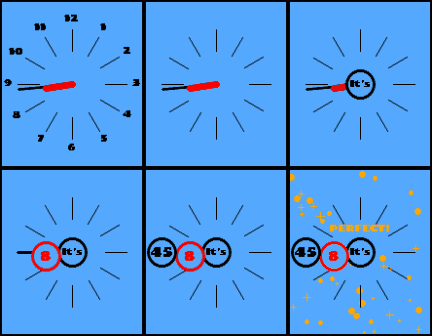
FacesTitle: It's Time - Read & Reward This is a watchface for kids, and for Pebble-loving parents. It's been over 10 years since we first discovered Pebble. Today, we need a "legitimate excuse" to get a new gadget. At least, I do. When I got my first Pebble, I had just graduated and started working. My salary wasn't high, but I had total control over my finances. And now? I married the woman I met after Pebble Tech went bankrupt, and we have a beautiful child. The money I earn is no longer just mine. "Buy a new gadget?! You just bought a Pebble 2 Duo! How many arms do you have?! Think about our kid's education!" ...Who said that? Anyway, let's leave that aside. Seriously though, education is important. It is our duty to raise our children well. And in that process, there is a crucial stage: practicing how to read an analog clock. My kid is exactly at that stage right now. Then, I had an epiphany. I will provide my child with the perfect opportunity to practice reading a clock with this watchface. Yes, everything is for my beloved child! ...And so, I can proudly get a new Pebble! ✨ Features & Highlights ✨ Packed with educational and playful features that will make your kid want to shake their wrist. ⌚ Ultra-Bouncy "Reading" Animation Shake your wrist, and the time pops up ("It's" -> "Hour" -> "Minute") expanding massively across the screen! It bounces elastically like a snowman, naturally teaching how to read the clock by linking analog hands with digital numbers. 🌞 Day & Night Theme The background automatically switches between a light theme (6 AM - 6 PM) and a dark theme (6 PM - 6 AM). Even toddlers who can't read numbers yet can intuitively grasp their daily rhythm: "The screen got dark, so it's time for bed." 🎉 The Ultimate "GOOD JOB!" Reward When the time reading finishes, the screen rhythmically flashes! A golden message randomly pops up from a wide variety of cheering words (like "BINGO!", "GENIUS!", "WOW!", "PERFECT!"), accompanied by sparkling confetti. Reading the clock turns into a fun daily gacha game! 👀 Smart & Cohesive "Toy Box" Design Numbers 1-12 are placed on the outer edge using the same pop and playful font as the center, completing the aesthetic. The congratulatory message dynamically changes its position based on the hour hand so it never overlaps with the time. 📱 Universal Compatibility (But New Models Highly Recommended!) While it is a fact that this watchface fully supports classic models (Pebble 2, Time, etc.), let me be clear as the developer: to truly practice reading the clock with your child, the ultra-high resolution of the latest Pebble Time 2 or Pebble Round 2 is absolutely necessary. (Please use this official statement as your excuse to pre-order the new model!) 🤖 Powered by AI: All the C code for this watchface was 100% written by Gemini! ☕ Support the Creator: If you and your kid enjoy this watchface, consider buying me a coffee! -> https://ko-fi.com/1987haaa 【Japanese Version】 タイトル: It's Time - Read & Reward これは、子供たちと、Pebbleを愛してやまない親のためのウォッチフェイスです。 私たちが初めてPebbleに出会ってから、もう10年以上が経過しました。 今の私たちには、新しいガジェットを手に入れるための「正当な理由」が必要です。少なくとも私にはそうです。 初めてPebbleを手にしたとき、私は大学を卒業して働き始めたばかりでした。決して高い給料ではありませんでしたが、家計の全権は私が握っていました。 しかし、今はどうでしょうか? Pebble Techが倒産した後に知り合った妻と結婚し、愛する子供も生まれました。私が稼いだお金は、もはや私だけのものではありません。 「新しいガジェットを買う!? もうPebble 2 Duoを買ったじゃない! 腕は何本あるの!? それより子供の教育のことも考えなきゃ!!!」 ……一体誰がそんなことを言うのでしょうか? ええ、この話はこれくらいにしておきましょう。 真面目な話、子供の教育は大切です。私たちには子供を良く育てる義務があります。そして成長の過程には「アナログ時計を読む練習」という重要なステージが存在します。私の子供も、今まさにそのステージにいます。 そこで私はひらめきました。 このウォッチフェイスで、子供に時計を読む練習の最高の機会を提供するのです。 そう、すべては愛する子供のために!……そして私は、堂々と新しいPebbleを入手するのです! ✨ 主な機能と特徴 ✨ 子供が自分から「いま何時?」と腕を振りたくなる、知育と遊び心を融合させた機能が満載です。 ⌚ 画面いっぱいに弾む「時間読み上げ」アニメーション 手首をシェイクすると、「It's」→「◯時」→「◯分」の順番で、数字が「ぽよんっ!」と大げさに弾みながら画面いっぱいに飛び出します。アナログ針とデジタルの数字がリンクすることで、自然と時計の読み方が身につきます。 🌞 昼と夜を教える「デイ&ナイト」テーマ 朝6時から夕方6時までは明るいテーマ、夜間は暗いテーマ(モノクロモデルでは白黒反転)に自動で切り替わります。まだ数字が読めない小さな子供でも、「画面が暗くなったから、もう寝る時間だね」と直感的に生活リズムを学べます。 🎉 最高のご褒美「GOOD JOB!」フラッシュ 時間を最後まで読むと、画面全体がチカチカッとリズミカルに明滅!さらに「BINGO!」「GENIUS!」「WOW!」など、たくさんの黄金の褒め言葉がランダムで飛び出し、画面いっぱいにキラキラの紙吹雪が舞い散ります。時計を読むことが「楽しいガチャガチャ」に変わります! 👀 おもちゃ箱のような親切デザイン アナログ画面の外周にある1〜12の数字も、中心と同じポップで楽しいフォントに統一。お祝いのメッセージが時計の針と被らないように、時間帯によって出現位置がダイナミックに変化するこだわりの設計です。 📱 全モデル完全対応(※ただし最新モデルを強く推奨!) Pebble 2などの従来モデルにも完全対応しているのは事実です。しかし、開発者としてはっきり申し上げます。子供と一緒に時計の数字をしっかり読む練習をするには、最新の Pebble Time 2 または Pebble Round 2 の超高解像度が絶対に必要です。(ぜひ、この見解を最新モデルをプレオーダーするための口実にお使いください!) 🤖 Powered by AI: このウォッチフェイスのC言語のコードは、すべてGeminiがフルスクラッチで書いてくれました! ☕ Support the Creator: もしお子様と一緒にこのウォッチフェイスを楽しんでいただけたら、ぜひコーヒーを一杯おごってください! -> https://ko-fi.com/1987haaa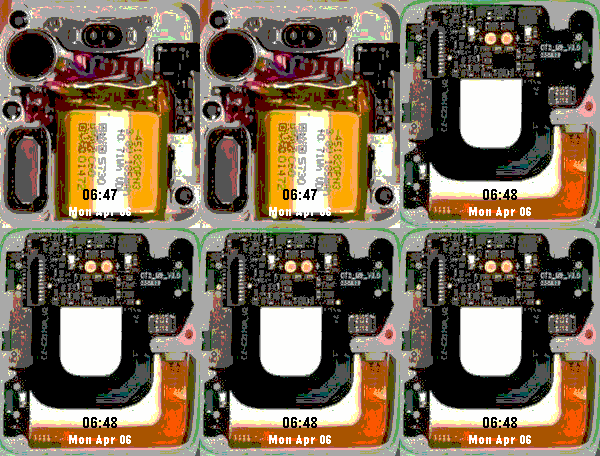 50
50Internal
FacesThis contest is meant to be fun! I've adjusted the image colors in V1.1. Also, if anyone happens to have a high-resolution photo of the inside of a Pebble Time 2, I would really appreciate it if you could share it with me. Internal picture was captured from following links. https://youtu.be/KTlRBI2QCzM?si=mjy4qMHthvLQl4nV&t=1684 https://x.com/ericmigi/status/2014531426201567524?s=20
 61
61Iris
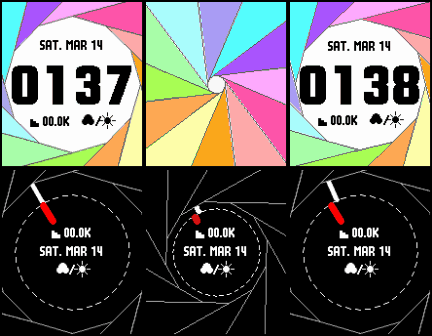
FacesMeet Iris: a watch face inspired by the beauty of a camera shutter. It brings digital and analog watches together on one watch face, letting you seamlessly transform your watch for business hours directly from your wrist. Try turning on Quiet Time during your business hours to see the magic happen! (Just be sure to turn on 'Enable Business Mode' in the settings.) [Feedback & Support] I'd love to hear your thoughts! For bug reports, feature requests, or if you just want to say hi, please feel free to reach out to me on X (formerly Twitter) at @1987haaa. If you enjoy Iris and want to keep the mechanical gears turning, consider buying me a coffee! [https://ko-fi.com/1987haaa] Iris(アイリス)をご紹介します。カメラのシャッターの美しさにインスピレーションを受けたウォッチフェイスです。デジタルとアナログ、2つの時計を1つの画面に統合し、腕元から直接、ビジネスシーンにふさわしいスタイルへシームレスに変形させることができます。 設定したビジネスタイム中に「Quiet Time」をオンにして、魔法のような変形ギミックをぜひ体感してみてください!(※設定画面で「Enable Business Mode」をオンにするのをお忘れなく。) [フィードバック&サポート] 皆さんの声をお待ちしています!バグの報告や機能のリクエスト、あるいは「使ってるよ!」というご挨拶だけでも大歓迎です。X(旧Twitter)の @1987haaa まで、お気軽にご連絡ください。 もしIrisを気に入って、この機械式の歯車を回し続けるためのサポートをしていただけるなら、ぜひコーヒーを1杯ごちそうしてください! [https://ko-fi.com/1987haaa] ✨ Special Thanks Fonts: Huge thanks to the creators of the beautiful fonts used in this watch face. (Teko Font: SIL Open Font License (OFL) via Google Fonts / x8y12pxDenkiChip: A beautiful pixel font by hicc. https://hicchicc.github.io/00ff/) AI Partner: Special thanks to Google Gemini for the amazing coding, debugging, and brainstorming support! 🤖🤝 Most of the code for this watchface is proudly co-authored with Gemini (Google AI).