Mi T03 connects your Pebble watch to your Leapmotor T03 through Home
Assistant (leapmotor-ha integration) — no custom servers or MQTT bridges
needed.

From your wrist you can:
- Check battery level, estimated range, and charging status at a glance.
- See whether the car is parked, driving, or charging, with large, clear
  icons — including estimated charge-end time, charging power, and
  current speed while driving.
- View all 4 tire pressures on a top-down car diagram. On touch-capable
  models, tap a wheel to highlight it and see its exact pressure. Any
  tire at 2 bar or below turns red automatically, with a one-time
  Timeline alert.
- See at a glance whether the car is locked, via a color-coded lock icon
  next to the battery indicator.
- Check the state of all 4 windows on a car diagram, same style as the
  tire page.
- Trigger fast cooling, fast heating, or turn off climate control, with
  on-watch confirmation.
- Open or close the sunshade.
- Lock or unlock the car.
- Feel a distinct vibration for successful vs. failed actions, without
  looking at the screen.
- Get a Timeline notification when charging stops, a tire is low, a
  window is left open while parked, or the car is left parked and
  unlocked.
- Pick your car's display color (white, black, or light blue).
- Refresh manually, or let it auto-refresh every 15/30/60 seconds while
  the app is open (configurable, battery-friendly by design).

Requires your own Home Assistant instance with the Leapmotor T03 already
set up via leapmotor-ha (github.com/kerniger/leapmotor-ha), reachable
from your phone (LAN, VPN, or public domain), and a Home Assistant
long-lived access token. Everything is configured from the watch —
nothing to set up outside of it.
 5
5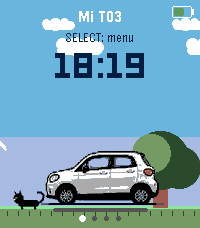 2
2