Use your Pebble watch to speak to your Telegram bot.

Press SELECT, say what's on your mind, and read your bot's reply on your wrist. Connect your own compatible AI assistant or automation bot for quick questions, notes and requests without typing on your phone.

MAKE IT ONE BUTTON
Assign Telegram Voice to Hold SELECT in Pebble's Quick Launch settings. Hold the button from your watchface to open the app and start speaking. Press SELECT again for follow-up messages; UP and DOWN scroll the answer.

SET UP WITH YOUR WATCH
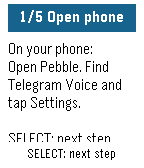
The watch walks you through numbered instructions while you complete setup on your phone. Each person configures their own watch bot token and destination bot. Try the offline demo before connecting anything.

YOU WILL NEED
A Pebble with a microphone, a connected phone with internet and working dictation, a dedicated Telegram watch bot, and a compatible destination bot. For private bot conversations, both bots must enable Bot-to-Bot Communication Mode, and the assistant must accept bot messages.

Messages are delivered as text. Replies are checked while the app is open; the latest reply is saved on your phone. Very long replies are shortened. No voice playback.

Your bot, your choice. No developer account or hosted bridge service is required.

Independent community app; not affiliated with Telegram.