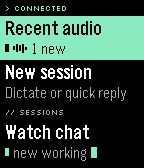
Hermes on your wrist. Browse conversations, catch audio replies, dictate or send a quick reply, and choose where to listen: phone headphones, phone speaker, or a supported watch speaker. Includes a cross-session Recent audio inbox, Quick Launch destinations, and the black/green/violet Phosphor interface.

ANDROID COMPANION REQUIRED
This watch app is not standalone. Install the matching Wristbound Android APK from GitHub Releases, pair your watch with the current Pebble Android app, and connect the companion to your own Hermes Agent dashboard. Android 10+; no iOS companion is currently provided. No hosted Hermes account or service is included.

GET STARTED
1. Download the v0.6.6 Android companion APK from https://github.com/AndreasThinks/hermes-wristbound/releases/latest . It is currently a sideloaded debug APK, not a Google Play app.
2. Make your authenticated Hermes dashboard reachable from the phone, preferably over Tailscale and HTTPS. Use the dashboard URL, not the separate Hermes API-server endpoint. Configure authentication before exposing a loopback dashboard through a proxy.
3. Sign in in Wristbound on the phone and press Test connection. Require Connected, not just saved credentials.
4. Install/open this watch app. Current pair: Android v0.6.6 and watch v0.6.6, both using protocol v5. Update both for optional launch-for-alerts behavior. Install the APK over the existing companion without uninstalling.
5. On the phone, check Keep checking in the background, grant notification permission, and press Allow background use to request the battery-optimisation exemption. New or unset background-checking preferences default on; existing saved choices are preserved. Keep Pebble forwarding enabled. Telegram text and audio alerts can be configured separately.

Full setup, network/security guidance, update instructions and troubleshooting:
https://github.com/AndreasThinks/hermes-wristbound/blob/main/docs/INSTALL.md

QUICK LAUNCH
Configure its destination in the Android companion under Watch > Watchapp opens on. Assign the actual hardware button through Pebble settings. The optional Play latest audio shortcut deliberately plays through phone headphones if connected, otherwise the phone speaker. Choose Home or Recent audio for silent entry. Ordinary incoming replies do not autoplay.

OPTIONAL ALERT BANNERS IN v0.6.6
Open Wristbound for alerts under Notifications is off by default. When enabled, the phone starts the watchapp over the watchface or another app to show its own banner, skips the splash, and waits up to 10 seconds for HELLO. Startup or delivery failure falls back to the existing native notification. An untouched banner returns to the watchface after 15 seconds when Home is underneath; Select opens the reply and keeps Wristbound open. Silent late-audio updates do not launch the watchapp. This is a foreground app launch, not a native PebbleOS overlay. Emulator fixture tests passed; real-device Bluetooth startup, HELLO timing and locked-phone acceptance remain pending.

BACKGROUND RELIABILITY
The companion uses wakeup alarms for closed-watchapp checks, a foreground service for background monitoring, active turns and phone audio, bounded wake locks for turns/checks, and a MediaPlayer wake lock during playback. Monitoring restores after boot or app replacement; network-return events trigger catch-up checks. Setup shows when Hermes was last reached. Android can still delay alarms in Doze, particularly without the battery exemption; exact alert timing is not guaranteed. Forced Doze, reboot recovery, turns completing after the watchapp closes, and long screen-off playback still require hardware acceptance.

EXPERIMENTAL RELEASE
Real-device use so far: Pixel 9a, Hermes 0.22.2 and Pebble Time 2. Session browsing and phone/headphone audio were user-confirmed. Watch-speaker sound, forced phone-speaker routing with headphones attached, and hardware Quick Launch still need dedicated acceptance tests. Features depend on watch hardware; builds for all targets do not establish hardware compatibility for every feature. Watch audio is limited to two minutes and may buffer. Automatic Telegram/Ringbearer reply audio requires the matching Hermes durable automatic-reply-audio extension; it retains newly generated audio for seven days subject to a bounded storage cap. Older deleted voice files cannot be recovered. Native watch notification rendering, silent-phone forwarding and the new playback actions still need locked-phone hardware acceptance. Android silent notification-shade and background-service records can remain.

Your phone connects to your own Hermes server. There is no maintainer-operated relay. Hermes model/TTS providers and dictation services may process content and charge according to your configuration. Credentials and bounded caches stay on the phone; do not expose an unauthenticated agent publicly.

Source, releases, instructions and support:
https://github.com/AndreasThinks/hermes-wristbound

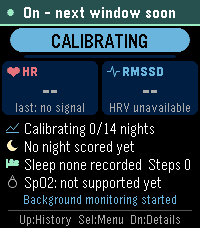
Screenshots use emulator test conversations, not private messages.
 1
 19
 4
 164