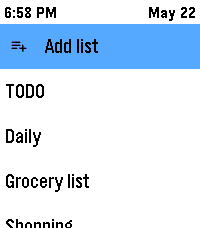
📋 PebbleTasks — Google Tasks on your wrist ⌚
Your to-dos, right on your Pebble. 📱➡️⌚ Open lists, tick things off, and stay organised without pulling out your phone. 🎯

✨ Getting started with Google 🔐
⚙️ Open PebbleTasks settings on your phone and choose to connect Google Tasks.
🌐 Sign in with Google in your normal browser (Safari, Chrome, etc.) — the same way you’d sign in anywhere else (Pebble's built in web browser is not trusted by Google!)
📋 Finish the short steps on screen — you’ll get a simple code or line to paste back into the app. That’s it: your watch can now load your real Google task lists. 🎉
You will be asked to grant access ONLY to Google Tasks ✅ — not your email 📧, contacts 👥, or anything else. No one other than you is able to view this information. The token is not stored, all code is open source.

📝 Lists — browse and create 📂
👆 Pick a list from your lists on the watch to see its tasks.
➕ Create a new list from the app when you need a fresh place for tasks (same lists you use in Google Tasks on the web or phone). 🖥️📱
✅ Tasks — quick actions 🎮
On the task list (the list of tasks): 📜

👆 Short press Select on a task → mark it complete ✅
⏱️ Press and hold Select on a task → open a small menu for that row (for example delete 🗑️)
When you’re looking at a single task: 🔍

👆 Short press Select → mark it complete ✅
⏱️ Press and hold Select → open the task menu:
✅ Mark complete
📅 Add a due date (synced with Google Tasks) — Google only supports a date here, not a time of day, through their side of things. ⏰❌
📌 Add to your Pebble Timeline with the exact date and time you choose — great for reminders on your watch 🔔
🗑️ Delete the task
🏁 Completed tasks 🎊
There’s a place to see tasks you’ve marked complete on the watch. 👀

↩️ Tap a completed task if you want to mark it not done again and put it back in play.
🧹 Clear completed when you want a tidy list — this only affects what the watch remembers as recently completed here; it helps you keep the completed view neat without touching your whole Google account in odd ways.
🔒 Privacy — your account, your data 🤝
We don’t store your Google password or secret sign-in details on our servers. 🚫💾

A small, open-source helper 🧩 runs in the middle of the sign-in process so Google can hand you a connection code that lives on your phone 📲 — that’s what lets PebbleTasks talk to your tasks. The helper exists only so you can get that link-up done safely; you can read the code yourself if you like. 👀

☁️ Or stay offline 📵
Prefer not to link Google? You can use local lists on the watch — everything stays on your phone, no cloud. 🏠🔐

🔗 Links
💾 Source: https://github.com/shan-srini/PebbleTasks
🔒 Privacy: https://pebbletasks.shansrini.com/privacy
📜 ToS: https://pebbletasks.shansrini.com/terms