 3
3Around 2
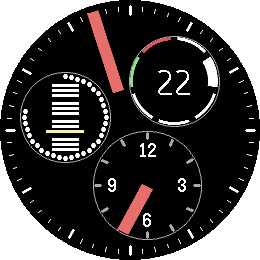
FacesAround 2 is a watch face where time, battery and calendar circle the center together. If you are looking for something simpler and cleaner, try Around. The minute hand is an orange bar on the rim of a big minute disc. Three small discs orbit with it, evenly spaced, so the picture always stays balanced: - Hour disc (opposite the minute hand): 12 hour marks, the numerals 12 / 3 / 6 / 9 (0 / 15 / 18 / 21 in the afternoon) and an hour indicator - Battery disc: a ring of dots that fills with your charge -- white above 40%, yellow up to 40%, red up to 20%. Inside, the twelve months as bars in four groups of three, with the current month highlighted - Weekday disc: seven segments, Saturday green and Sunday red, today's segment emphasized, and the day of the month in the middle. Hourly vibration. Battery-friendly: the face redraws once a minute. Every element has its own color, set from the phone (22 colors: minute disc, hour disc, battery dots and month bars, weekday segments and date). The settings page is in German. For Pebble Time 2 (Emery) and Pebble Round 2 (Gabbro). Inspired by ressence watches. It's done with the skill (see https://repebble.com/blog/spring-2026-pebble-app-contest) using Claude.
 18
18Modular
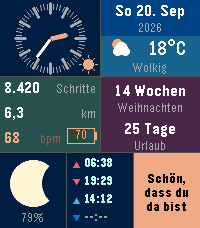
FacesModular turns your Pebble Time 2 into a personal dashboard: seven cells, each showing one thing clearly and each colored the way you like. - Analog clock with a sun/moon symbol for day and night - Date with live weather: icon, temperature and condition - Steps, distance in km, heart rate and battery level (percent inside the icon) - Two countdowns (weeks / days to your dates) with optional labels -- while none is set, a weather forecast for the next 4 hours takes their place - Real moon phase with percent lit - Sunrise, sunset, moonrise and moonset times - A free text cell: write anything you like - if not set, it shows the time there digitally - Hourly vibration, and a Bluetooth-lost flash in place of the weather icon - Optional spoken time: shake the watch and hear the time as a repeater -- low dings for hours, low-high for quarters, high double dings for minutes; Bell near clocks shows, when sound output is enabled. Everything is set from the phone: 20 colors (clock hands, marks, and foreground/background per cell), countdown dates and labels, your text, and sound on/off. Weather, forecast, moon and sun times need the phone connection. Texts are in German. For Pebble Time 2 (Emery). It's done with the skill (see https://repebble.com/blog/spring-2026-pebble-app-contest) using Claude.
 6
6SunAndMoon
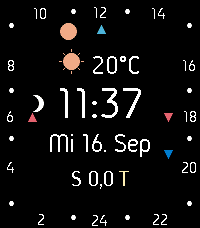
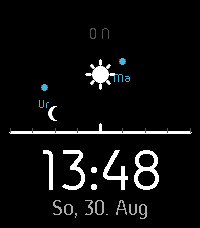
FacesA real 24-hour sundial. SunAndMoon places the sun and moon on the dial by their own astronomical hour angle instead of literal clock time, so their positions genuinely track the sky throughout the day. A true illuminated moon phase, plus small marks for sunrise, sunset, moonrise and moonset, complete the picture. The center shows live weather and temperature, the time in 24h format, weekday/date/month, and whether it's day (T) or night (N), alongside your step count and heart rate (only on emery). A red flash warns when Bluetooth disconnects, and a red "B" appears when the battery drops below 20%. Focus on German laguange. Square dial for Pebble Time 2 (Emery), round dial for Pebble Round 2 (Gabbro). It's done with the skill (see https://repebble.com/blog/spring-2026-pebble-app-contest) using Claude.
 3
3Abakusapp
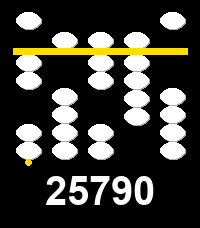
Tools & UtilitiesAbakusapp is a hands-on soroban (Japanese abacus) number-entry toy for Pebble's touch-capable watches (Pebble Time 2, Pebble Round 2). Five vertical stacks let you dial in any 5-digit number: swipe a bead towards the separator bar to activate it -- and everything between it and the bar -- or swipe away to deactivate; tap for a quick +/-1. A long horizontal swipe clears everything. Works with buttons too, on every Pebble: Select picks a stack, Up/Down adjusts it, long-press Select clears. The current number is always echoed as plain digits below the stacks. Stone/background/separator colors are configurable from the phone's Settings screen. This is an experimental first project built specifically to learn Pebble's new touch/gesture API. It's done with the skill (see https://repebble.com/blog/spring-2026-pebble-app-contest) using Claude.
 2
2Abakuswatch
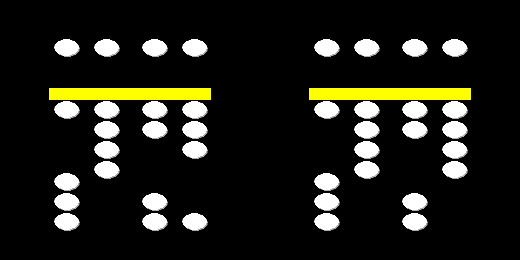
FacesAbakuswatch tells the time (always 24-hour) using the logic of a soroban, the classic Japanese abacus. Four vertical stacks read left to right like a digital clock: tens-of-hours, hours, tens-of-minutes, minutes. Each stack has one "heaven" bead worth 5 above a bright separator bar, and four "earth" beads worth 1 each below it -- only a bead pushed towards the bar counts. Heaven beads slide down to touch the bar from above; earth beads slide up to touch it from below. Read a stack's value by adding 5 (if the heaven bead touches the bar) to however many earth beads are touching it. Stones, background, and the separator bar are all colors you can pick from the phone's Settings screen. Hourly vibration. It's done with the skill (see https://repebble.com/blog/spring-2026-pebble-app-contest) using Claude.
 6
6Scene
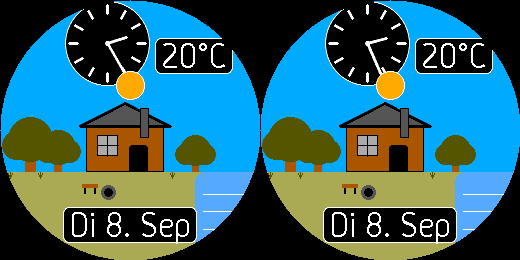
FacesA little house by a quiet lake. Watch it breathe through real days and nights, real weather conditions, real seasons, real sun and moon position, real moon phase. Keep an eye on the water and don't blink when something crosses the sky. Not everything on this dial announces itself. Did you find all the hidden features regarding scenery? Display focuses on language and units used in Germany. Second screen supports with details in text form. Shake the watch to display the second dial, shake it again, to come back to that display of the little house. It's done with the skill (see https://repebble.com/blog/spring-2026-pebble-app-contest) using Claude.
 3
3CatWatch
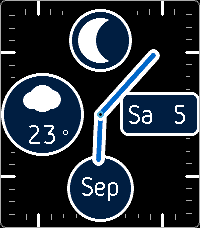
FacesCatWatch is the classic Perpetual2 analog dial -- real moon phase, live weather, weekday/date and month registers, every color phone-configurable -- with a little orange cat who actually lives there. Shake your wrist, or just wait, and she wanders out across the face: strolling between the complications, climbing up onto the moon window or the weather circle, curling up for a nap in an open corner of the dial and always waking with a proper back-arching stretch, flopping onto her back to bat at something drifting overhead, or trotting over to her food bowl for a bite before wandering off again. Sleeping only ever happens in open floor space, checked clear of every complication. Eight behaviors so far: strolling, sitting and looking up at you, peeing, playing with a toy, climbing, sleeping, stretching, and eating -- with more planned. This is an initial, experimental release. For cat lovers. :-) Display focuses on language and units used in Germany. It's done with the skill (see https://repebble.com/blog/spring-2026-pebble-app-contest) using Claude.
 12
12Sky
FacesSky turns your wrist into a window onto the sky above you. Point your watch in any direction and Sky shows what is actually there: the Sun, the Moon, and any of the seven other planets currently above the horizon in that direction, tracked live as you turn using the watch's compass. Each body is drawn as a small icon, positioned by its real azimuth and altitude -- turn your wrist and the sky scrolls past like an AR window. The first dial now shows also Andromeda, Orion Nebula, Pleiades, Beehive Cluster, Hercules Cluster, the Double Cluster, and both Magellanic Clouds — drawn as small violet squares (vs. the planets' cerulean circles) and only appearing once the Sun drops below -12° altitude. Time and date are shown below the horizon. Shake the watch for a second dial: a heliocentric diagram of the whole solar system, Sun at the center, all eight planets laid out on their orbits. Under the hood, Sky computes every position itself with a low-precision orbital-mechanics engine written from scratch (the Astronomical Almanac's low-precision solar formula, a truncated lunar theory, and classic osculating Keplerian elements for the planets), running on the phone from your GPS location and cross-checked against PyEphem to within a fraction of a degree. The watch itself never does any of that math -- it only receives plain numbers over Bluetooth and places them on screen with simple integer arithmetic, keeping it fast and battery-friendly. A small lightning-bolt icon appears beside the time if the phone connection is lost. A GPS-unavailable icon shows whenever the phone's last location fix failed, and hides once it succeeds. This is an initial, experimental release. It's done with the skill (see https://repebble.com/blog/spring-2026-pebble-app-contest) using Claude.
 7
7Perpetual II
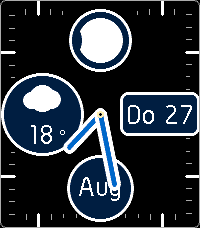
FacesPerpetual II is a classic analog watchface: weekday and date in a window, a month register, a real astronomical moon-phase indicator, and live weather (icon + temperature via Phone-GPS). Designed for Pebble Round 2 (round chapter ring) and Pebble Time 2 (square chapter ring, ticks spaced by arc length around the case). Every color is configurable from the phone's Settings screen. With a low-battery indicator (red center filled dot) and a Bluetooth-disconnect warning icon (Flash near weather display). Hourly vibration. Day / Night indicator by yellow / blue small center ring. Now with two count downs (Weeks, Days) shown only, when set. Display focuses on language and units used in Germany. It's done with the skill (see https://repebble.com/blog/spring-2026-pebble-app-contest) using Claude.
 6
6Perpetual
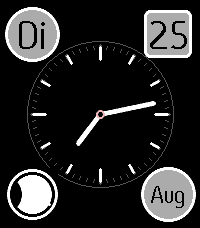
FacesPerpetual is an original analog chronograph-style watchface: a day-of-week register, a month register, a date window, and a real astronomical moon-phase indicator. Every color is configurable from the phone's Settings screen. Designed for use on Pebble Round 2, but to bridge the wait, made available for Pebble Time 2 also, with a different layout. Hourly vibration notification included. Display focuses on language and units used in Germany. It's done with the skill (see https://repebble.com/blog/spring-2026-pebble-app-contest) using Claude.
 5
5Wheels
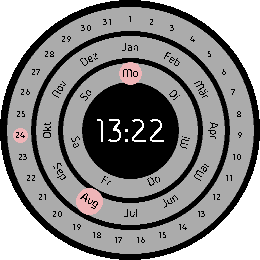
FacesShows the current date, month, weekday, and time. Experimental placement of the month and weekday. Hourly vibration notification included. Display focuses on language and units used in Germany. Challenging to read, that's true. Watch face is created for Pebble Time 2, Pebble Round 2 and Pebble 2 DUO. Most suitable for Pebble Round 2. Settings screen on the Phone provided to select colors for each element. It's done with the skill (see https://repebble.com/blog/spring-2026-pebble-app-contest) using Claude.
 5
5Overview II
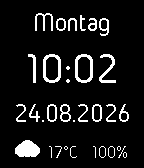
FacesShows the current weekday, time, date, weather condition as icon and temperature and battery in %. Hourly vibration notification included. Bluetooth disconnect is show by separate icon replacing weather condition until reconnected. Display focuses on language and units used in Germany, easy to read for older eyes. Watch face is created for Pebble Time 2, Pebble Round 2 and Pebble 2 DUO. Settings screen on the Phone provided to select colors for each text line and background. Inspired by Clean and Smart watch face. It's done with the skill (see https://repebble.com/blog/spring-2026-pebble-app-contest) using Claude.
 3
3Mixture
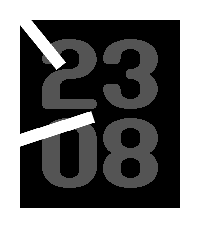
FacesMixture combines two ideas into one face: Frame's minimal analog design — a thick frame that follows your watch's actual shape (round or rectangular), with hour and minute indicators anchored at the frame's edge and pointing inward — layered with a large, bold day-over-month date display in the center. Shake your wrist to swap the background and indicator colors; the date color stays put. All three colors (background, frame/indicators, date) are customizable from the watch app's Settings on your phone. Watch face is done with the skill (see https://repebble.com/blog/spring-2026-pebble-app-contest) using Claude.
 2
2Frame
FacesA very simple watch face: time shown by indicators within a frame, nothing to distract. Shake the watch to swap the colors. Default: Black background, white indicators and frame. Colors are fully customizable from the watch app's Settings on your phone. With hourly vibration alert. Provided for Pebble 2 DUO, Pebble Time 2 and Pebble Round 2. Inspired by Soto X watch face. Watch face is done with the skill (see https://repebble.com/blog/spring-2026-pebble-app-contest) using Claude.
 3
3My Steps
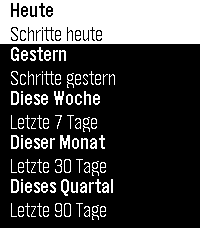
Health & FitnessMy Steps shows your Pebble-tracked step count and walked distance (calculated) right on your wrist: today, yesterday, and rolling totals for the last 7, 30, and 90 days — each with a full day-by-day breakdown. Step tracking itself is handled by the watch's own firmware; My Steps is a fast, easy-to-read viewer for that data. No settings, just as it is. It's done with the skill (see https://repebble.com/blog/spring-2026-pebble-app-contest) using Claude. --- My Steps zeigt deine mit der Pebble-Uhr erfasste Schrittzahl und zurückgelegte Strecke (berechnet) direkt am Handgelenk: heute, gestern sowie rollierende Auswertungen für die letzten 7, 30 und 90 Tage – jeweils mit einer vollständigen Tag-für-Tag-Aufschlüsselung. Die Schritterfassung selbst übernimmt die Firmware der Uhr; My Steps ist ein schneller, übersichtlicher Viewer für diese Daten. Keine Einstellungen, einfach wie es ist
 4
4My Sleep
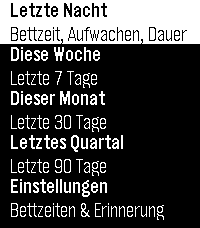
Health & FitnessMy Sleep displays your sleep statistics—tracked by your Pebble watch—right on your wrist: bedtime, wake-up time, and the duration of your last night’s sleep, as well as rolling averages for the last 7, 30, and 90 days. You can also set a scheduled bedtime for each day of the week—the watch will remind you in time with a vibration, even if the app isn’t currently open. BUT: you need to open the app on the watch at least once, to initialize reminder setting! The watch’s firmware handles the sleep tracking itself; My Sleep is a fast, easy-to-read viewer for this data and sets the reminder. Watch face is done with the skill (see https://repebble.com/blog/spring-2026-pebble-app-contest) using Claude. My Sleep zeigt Deine mit der Pebble-Uhr erfasste Schlafstatistik direkt am Handgelenk: Bettzeit, Aufwachzeit und Dauer der letzten Nacht sowie rollierende Auswertungen für die letzten 7, 30 und 90 Tage. Für jeden Wochentag lässt sich außerdem eine geplante Bettzeit einstellen – die Uhr erinnert dich rechtzeitig per Vibration daran, auch wenn die App gerade nicht geöffnet ist. AUFPASSEN: die App muss auf der Uhr mindestens einmal gestartet werden, damit die Initialisierung für den ersten Reminder stattfinden kann. Die Schlaferkennung selbst übernimmt die Firmware der Uhr; My Sleep ist ein schneller, übersichtlicher Viewer für diese Daten und setzt die Erinnerung.
 7
7Impress
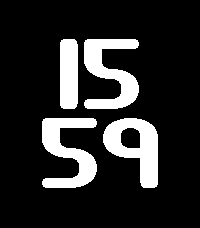
FacesA very simple watchface: time shown big. Shake the watch to see the date instead. Black background, white text. With hourly vibration alert. Provided for Pebble 2 DUO, Pebble Time 2 and Pebble Round 2. No settings, just as it is. Inspired by Glow watch face. Font is provided by Brian Kent / aenigmafonts. Watch face is done with the skill (see https://repebble.com/blog/spring-2026-pebble-app-contest) using Claude.
 6
6Cells
FacesA minimalist digital watchface. Time is shown as two stacked bar/disc counters -- hours on the left, minutes on the right -- each built from ones-bars, a fives-bar, and tens-discs. 24-hour time. Inspired by CELL Clock watch face. With hourly vibration alert. Provided for target platforms Pebble time 2, Pebble round 2 and Pebble 2 DUO. No settings, just as it is. It's done with the skill (see https://repebble.com/blog/spring-2026-pebble-app-contest) using Claude.
 5
5Simple Classic II
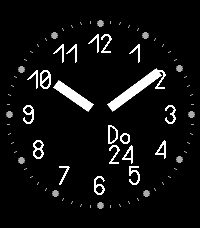
FacesAn analog dial and numerals ring the dial. The day/date label orbits the center, always keeping distance to the hands. Indicates AM/PM. Hourly vibration notification. Battery charge is shown by the color of the 6/18 numeral, and the background shifts between day and night automatically with local sunrise/sunset (needs connection to the phone to know sunrise/sunset time). NEW: Fully customizable from the phone's Settings screen: pick your own background and foreground colors, choose whether the background switches for night at all and to which color, and set the weekday label's language — German, English, French, Spanish, Italian, Portuguese (or let it follow your Pebble's own language automatically), plus Swedish. Selection due to font used (Bowhouse). Provided for target platforms Pebble time 2 and Pebble round 2. t's done with the skill (see https://repebble.com/blog/spring-2026-pebble-app-contest) using Claude.
 10
10Pebble Notes with Reminders
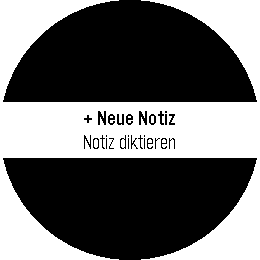
Tools & UtilitiesVoice-dictated notes stored entirely on your watch — no phone app needed. Usefull for doorpin notes or parking lot ids. Add, view, update, and delete notes by speaking. Set reminders just by saying phrases. German interface. Basically touch enabled user interface. Limited storage. Works on Pebble Time 2, Round 2, and 2 Duo. No settings, just as it is. It's done with the skill (see https://repebble.com/blog/spring-2026-pebble-app-contest) using Claude. Here's the full set of supported "remind me" phrasings — matched case-insensitively, checked in this order, first match wins: 1. Duration — English or German remind me in N minute(s) erinnere mich in N minute(n) 2. English clock time (ambiguous AM/PM) remind me at N o'clock — N is 1–12; resolves to whichever of N-AM or N-PM comes soonest (today or tomorrow). 3. German clock time — explicit 24h erinnere mich [um] HH:MM uhr — colon form, e.g. "erinnere mich um 14:25 uhr" erinnere mich [um] HH uhr[ MM] — natural spoken word order (Uhr between hour and minutes), e.g. "erinnere mich vierzehn Uhr fünfundzwanzig" um is always optional in both forms Minutes are optional in the second form — "erinnere mich um 14 uhr" alone defaults to :00 Rolls to tomorrow if that time today has already passed Numbers, in every phrase above: digits (5) or spoken words work interchangeably, English and German, including German compounds (fünfundzwanzig = 25, einundzwanzig = 21, etc., covering the full 21–59 range needed for hours/minutes). A few concrete working examples: "remind me in 5 minutes" / "remind me in five minutes" "erinnere mich in 3 minuten" / "erinnere mich in drei minuten" "remind me at 7 o'clock" "erinnere mich um 14:25 uhr" / "erinnere mich 14 uhr 25" "erinnere mich vierzehn uhr fünfundzwanzig" "erinnere mich um 9 uhr" (→ 09:00) Anything outside these four patterns is saved as a plain note with no reminder — no error shown, so it's worth sticking to one of these forms.