 5
Forty
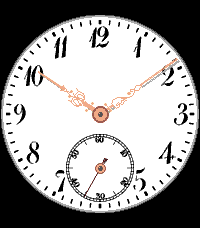
FacesForty is a pocket-watch dial on your wrist, rebuilt from a photograph of a real dial: Arabic numerals with their thick and thin strokes, a ring of fine minute ticks with a heavier mark at every hour, and a small seconds dial at six o'clock with its ladder of sixty steps. Two gold hands with ornate filigree sweep over the white enamel, just like on the old watch. This is the dial of my old pocket watch. Simple, but beautiful. - The numerals and the small seconds dial are taken straight from the photo, the hands are traced from it - Small seconds hand: it appears and runs for 30 seconds when you shake your wrist, so the watch saves power the rest of the time. You can also let it run all the time, or switch it off - The usual short vibration on the full hour (silent in Quiet Time, can be switched off) - No date, no weather, no clutter: only the time, as on the original - For Pebble Time 2 and Pebble Round 2 (probably looks best there) Settings from the phone: how the small seconds hand behaves (after a shake, always, off) and the hourly vibration (on or off). The settings page is in German. Development supported by Claude.
 4
Regulator2
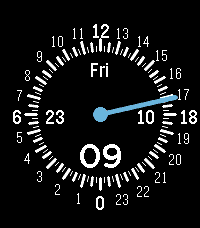
FacesRegulator2 is a watchface with a 24 hour dial and one hand. The whole dial is on the display: 12 at the top, 0 at the bottom, 6 on the left, 18 on the right. The light blue hand starts at a disc in the center and reaches the numerals. - Marks for hours, half hours and quarters, numerals for every full hour outside of them; 0, 6, 12 and 18 are a bit bigger - Inside the dial: the weekday (three letters, in your Pebble's language) below 12, the day of the month right of 6, the month as a number left of 18, and the minutes above 0 - Black background, white elements, light blue hand - Short vibration every full hour - Optional sun dial: the dial is split by a line from sunrise to sunset for today's date and your location. The part with the 12 is the bright day, the other the dark night, so you see at a glance how much daylight is left and how the days grow and shrink through the year Make it yours from the phone settings: the sun dial (off by default; the phone works out sunrise and sunset from its location, so the Pebble app needs the location permission) with its own colors for day, night and the dividing line; show the running hour in a bigger typeface on the dial (off by default, own color), a light mode (white background, black elements; the hand stays), and every element has its own color (background, hour, half hour and quarter marks, numerals, the big numerals, hand, center disc, weekday, day, month, minutes), and a button resets them all. For Pebble Time 2 and Pebble Round 2. The settings page is in German Development supported by Claude.
 15
Overview III
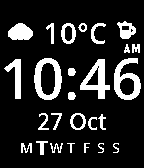
FacesOverview 3 shows the essentials in large, easy to read type: the time as big HH:MM digits in the middle, the weather condition as an icon with the temperature right above it, a small coffee pot next to the temperature that shows the battery level, and the day and month below it. Under the date a row of the weekday initials (M T W T F S S, in your language) shows all seven days with today in larger, bold type. New in 1.5.0: if you prefer, a weekday ring in front of the date takes the place of that row. The time is in 24 hour format, or 12 hour format with an optional small AM or PM if you prefer. - The coffee pot is your battery gauge: full of coffee when the battery is full, nearly empty when it is low (on by default, switch it off in the settings if you prefer) - Hourly vibration - A Bluetooth disconnect shows as a separate, crossed-out icon in place of the weather icon, until the phone is connected again - For Pebble Time 2, Pebble Round 2 and Pebble 2 Duo Make it yours from the phone settings: - A color for every element: background, weather icon, temperature, hours, colon, minutes, AM/PM, weekday row, day, month, the weekday ring (weekdays, Saturday, Sunday), and the coffee pot (outline and coffee separately). Default: white on black - 12 hour display (off by default) and AM/PM (off by default) - Coffee pot next to the weather (on by default) - Weekday ring (off by default) instead of the weekday row: seven arcs around today's initial, Monday at the top and clockwise, today's arc thicker; ring and date are centered together and the time sits evenly between the weather and the date. Own colors for Monday to Friday, Saturday and Sunday (default white, green, red) - Font: Gidolinya or Open Sans Semibold - Larger time (off by default): the digits grow to almost the full width; weather and date move outward, their size stays - Temperature in degrees Celsius (default) or Fahrenheit - Language: weekday and month follow your Pebble's language, or you pick German, English, French, Spanish, Italian or Portuguese Colors apply to the color displays (Pebble Time 2 and Pebble Round 2); the Pebble 2 Duo shows black and white. The settings page is in German. Typefaces: Gidolinya by Andreas Larsen (SIL Open Font License) and Open Sans (Apache License 2.0). Weather data from Open-Meteo. Development supported by Claude.
 9
Simple Retro
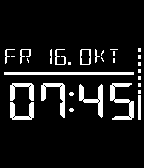
FacesSimple Retro is a watch face in the look of an segment display: big, clear and easy to read. - First line: weekday, month and day, left aligned, in the language and order of your Pebble. For example "FRI OCT 16" in English (US), "FRI 16 OCT" in other English, "FR 16. OKT" in German, "VEN 16 OCT" in French. Spanish, Italian and Portuguese are included too; any other language is shown in English - Second line: the time as HH:MM in 24 hour mode, right aligned - On the right edge a vertical line as high as the two lines shows the battery: solid from the bottom as far as the battery is charged, the missing part dashed from the top. At 100 % the line is solid all the way The text is set in the DSEG segment font (by keshikan, SIL Open Font License), large enough to read at a glance. Colors: in the app settings on the phone you can choose every color: background, date, line, time, the charged part of the battery line and the missing (dashed) part. The defaults are black, white and green. Battery friendly: the face redraws once a minute and when the battery level changes. Nothing is sent anywhere; the settings stay on your phone. For Pebble Time 2, Pebble Round 2 and Pebble 2 DUO (no colors) Development supported by Claude and the skill for it.
 10
Cards
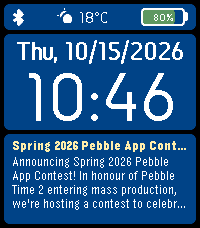
FacesCards is a watch face with a card in its lower half: a title and as much text as fits. Shake the watch and the card fills the whole screen, shake again and the watch face is back. The upper half shows a status bar with Bluetooth, weather and battery, the weekday, date and the time. You choose the kind of card in the app settings on the phone: - Web page: enter an address and the card shows the page's title, its short description and the first paragraphs of the article. Refreshed every 30 minutes - Note: type a title (optional) and a text in the settings, one line per paragraph, up to about 1200 characters. The small card shows the note line by line, so a list looks like a list. With the shake switched off the note is shown as large as it fits: a short note in big letters, a longer one smaller, a very long one cut off with "..." -RSS feed: enter the address of an RSS or Atom feed (or of a web page that points to one) and the card shows the name of the feed and its 10 newest headlines, one per line. Refreshed every 30 minutes Full screen: shake the watch and the card is shown with a larger font. A long card turns its pages by itself every 8 seconds ("2/7" at the bottom). The watch face comes back by itself after 90 seconds, or when you shake again. Battery: each kind of card has a switch "Bei Schütteln im Vollbild zeigen" (show full screen when shaken). Without the mark the watch does not listen for shakes at all, which saves battery, and only the first lines of the card appear in the lower half. The mark is set by default. More in the settings: colors for the status bar, the date and time panel, the card and the full screen view, the language of weekday and date (German, English, French, Spanish, Italian, Portuguese, or automatic from the watch) and Celsius or Fahrenheit. The last card is kept on the watch, so it is there when the watch face starts. Good to know: web pages that are built by JavaScript in the browser give little or nothing, some sites block requests that do not come from a browser, and a page asking for cookie consent may show just that text. The watch can only draw Latin characters, other scripts and emoji are left out. The card text is limited to 1200 bytes. Why is it done? Just to find out, what is possible with a pebble. :-) For Pebble Time 2 and Pebble Round 2. Nothing leaves your phone except the request for the web page you entered; there is no server. Development supported by Claude and the skill for it.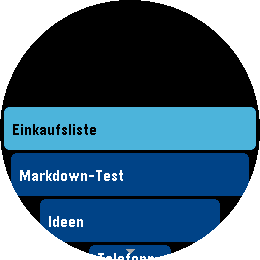 9
Notesview for Nextcloud
Tools & UtilitiesNotesview shows selected notes of your own Nextcloud on the watch via the phone app. The whole screen is a list of your notes, select one (touch enabled or buttons as you like) and it opens as a second screen with its Markdown rendered. BACK returns to the list, BACK in the list leaves the app. - Your own Nextcloud, no other service: the notes come from the Notes app of your Nextcloud server over HTTPS. There is nothing in between that stores them - Notes are read only (use f.e. 'Nextcloud Notes' on your (I)phone to edit the notes on the go - Sign in with an app password: create one in your Nextcloud (Settings > Security > "Create new app password"), then enter the server address, your user name and that app password in the app settings on the phone. The connection is checked before it is saved. The password stays on your phone, and you can delete it in the Nextcloud at any time. Your normal password is never needed. - Typing "demo" as the address shows a few sample notes without any server. - Pick what is shown: the list shows the notes of one category of the Nextcloud Notes app (default "Pebble", you can choose any name) and up to 12 notes (to keep it fast and with regards to limited memory on Pebble), favorites first, then the newest - Markdown rendered on the watch: headings, bold, italic, code, code blocks, links (shown as colored text), bullet, numbered and task lists with check boxes, quotes, horizontal rules. Tables are shown as plain text. Very long notes are cut after about 3 KB with a "(gekuerzt)" note - Buttons: UP / DOWN select a note, SELECT opens it, hold SELECT refreshes the list. In a note UP / DOWN scroll, SELECT scrolls a page, hold SELECT jumps to the top, BACK returns - Touch: drag the list or a note to scroll, tap a note to open it, tap the top or bottom third of a note to scroll a page, tap the title bar or swipe right to go back - The last list is kept on the watch, so it is there immediately when you start the app; the notes themselves are fetched when you open them - Colors for the list, the selected row and the note (text, headings, quotes, code, links) can be changed in the app settings. - German and English messages, following the language of your watch For Pebble Time 2 and Pebble Round 2. Nothing leaves your phone except the requests to your own Nextcloud server. Development supported by Claude and the skill for it.
 25
Morpheuz Reborn
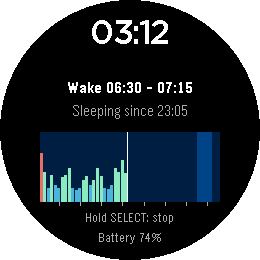
Health & FitnessMorpheuz Reborn is a sleep monitor with a smart alarm. It is a ground-up rebuild of the original Morpheuz by James Fowler (MIT licence), whose servers are gone: https://apps.rebble.io/application/52b20a9b05c04688bf000058 (source: https://github.com/JamesFowler42/morpheuz20). The idea is the same, the code is new, and everything that needed a web service is left out. Morpheuz Reborn is an experiment to find out whether an app like this is still useful at all, now that Pebble has its own sleep tracking. Please treat it as an experiment. How it works: You start the app when you go to bed and leave it open. It counts the movement of your wrist with the accelerometer, one value for every 10 minutes of the night. You choose a wake window, for example 5:00 to 5:15. The alarm rings as soon as you move more than you usually do while asleep, which marks a moment of light sleep inside the window. If that never happens, it rings at the latest time. Details: - Splash screen at every fresh start (bed, sleeper, credit to the original Morpheuz); any key or tap skips it - Start screen: four rows that name the buttons to press: Select = sleep, Select Hold = 22 minute nap, Up = alarm (Hold = next preset), Down = nights (Hold = menu). The rows are touch buttons as well (touch can be switched off in the settings), and a line shows your last night - Smart alarm inside your wake window, or a fixed alarm at the latest time. A progressive vibration, SELECT snoozes, UP or DOWN stops it. An alarm you do not answer rings again after the snooze time - Chart of the night, drawn while you sleep: one bar per 10 minutes, deep sleep, light sleep and restless. The wake window is shaded, hour ticks run along the bottom - Two sleep screens: digital (clock, wake window and chart) or analogue (a 12 hour dial where the night appears as a colored ring at the clock positions it was recorded at, the wake window as a yellow arc, plus hands). Press UP or DOWN while sleeping to switch, or choose in the phone settings - Four saved wake windows (presets), for example weekdays and weekends. Hold UP in the start screen or choose "Next preset" in the menu to switch - Alarm Editor on the watch and in the phone settings. - Enable / disable Touch in the alarm editor and in the phone settings; with touch off only the buttons work. Your settings are kept. - History of the last 7 nights on the watch, with the share of deep, light and restless sleep, the duration and the number of snoozes - Long history on the phone: every saved night is sent to the phone, which keeps the last 120. Open the settings in the Pebble app to see a chart for each night and the average of the last 7 nights - Menu (hold DOWN or tap the clock in the start screen, SELECT while you sleep): bed time (start a new sleep cycle), automatic bed time (every day at the same time the app starts a sleep cycle by itself), ignore (skip the next 10 minutes of movement, for example when you are up for a moment), stop & quit, and resend the data to the phone - Power nap: hold SELECT in the start screen. The alarm rings exactly 22 minutes later, the time to settle down included - Safety net: if the app is closed during the night, it comes back by itself, and the alarm is also scheduled with the watch so that it still rings - BACK is ignored while the night runs, so you cannot leave by accident. Hold SELECT to stop - Battery level on the screen while you sleep Set the alarm on the watch (UP in the start screen) or on the phone: earliest and latest wake time, smart alarm on or off, snooze time, automatic bed time, sleep screen, and touch input on or off (switch it off to use the buttons only). Both stay in sync. German and English, following the language of your watch. For Pebble Time 2 and Pebble Round 2. Keep the watch charged for the night. Nothing leaves your watch and your phone, there is no server. Development supported by Claude and the skill for it.
 9
Slide
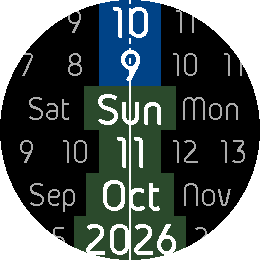
FacesSlide shows the time and the date as six streams of values that slide past one line. - Six bands, top to bottom: hours, minutes, weekday, date, month and year - Each band is a continuous stream - The current value sits on the center line, bigger and bold, in a slot of its own - The center line is also the battery gauge: full height at 100%, the charged part solid at the bottom, the used-up part dashed above it. You can switch the line off - A double vibration on the full hour Make it yours from the phone settings: - Language of the weekday and month names: your Pebble's language, or German, English, French, Spanish, Italian or Portuguese - Direction: values ascend to the right (default) or to the left - Colors for every band: the current value in its own foreground and background color, the other values in their own foreground color on the common background. And the color of the center line and of the background. The defaults: light gray values on black, white current values on dark blue (hours, minutes) and dark green (the rest), a white line - Exact positions (optional): every stream stands at its true position instead of waiting on the line, so at 10:45 the hour 10 has already moved three quarters of the way left. - The current value keeps its big bold look and its own colors until its unit changes. - The minutes stream can follow the seconds (draining battery), or move minute by minute (the default, it saves battery) - The center line, and with it the battery gauge, can be switched off - New settings: 12 hour display (the hours band counts 01-12) and switching off the vibration on the full hour. For Pebble Time 2 and Pebble Round 2. The settings page is in German. Typeface: Gidolinya by Andreas Larsen (SIL Open Font License). Development supported by Claude and the skill for it.
 9
Regulator
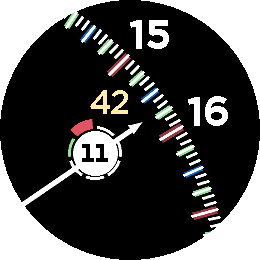
FacesRegulator is a watchface with one hand on a big 24 hour dial. The watch shows only the part of the dial the hand points to, large, with the marks and the hour numbers right where you read them. - A 24 hour dial: 12 at the top, 24 at the bottom, 6 on the left, 18 on the right. The view follows the hand around the dial - Five kinds of marks: minutes, 5 minutes, quarters, half hours and hours. The longer ones can sit on a wide colored backing. Out of the box the fine one-minute marks, the minute circle and the dial rim are off, so you see only the marks that matter - The hour numbers outside the minute track, and the running minute inside it, right or left of the hand - A disc on the hand with the day of the month. Around it the weekday arcs: Monday at the top, clockwise, Saturday and Sunday in their own colors, today as the thick arc - A short vibration on the full hour Make it yours from the phone settings: - The size of the dial: six steps, from a small dial with a lot of curve to a big, almost flat cutout. The running minute stands left or right of the hand - Every element in its own color: background, dial, rim, minute track, every kind of mark and its backing, numbers, hand, disc, the weekday arcs and the running minute. A button resets all colors to the defaults, another one resets all settings - The font of the hour numbers and of the date: 26 of the Pebble's own fonts. The running minute is always one step smaller than the hour numbers, and the date disc has five sizes. - Switch the date disc, the weekday arcs, the running minute and the colored backing on and off. With both disc and arcs off only the hand is left - Switch the one-minute marks, the minute circle and the dial rim on and off, so that only the marks for 5 minutes, quarters, half hours and hours stay For Pebble Time 2 and Pebble Round 2. The settings page is in German. Development supported by Claude and the skill for it.
 7
ArtWatch
FacesArtWatch turns the time into a small piece of art: four big digits in front of a star chart, in colors that change every minute. - The time as four digits, the hours above the minutes. The two digits of each pair stand a little apart and at slightly different heights, the hours to the upper left and the minutes to the lower right - Behind the digits a constellation drawn from the real star positions: the twelve zodiac signs plus Orion, the Big Dipper, Cassiopeia, the Southern Cross and Cygnus. The brightest stars sparkle - Every minute the background, the stars, the lines between them and each of the four digits get new random colors, picked from the display's colors with enough contrast to read the time at a glance - Dark at night, light by day: the background follows sunrise and sunset at your location. By default it is a random color every minute; in the settings you can instead pick a fixed background for the day and one for the night. The stars, lines and digits keep changing and always stay readable on it - A double vibration on the full hour - The sun (always yellow) and the moon (always white, with its real phase) travel once a day along the edge of the display, placed by their real position in the sky: 12 o'clock at the top is the highest point of the sun or the moon, 18 at the right, 24 at the bottom, 6 at the left - Digits that enclose an area (0, 6, 8 and 9) show a small picture in it, chosen at random: Settings on the phone: choose the constellation (default: Libra) and the background (automatic or two fixed colors). The settings page is in German. The watch needs the phone's location permission for sunrise, sunset and the positions of the sun and the moon. The astronomy is calculated on the phone; without it the face keeps its last values (and a dark background from 18:00 to 6:00). For Pebble Time 2 and Pebble Round 2. Development supported by Claude and the skill for it.
 4
TimeByWords
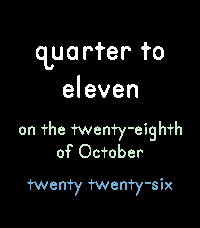
FacesTimeByWords is an experimental watchface that tells the time, the date and the year in words, for example (German) "viertel eins, am vierten Oktober, zweitausendsechsundzwanzig" or (English) "quarter to eleven, on the twenty-eighth of October, twenty twenty-six". - Three groups of words: the time, the date and the year, each in its own color - Six languages: German, English, French, Spanish, Italian and Portuguese. By default the words follow the language your Pebble is set to - The time is set much larger than the date and the year - The type sizes adapt to the text: short phrases are set large, long ones smaller. Long words are hyphenated only when they have to be - Updates every minute Make it yours from the phone settings: - Language: automatic (the language of your Pebble) or one of the six - 24 hour or 12 hour counting. With 24 hour counting the half hour is "dreißig Minuten nach zwölf" instead of "halb eins" - Quarter phrases, for 12 hour counting: "viertel eins" and "dreiviertel eins" in German, "quarter past" and "quarter to" in English and their counterparts in the other languages. Without them you get "fünfzehn Minuten nach zwölf" and so on - "gleich" (German), "almost" (English) and so on, one minute before the full hour: "gleich dreizehn". In German with 12 hour counting also one minute before and after the quarter, the half and the three-quarter hour: "gleich viertel eins", "kurz nach halb eins", "kurz nach dreiviertel eins"; the minutes between halb and dreiviertel are counted as "fünf Minuten nach halb eins" - "fünf vor" and "fünf nach" (German, 12 hour counting): five minutes before and after the full, quarter, half and three-quarter hour, e.g. "fünf vor halb eins", "fünf nach viertel eins" - Show the year or leave it out - Text alignment: centered, left, right or running text - Colors for the background, the time, the date and the year, with a button that resets them to the defaults. By default it is white on black, with a light green date and a light blue year For Pebble Time 2 and Pebble Round 2. The settings page is in German. Development supported by Claude and the skill for it.
 7
CalendarView
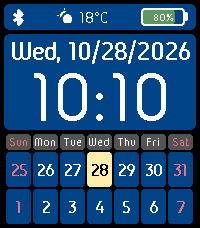
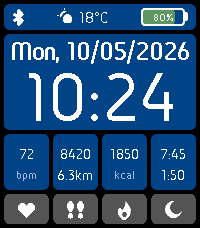
FacesCalendarView puts the time, the date, the weather and the next two weeks on one watchface, so you can plan ahead with a glance at your wrist. - The time in 24 hour format, large and clear, with the weekday and the full date above it - A status bar with the Bluetooth connection, the current weather as an icon with the temperature (degrees Celsius or Fahrenheit, as you prefer), and the battery level with the percent shown inside the battery icon - A calendar below: the weekday headings and two rows of seven days, the current week and the next week. Today is highlighted, Saturday and Sunday have their own color, and the week can start on Monday or Sunday The weather comes from your phone and needs the location permission. Make it yours from the phone settings: - 30 colors: the display, the status bar, the date and time panel and the calendar. For the calendar you can set the weekday headings, the cells and numbers of the current week and of the next week, the weekend, the days of other months and the highlight for today. Saturday and Sunday each have their own cell background and number color and their own heading background and text color. By default it is white text on deep blue, with a yellow highlight for today and red weekends - A button that resets all colors to the defaults in one tap - The first day of the week: automatic (Monday, or Sunday when the language is English), Monday or Sunday - The temperature unit: Celsius (default) or Fahrenheit - The weekday and the date follow the language your Pebble is set to. Or choose German, English, French, Spanish, Italian or Portuguese. The date format follows: German 05.10.2026, English 10/05/2026, the others 05/10/2026 For Pebble Time 2 and Pebble Round 2. The settings page is in German. Development supported by Claude and the skill for it.
 5
DateAndTime
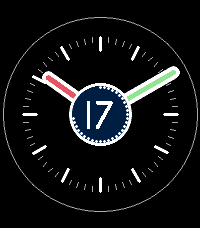
FacesDateAndTime is an analog watchface that puts today's date right where your eyes land: on a disc in the center of the dial. - A round minute dial with 60 marks, set well in from the edge so the face stays calm and uncluttered; every fifth mark is longer and bolder - Hour and minute hands in a classic baton style, with an outline and a fill. The hour hand moves smoothly with the minutes - A date disc in the middle of the dial, drawn over the hands: the hands come out from underneath it, and the day of the month stays easy to read at any time of day Make it yours from the phone settings. Every element has its own color: - the background around the dial, the dial and its rim - the five-minute marks and the minute marks - the hour hand and the minute hand, each with its own outline and fill - the date disc, its ring and the date number By default it is white and gray on black, with red an green hands and a deep blue date disc. For Pebble Time 2 and Pebble Round 2. The settings page is in German. Development supported by Claude and the skill for it.
 10
Healthoverview
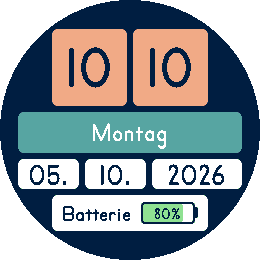
FacesHealthoverview puts your day and your health on one watchface: the time, the date, the weather and four health values you can read at a glance. - The time in 24 hour format, large and clear, with the weekday and the full date above it - A status bar with the Bluetooth connection, the current weather as an icon with the temperature (degrees Celsius or Fahrenheit, as you prefer), and the battery level with the percent shown inside the battery icon - Four tabs with an information box above each one: heart rate, steps with the distance in km, calories burned today, and sleep with deep sleep Health values come from Pebble Health. The weather comes from your phone and needs the location permission. Make it yours from the phone settings: - 29 colors: the display, the status bar, the date and time panel and, for every tab, its information box, its text, the tab and its icon. By default it is white text on deep blue with dark gray tabs - A button that resets all colors to the defaults in one tap - The temperature unit: Celsius (default) or Fahrenheit - The weekday and the date follow the language your Pebble is set to. Or choose German, English, French, Spanish, Italian or Portuguese. The date format follows: German 05.10.2026, English 10/05/2026, the others 05/10/2026 For Pebble Time 2 and Pebble Round 2. The settings page is in German. Development supported by Claude and the skill for it.
 12
Tiles
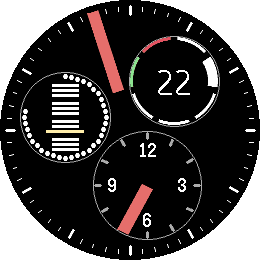
FacesTiles shows the time, the date and your battery on a clean grid of big, white tiles that you can read at a glance. - Two large tiles for the hours and minutes (24 hour time) - The weekday as one word, and the date in three tiles: day, month and year - A battery tile with a gauge showing the percent inside, filled green, yellow or red depending on the charge - Set in Primer Print Bold, a friendly, clear typeface Make it yours from the phone settings: - Colors: the display background, plus the background and the text color of every single tile. The battery gauge has its own colors for frame and charge levels (19 colors in all) - Languages: weekday, battery word and date in German, English, French, Spanish, Italian or Portuguese. Leave it on automatic and Tiles follows the language your Pebble is set to - The date follows the language too: German 05.10.2026, English 10/05/2026, the others 05/10/2026 For Pebble Time 2 and Pebble Round 2. The settings page is in German. Development supported by Claude and the skill for it.
 5
Around 2
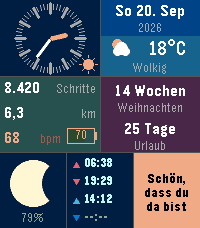
FacesAround 2 is a watch face where time, battery and calendar circle the center together. If you are looking for something simpler and cleaner, try Around. The minute hand is an orange bar on the rim of a big minute disc. Three small discs orbit with it, evenly spaced, so the picture always stays balanced: - Hour disc (opposite the minute hand): 12 hour marks, the numerals 12 / 3 / 6 / 9 (0 / 15 / 18 / 21 in the afternoon) and an hour indicator - Battery disc: a ring of dots that fills with your charge -- white above 40%, yellow up to 40%, red up to 20%. Inside, the twelve months as bars in four groups of three, with the current month highlighted - Weekday disc: seven segments, Saturday green and Sunday red, today's segment emphasized, and the day of the month in the middle. Hourly vibration. Battery-friendly: the face redraws once a minute. Every element has its own color, set from the phone (22 colors: minute disc, hour disc, battery dots and month bars, weekday segments and date). The settings page is in German. For Pebble Time 2 (Emery) and Pebble Round 2 (Gabbro). Inspired by ressence watches. It's done with the skill (see https://repebble.com/blog/spring-2026-pebble-app-contest) using Claude.
 33
Modular
FacesModular turns your Pebble Time 2 into a personal dashboard: seven cells, each showing one thing clearly and each colored the way you like. - Analog clock with a sun/moon symbol for day and night - Date with live weather: icon, temperature (°C or °F) and condition - Steps, distance in km, heart rate and battery level (percent inside the icon) - Two countdowns (weeks / days to your dates) with optional labels -- while none is set, a weather forecast for the next 4 hours takes their place - Real moon phase with percent lit - Sunrise, sunset, moonrise and moonset times - A free text cell: write anything you like - if not set, it shows the time there digitally - Hourly vibration, and a Bluetooth-lost flash in place of the weather icon - Optional spoken time: shake the watch and hear the time as a repeater -- low dings for hours, low-high for quarters, high double dings for minutes; Bell near clocks shows, when sound output is enabled. Everything is set from the phone: - Language: most on the watch (weekday and date, the countdown units, the weather condition and forecast, "steps", number formats) follow your Pebble's language, or you pick German, English, French, Spanish, Italian or Portuguese - Temperature in degrees Celsius (default) or Fahrenheit - 20 colors (clock hands, marks, and foreground/background per cell), countdown dates and labels, your own text, and sound on/off Weather, forecast, moon and sun times need the phone connection. Your own labels and text are shown as you write them. The settings page is in German. For Pebble Time 2 (Emery). Development supported by Claude and the skill for it.
 8
SunAndMoon
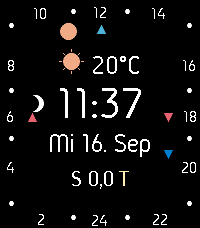
FacesA real 24-hour sundial. SunAndMoon places the sun and moon on the dial by their own astronomical hour angle instead of literal clock time, so their positions genuinely track the sky throughout the day. A true illuminated moon phase, plus small marks for sunrise, sunset, moonrise and moonset, complete the picture. The center shows live weather and temperature, the time in 24h format, weekday/date/month, and whether it's day (T) or night (N), alongside your step count and heart rate (only on emery). A red flash warns when Bluetooth disconnects, and a red "B" appears when the battery drops below 20%. Focus on German laguange. Square dial for Pebble Time 2 (Emery), round dial for Pebble Round 2 (Gabbro). It's done with the skill (see https://repebble.com/blog/spring-2026-pebble-app-contest) using Claude.
 3
Abakusapp
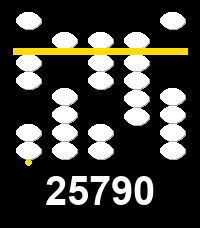
Tools & UtilitiesAbakusapp is a hands-on soroban (Japanese abacus) number-entry toy for Pebble's touch-capable watches (Pebble Time 2, Pebble Round 2). Five vertical stacks let you dial in any 5-digit number: swipe a bead towards the separator bar to activate it -- and everything between it and the bar -- or swipe away to deactivate; tap for a quick +/-1. A long horizontal swipe clears everything. Works with buttons too, on every Pebble: Select picks a stack, Up/Down adjusts it, long-press Select clears. The current number is always echoed as plain digits below the stacks. Stone/background/separator colors are configurable from the phone's Settings screen. This is an experimental first project built specifically to learn Pebble's new touch/gesture API. It's done with the skill (see https://repebble.com/blog/spring-2026-pebble-app-contest) using Claude.
 2
Abakuswatch
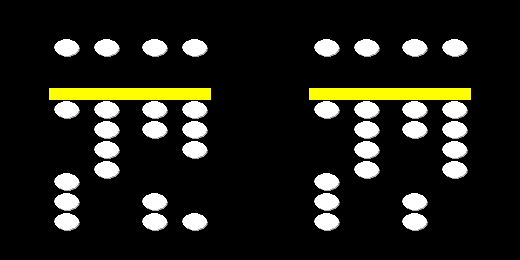
FacesAbakuswatch tells the time (always 24-hour) using the logic of a soroban, the classic Japanese abacus. Four vertical stacks read left to right like a digital clock: tens-of-hours, hours, tens-of-minutes, minutes. Each stack has one "heaven" bead worth 5 above a bright separator bar, and four "earth" beads worth 1 each below it -- only a bead pushed towards the bar counts. Heaven beads slide down to touch the bar from above; earth beads slide up to touch it from below. Read a stack's value by adding 5 (if the heaven bead touches the bar) to however many earth beads are touching it. Stones, background, and the separator bar are all colors you can pick from the phone's Settings screen. Hourly vibration. It's done with the skill (see https://repebble.com/blog/spring-2026-pebble-app-contest) using Claude.