 47
47Color Calendar Redux
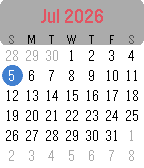
DailyColor Calendar Redux This is an update of the original Color Calendar app created by Kelby. A simple, easy-to-read calendar for your Pebble. Tap or Swipe Up and Down to scroll between months, Tap/Select returns to today, and long select press toggles between Sunday-first and Monday-first week layouts. New in this version: - Full support for Pebble Time 2 and Pebble Round 2, with a layout that scales to fill their larger displays (and it still runs great on Pebble Time and Pebble Time Round). - Touchscreen controls on Pebble Time 2 and Pebble Round 2: swipe up or down to change months, tap to jump back to today. - Simple calendar icon in the app menu - The current date now appears in the launcher under the app name (e.g. "Thu, Jan 1st") Based on the original Color Calendar by Kelby. Full credit to them, I just added some features and native scaling for the new watches. About the Developer - Comet Designs creates fun content for the Pebble platform - Buy me a coffee https://ko-fi.com/cometdesigns
 3
3Insignia Live
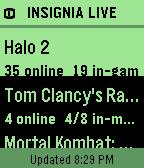
DailyInsigniaLive shows you who's playing original Xbox games online right now, straight from your wrist. - See active games on Insignia's Xbox Live replacement - View online, in-game, and in-match player counts Built for Pebble Time 2. --- - Comet Designs creates fun content for the Pebble platform. - For any bug reports, send them to us at cometdesignspebble@gmail.com. - Buy me a coffee → https://ko-fi.com/cometdesigns *This app is not affiliated with, endorsed by, or connected to Insignia or Microsoft Xbox in any way.*
 8
8Bamboo
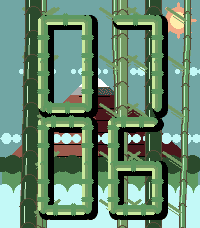
Faces🎋 Bamboo Step into a quiet little bamboo forest every time you check the time. Mt. Fuji rises in the distance, the sun glows in the corner, mist drifts lazily through the trees, and your time is spelled out in bamboo style digits. Supports the Pebble Time 2 RGB Backlight. Configurable to the color of your choice. Other settings are also available for changing or disabling the animation. About the Developer - Comet Designs creates fun content for the Pebble platform. - For any bug reports, send them to us at cometdesignspebble@gmail.com. - Buy me a coffee → https://ko-fi.com/cometdesigns
 88
88Time2Paint
Tools & UtilitiesA full-featured drawing app for Pebble Time 2 and Pebble Round 2. Paint, sketch, and create directly on your wrist with 8 tools, 30 colors, and 3 save slots. Whether you want to doodle on the go, sketch a quick idea, or just see what you can create on a tiny screen, Time2Paint gives you the tools to do it. Use the Screenshot button in the Pebble app to save your creations! Tools -Brush — Freehand drawing with stroke smoothing for clean, fluid lines. Tap to place a dot. -Eraser — Erase by dragging over your drawing. Uses the current brush size. -Line — Draw a perfectly straight line. Touch to start, drag to end, lift to commit. -Fill — Flood-fill any area from a tap point outward. -Box — Draw a rectangle outline. Tap MID while Box is active to toggle filled mode. -Box Fill — Draw a solid filled rectangle. -Circle — Draw a circle outline. Tap MID while Circle is active to toggle filled mode. -Circle Fill — Draw a solid filled circle. Sidebar Shows your current color, active tool, and brush size. Hides automatically after a few moments, tap any button to re-open it. A stroke-count meter tracks how much canvas slot capacity you've used — blue is fine, yellow means 75% full, red means 90%. Save Slots Three independent canvases that each save automatically. Hold DOWN to open the canvas slot manager, switch between them, or hold a slot to permanently clear it. Controls UP button - Tap — Cycle Colors - Hold — Open the Color Picker MIDDLE button - Tap — Toggle the Eraser on/off. - Hold — Open the Tool Menu DOWN button - Tap — Cycle brush sizes - Hold — Open canvas slot manager BACK button -Tap — Undo last stroke Shake Shake the watch twice to clear the canvas. About the Developer - Comet Designs creates fun content for the Pebble platform - We'd love to see your drawings! Send them to us at cometdesignspebble@gmail.com . - Buy me a coffee https://ko-fi.com/cometdesigns
 21
21NHL Scores
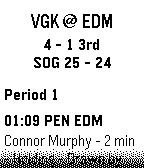
DailyKeep updated with your favorite teams with NHL Scores, the ultimate daily companion for hockey fans on the Pebble watch! Whether you're tracking a live matchup or checking the final results from earlier in the evening, NHL Scores focuses exclusively on the current day's action, bringing the scoreboard right to your wrist. Get a quick glance at today's game scores, or dive into detailed views to see team records, division standings, and play-by-play events including goals, assists, and penalties. Configuration Settings Customize your experience right from the Pebble app on your phone: - Favorite Teams: Select up to 5 of your favorite NHL teams to always pin their games to the top of your daily list. - Show Penalties: Choose whether to display or hide penalty events in the play-by-play view. - Event Sort Order: Read through today's game events sequentially (from puck drop in Period 1 to the final horn), or set it to "Latest Event First" to see the most recent goals and action at a glance. Credits Score data is made possible thanks to the excellent open-source nhl-score-api project and official NHL web APIs. The configuration menu is powered by the @rebble/clay library. About the Developer - Comet Designs creates fun content for the Pebble platform. - Please send any feedback to cometdesignspebble@gmail.com ! - Buy me a coffee https://ko-fi.com/cometdesigns
 38
38Birdy Friend
GamesBirdy Friend is a virtual pet game where you feed, care for, and grow with your lovable bird companion. Earn Feathers, increase your Love Level, purchase new treats and extras. Features - Feed and care for Birdy while managing hunger, happiness, and overall progress. - Earn Feathers, raise your Love Level, and unlock new treats, extras, and special rewards as you play. - Check in throughout the day and night. Birdy will fall asleep after inactivity, slowing his hunger and happiness status degradation. - Supports Touch Controls on the Time 2 and Round 2 platforms About the Developer - Comet Designs creates fun content for the Pebble platform - This is our first app release, please send any feedback to cometdesignspebble@gmail.com ! - https://ko-fi.com/cometdesigns
 6
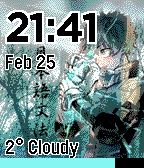
6Deku - My Hero Academia
FacesGo Plus Ultra with this highly customizable My Hero Academia watchface! Features live weather, dynamic battery rings, and configurable settings. Supports Pebble Time and Round Series watches only.