 132
132License Revoked
GamesGTA meets Goat Simulator meets SNES FX-chip graphics — an open-world crime sandbox. Two islands, a causeway. Steal cars, run people down, rob the gun store, and lose the police in a parking garage. No missions — cause mayhem and get away with it. * Controls with one hand: thumbstick on the touchscreen, buttons to turn and fire * Money comes off bodies. Spend it at the gun store, or the strip club * Drive a taxi and pick up fares if you'd rather earn it honestly * Police escalate: arrests first, then guns, then a helicopter and SWAT if you keep it up * Steal the police helicopter
 32
32MirrorMov
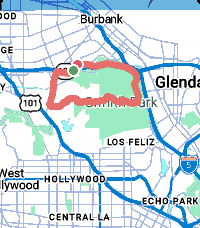
Health & FitnessYour Pebble is a sports watch. MirrorMov records your ride, run or hike with a live map, heart rate and cadence, then hands you a real FIT file you can take anywhere. MirrorMov requires a subscription from mirrormap.app. COMPATIBLE WITH STRAVA - Upload finished activities straight to your own Strava account, automatically on finish or manually from your history - Pull your own Strava routes onto the watch and navigate them with live progress and a breadcrumb - Your chosen sport carries into the upload, so activities land correctly categorised - Connect or disconnect whenever you like RECORDING - GPS at ~1Hz for a real activity track - Heart rate from the watch HRM, cadence from step rate - A live map while you record: your position on real map tiles, not just numbers - True pause/resume -- paused time and distance are genuinely excluded - Crash-safe: a background worker keeps logging if the app closes mid-activity, and the gap is stitched when you return MAPS AND ROUTES - Real map tiles with day and night themes - Two styles: Urban for streets, Outdoor for trails - Import your own GPX routes and navigate them YOUR DATA, YOURS - Every activity saved on your phone with full track and sensors - Browse your history: sport, date, distance, duration - Export any activity as a FIT file -- Garmin Connect, Komoot, TrainingPeaks, anywhere - Delete anything, any time - No Strava account required: recording, maps, history, GPX import and FIT export all work standalone REQUIREMENTS - A subscription from mirrormap.app - An Android phone. iOS is not supported -- iOS PebbleKit JS lacks the browser APIs the map depends on. Pebble Time 2 gets all 23 sport types and larger route capacity. Pebble Time and Time Steel get the core six. mirrormap.app/mirrormov
 81
81MirrorMsg
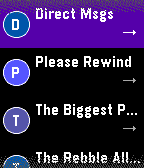
NotificationsMirrorMsg is the most advanced messaging client for Pebble. Log in to your accounts and see all your live conversations in chat threads that scroll through the entire chat, with rich modern features: thumbnail previews, HQ images, animated GIFs, video playback, emoji reactions, threaded replies and more. Works with Google Messages, WhatsApp, Telegram, Discord and Facebook Messenger natively, with no separate login beyond the app itself. Already on Beeper? Connect Signal, Instagram, Slack, iMessage and more through it too. NEW IN 0.91 - Watch Google Messages videos right on your wrist (Pebble Time 2). Tap to pause or resume. - Animated GIF previews play right in your chats - Color emoji, and GIANT emoji - Touch controls and zoom on Pebble Time 2 SWITCHING ACCOUNTS Every account you connect has its own conversation list. To switch, scroll to the top of your chats and hold UP, then pick an account and press SELECT. On Pebble Time 2, pull down from the top of the screen from anywhere in the list and choose an account. REPLYING Hold SELECT in a chat and the reply menu slides in, with your conversation still visible beside it. Reply by voice, pick a color emoji, or send one of your quick replies. Open a message first to react to it or reply to it directly, where the network supports it. On Pebble Time 2, pull the reply menu in from the right edge of a chat or message, tap to choose, and swipe right to close it. TOUCH AND ZOOM (PEBBLE TIME 2) - Tap a chat to open it, and tap a message to see it in full - Swipe right to go back from any screen - Zoom: double-tap, keep your finger down on the second tap, then drag down to make things bigger or up to make them smaller. Lift your finger to keep the size; every screen remembers its own. EMOJI - The 100+ most popular emoji show in full color in your messages and in the reply menu. - Open a message that's only emoji to see them GIANT: a single emoji shows huge, and two or three show big, two per row. - Pebble's notifications only support 64 emoji; everything else arrives as blank tofu boxes. MirrorMsg swaps unsupported emoji for the closest one Pebble can render, so the message still makes sense instead of turning into "□□". BROWSE DISCORD LIKE A REAL CLIENT Not just DMs: your full server list, channels, per-server notification controls, and infinite scroll through history. You won't miss a meme, because animated GIFs work! Requires an active MirrorMap subscription (Routes or Dash) to unlock message mirroring. Enter your code right here in this watchapp's settings. Get a subscription at mirrormap.app. Android companion app: the MirrorMsg Android app is required and is on the Google Play Store. Search for MirrorMsg or follow the companion app link below. MirrorMsg's Android app is fully open source (AGPL-3.0): github.com/killdano/mirrormsg Emoji art: Twemoji by Twitter/X and contributors, CC-BY 4.0
 71
71MirrorMap
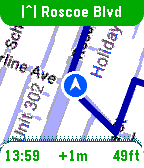
Tools & UtilitiesSee it in action: https://x.com/MirrorMapNav/status/2057143831699796173 *Pebble app needs it's BATTERY set to UNRESTRICTED to reliably send GPS* A navigation watchapp showing live directions on a smoothly rendered map with rerouting and travel modes. This is Pebble's nav app we've been missing! MirrorMap uses the Gmaps API for the best routing available. It can mirror a trip from your phone — share the destination from Gmaps , and it syncs the same trip on your wrist, or just select one of the saved addresses for a standalone trip! Three ways to use MirrorMap: THE MAP: Get the free watch app to explore at 30fps and see your real-time position. ROUTES (subscription): Save *home*, *work*, and *custom* addresses. Start navigating from the watch or even the Pebble settings page. Miss a turn? Shake to reroute! DASH (Play Store app): Besides having it's own Routes subscription, Dash can receive destination shares from any app with a share button-- watch instantly navigates there. Also, share a location from google maps, and both the phone and watch navigate together, in sync, so you can pay attention to either. For prices and more info go to: https://Mirrormap.app (click website link below) Android only: iOS Pebble app lacks the browser APIs that MirrorMap depends on.