Pickle Pal is the score keeper especially designed for Pickleball.

- Easily tracks score, server position and number (1/2)
- Works for both regulation and rally scoring
- Simple and easy to view display
- Simple interface with error correction

Display Layout:
- Layout matches court
- Opponents score is always on top
- Your teams score is always on bottom
- Serving team is highlighted in white
- Current server (1 or 2) and position is indicated at the corners of the display

To Start Pickle Pal Application:
- Click [Select] button
- Click [Down] button until Pickle Pal application is highlighted
- Click [Select] button

Button Quick Reference:
- Double click [BACK] button - Starts a new game
- [Select] button - Toggles the starting server position between your team and opponent's team (at start of new game only)
- [UP] button - Increments score when your opponent wins the rally
- [DOWN] button - Increments score when your teams wins the rally
- Holding the [UP] button - Decrements your opponent's score
- Holding the [DOWN] button - Decrements your team's score
- [SELECT] button - Changes the server position
- Holding the [SELECT] - Changes the server number (1/2)
- [BACK] button - Exit game or exit setting menu (with confirm)
 1
1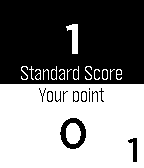 11
11