 3
T3 for Pebble
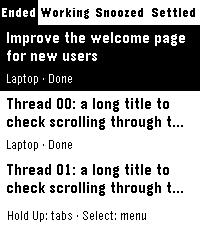
Tools & UtilitiesRead your T3 Code threads and reply from Pebble Time 2. Browse Ended, Working, Snoozed and Settled threads across your linked machines. Hold Up to change category. Titles use two lines and more threads load automatically as you scroll. Select opens a thread. Select again opens saved replies, starting with a three-line summary. Scroll up for Refresh all, Settle, Snooze and Mark unread. Replies are shown as drafts before sending. System dictation is available when supported by your phone app and speech service. Create a new thread from the Select-button menu: choose a machine and project, dictate your request, review and confirm. T3 uses the project defaults within your watch permissions. Interrupted creation can be resumed with the same request ID. Writing access and working system dictation are required. Paste a T3 pairing link in settings to fill the server address and code automatically, or enter them separately. One connection includes machines linked in T3. No developer-hosted relay, account or analytics. Your phone needs HTTPS access or a Tailscale VPN to your server. Read-only permissions are available. Requesting a summary sends a prompt to your agent and may use provider credits. English by default; French selectable in settings without reconnecting. Community translations welcome on GitHub. Time 2 only in this release. Android has been used on hardware. iPhone setup and dictation are not yet validated: please share successful setups and problems through the iPhone compatibility form on GitHub. Requires T3 Code with MCP and OAuth pairing support. Done means completed and unread on this watch; this read state is independent of desktop T3. Unofficial client, open source under MIT. Setup: https://g-cyrille.github.io/t3-pebble/ Privacy: https://g-cyrille.github.io/t3-pebble/privacy.html Source and feedback: https://github.com/G-Cyrille/t3-pebble
 20
Tick Every
Tools & UtilitiesSupports: Aplite, Basalt, Chalk, Diorite, Emery, Flint and Gabbro. English by default; French and optional local session history are available from Configure in the Pebble mobile app. Tick Every is a simple haptic timer that keeps running until you stop it. Choose an interval, optionally add a start delay, then launch the timer. The watch gives two short pulses when timing begins. It then vibrates at every cycle. A long pulse represents five cycles and short pulses represent the remainder, with clear pauses between pulses. Includes pause/resume, optional haptic counting and opt-in local history: 32 recent sessions on the watch, plus every successfully synchronized session in the phone archive with no app-imposed count limit. The timer and watch history work offline. Français Tick Every est un timer haptique simple qui tourne jusqu’à ce que vous l’arrêtiez. Choisissez un intervalle et, si besoin, un délai de démarrage. La montre émet deux petites vibrations au démarrage, puis vibre à chaque cycle. Une vibration longue représente cinq cycles et les courtes le reste, avec des pauses nettes entre impulsions. Pause/reprise, comptage haptique désactivable et historique local optionnel : 32 sessions récentes sur la montre, plus toutes les sessions synchronisées dans l’archive du téléphone sans plafond imposé par l’app. Le timer et l'historique montre fonctionnent hors ligne.