 34
PebbleEye
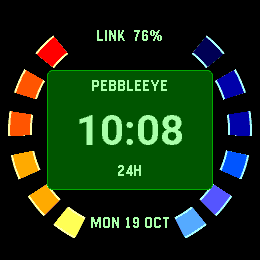
FacesYour time. Your mission. Turn your Pebble into a classic spy-watch display. PebbleEye pairs a bold, segmented bezel with a crisp clock and eight coordinated colour palettes: Classic, Amber, Ice, Orchid, Lagoon, Ember, Silver and Rose. Choose Digital for an instant read, Analogue for a traditional dial, or Hybrid for full-size hands with digital time written over the dial. Make it yours: • Three display modes and eight colour palettes. • Smooth, readable time digits with crisp date and status labels. • Five date formats, plus your watch’s 12-hour or 24-hour setting. • Optional battery and phone connection information. • Optional seconds hand while the backlight is on. • Time 2 only: optional 12-second theme on a double tap of the watch. • Round 2 only: optional three-second vibration rhythm on a double tap. • A settings preview, easy Undo and clear Save controls. Designed specifically for Pebble Time 2 and Pebble Round 2. Seconds are off by default; regular timekeeping updates once a minute. Music is also off by default and respects mute and Quiet Time. Round 2 has no speaker; its optional vibration rhythm is also off by default and respects Quiet Time. No account required. An independent, unofficial homage to classic spy-game watch displays.
 20
Wordish
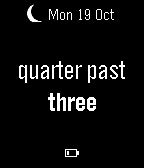
FacesTime in words. Exact when you need it. Wordish gives the classic Pebble word clock crisp text and colourful personalisation. Previously called Fuzzy Text Two. - Read relaxed time at a glance, with native layouts for Pebble Time 2 and Pebble Round 2 alongside classic Pebble models. - Double tap to reveal the exact time for 3, 5 or 10 seconds, following your watch's 12-hour or 24-hour clock setting. - Pick a colour preset or customise individual text rows, fonts and alignment. - Add a discreet corner date with a choice of formats and colours. - Switch animations or the double-tap gesture off for a still, simple display. - Optionally show low battery or phone disconnection, without vibrations. - Choose Catalan, English, French, German, Norwegian, Spanish or Swedish. The low-battery indicator appears at 20% or less and stays hidden while charging. Indicators are off by default. Colour customisation requires a colour screen; monochrome watches use high-contrast black and white. Open settings in the Pebble app to make it yours. A colour preview helps you choose a readable combination before saving.
 52
TrioWay
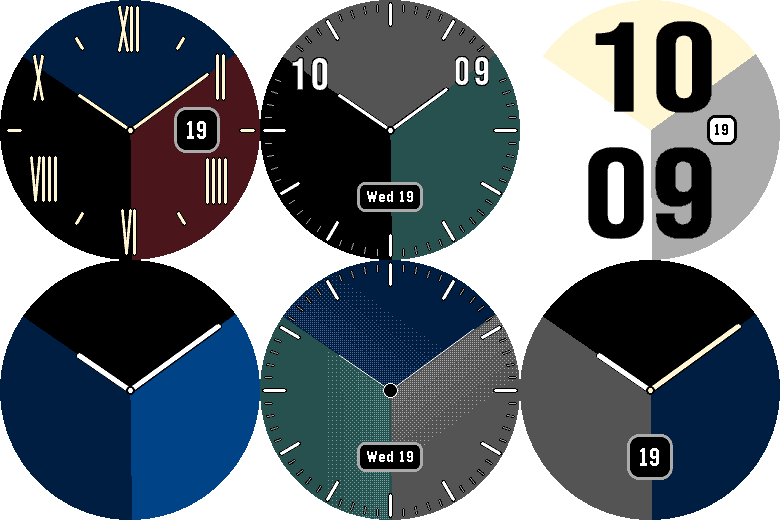
FacesTrioWay turns the hour and minute into three changing colour sectors. Choose from five layouts, including oversized digital numerals and a Hybrid dial with optional hour and minute marks. Made for Pebble Time 2 and Round 2. FIVE WAYS TO TELL TIME Digital Large: bold, oversized hour-over-minute numerals for easy reading. Add optional dial marks to check the colour sectors against the clock face. Hybrid: analogue hands point towards the exact hour and minute shown around the edge. Optional marks leave clear space around the numerals. Analogue Numerals: a numbered 1–12 dial that highlights the current hour and nearest five-minute numeral. Analogue Marks: a traditional dial with twelve longer hour marks and forty-eight fine minute marks. Analogue: a minimal face with hands and three changing colour sectors. MAKE IT YOURS - Thirteen colour presets, from restrained neutrals to Lagoon, Dusk and Ember - Individual colour choices for the sectors, hands, numerals and date - A live configuration preview with rectangular and round display options - Optional date number or weekday/date badge, depending on the layout - Optional hands on analogue layouts - 12-hour or 24-hour digital time - Optional subtle background texture - Settings saved across watchface restarts Designed for the native displays of Pebble Time 2 and Pebble Round 2.