Stopwatch / Alarm / Timer combo designed for quick launch; everyday cooking, reminders and alarms. Touch controls; set with one swipe! Optional audio. Packed with unique, detailed behaviour to optimise easy frequent use.

Optional touch controls (PT2/PR2): Set with just one or two swipes!
    - Timer: touch, hold and drag to select minutes; circle clockwise to wind-up hours, or anticlockwise for seconds
    - Alarm: touch, hold and drag to select hours, then minutes
    - Start touching from the middle to set a timer duration, or from the edge to set an alarm time
    - To cancel, finish touching in the middle or don't select any minutes

This app does 3 things I couldn't find anywhere else:
    - Start counting immediately on launch
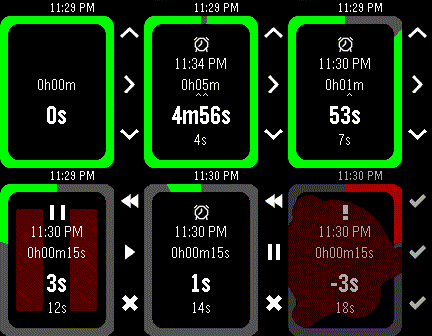
    - Show all 4 relevant values (alarm time, duration, remaining, elapsed) at all times
    - Modify the duration at any point without any pause or confirmation

Other features:
    - Timer modification controls optimised for speed (1h, 5m, 1m increments)
    - Configuration:
        - Alarm audio; beep sound volume
        - Full colour customisation & Themes
        - Vibe patterns
        - Battery saving
        - Various touch options
    - Battery saving:
        - Auto switch between seconds/minutes update rate, synced with backlight and/or remaining time
        - Zero background power use
        - Auto-cancel alarm vibe after 1m
    - Runs in background, wakeup for alarm
    - Counts overtime after alarm vibe
    - After expiry, set a new alarm from the same base just by increasing the duration again
    - Short vibe on start/stop for blind operation
    - Glance info in system app launcher
    - Pause, resume, restart, reset
    - Round and rect, black, white and colour pebbles

Button controls:
    - Select/Back to choose modification digits (15/30 seconds available while under 2/5mins)
    - Up/Down to increment/decrement. Hold to repeat. Down at 0 wraps up.
    - Select Long-press (or Press at lowest digit) to toggle pause/resume and enter "control mode":
        - Up (rewind icon) to restart the timer (i.e. set elapsed time to 0) while retaining the timer/alarm duration
        - Up Long-press to reset the entire app to 0
        - Select (play/pause icon) to pause/resume counting
        - Down (save icon) to save and exit
        - Down Long-press to discard and exit
        - Back to return to timer modification
    - Back while at the largest digit to exit with options:
        - Up/Back (save icon) to save and exit
        - Down (X icon) to discard and exit
        - Select (> icon) to return to timer modification
    - Back Long-press to save and exit
    - Select (✓ icon) or Back to dismiss alarm bell.

This app is great if you want to:
    - Set a generic egg timer running fast without looking in the middle of cooking, and then change it as you go along
    - Often quickly set an alarm clock to remind you about something in the near future
    - Set a wakeup alarm quick at a varying time just before you go to sleep
    - Do all of the above with a single app using one quick-launch slot

Use (a) different app(s) if you want:
    - More than one alarm/timer/stopwatch at once i.e. multi timers
    - To slowly set a timer/alarm to a long but precise time
    - Automatically repeat alarms daily/weekly
    - Millisecond precision
    - Sports-stopwatch split times / lap times
    - A history of previously set times
    - Voice control

Suggestions for further improvements welcome, open source btw.
Thanks for checking this out! Let me know if you end up using it :) 25
 13
 49
 294