 81
81FaceBrowser
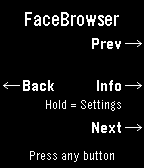
DailyBrowse watchfaces right from your wrist. FaceBrowser lets you scroll through the Rebble and Pebble app store catalog directly on your watch, showing you a live preview of each watchface so you can see exactly how it will look on your screen. Use the up and down buttons to flip through faces one by one, or turn on random mode to discover something new. Filter by collection to browse all available faces or just the most loved ones. When you find a face you like, press select to see the app name, developer, and a QR code you can scan to quickly open it on your phone and install it. Features: - Live watchface previews rendered on your watch - Browse sequentially or shuffle randomly - Filter by collection (all or most loved) - View app details including name and developer - QR code for quick install from your phone - Support for Rebble and Pebble app stores - Works on all Pebble hardware platforms
 18
18Disc Golf Counter
Health & FitnessLeave your phone in the bag and focus on your throw! Disc Golf Counter is the ultimate wrist-based caddie for your Pebble, powered by real-time course data. Unlike simple tally counters, this app uses your phone’s GPS to automatically find the nearest disc golf courses and download the actual scorecard layouts. KEY FEATURES: GPS Course Finder: Automatically detects nearby courses. Smart Layouts: Select the specific layout you are playing (e.g., "Main", "Advanced", "Shorts"). Supports dynamic hole counts (9, 18, 27, etc.). Live Scorecard: Tracks your strokes, current hole Par, and your total score relative to Par (e.g., +2, -1, E). Persistent Storage: Your game is saved automatically. If you exit the app, your score is waiting for you when you return. Readable Interface: Large, high-contrast numbers for easy reading in bright sunlight. CONTROLS: SELECT (Click): Add Stroke SELECT (Long Press): Subtract Stroke (Undo) UP (Click): Next Hole DOWN (Click): Previous Hole UP (Long Press): Refresh GPS / Find Course DOWN (Long Press): Reset Round (Clear Score) COMPATIBILITY: Works on all Pebble models (Original, Steel, Time, Time Steel, Round, 2). Note: This app requires a connection to your phone to fetch course data.
 552
552Find My Phone
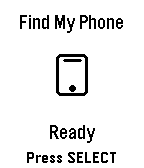
Tools & Utilities## Find My Phone **No companion app required - works directly through the Pebble app!** Never lose your phone again! Find My Phone helps you locate your misplaced phone instantly with a loud, attention-grabbing alarm - right from your wrist. ### Features: - **No Companion App Required** - Works directly through the Pebble app, no extra downloads needed - **One-Button Operation** - Simply press SELECT to activate the alarm - **Customizable Melodies** - Choose from 5 different alarm sounds to suit your preference - **Loud Audio Alert** - Plays a distinctive melody on your phone that's easy to hear - **Visual Feedback** - Animated display shows when the alarm is active - **Haptic Feedback** - Your watch vibrates to confirm the alarm is running - **Continuous Alarm** - Keeps playing until you press SELECT again to stop it ### How to Use: 1. Open the app on your Pebble 2. Press the SELECT button (middle button) 3. Your phone will start playing a loud alarm 4. Follow the sound to find your phone 5. Press SELECT again to stop the alarm ### Customize Your Sound: Access settings through the Pebble app to choose from: - Classic Find (Default) - Pleasant ascending melody - Urgent Alert - Fast alternating tones - Gentle Reminder - Soft repeating pattern - Emergency Siren - Loud alternating siren - Door Chime - Simple two-tone chime ### Perfect For: - Finding your phone under couch cushions - Locating your phone in another room - Quick phone location when you're in a hurry - Anyone who frequently misplaces their phone **Simple. Effective. Essential.** No more frantically searching for your phone. Just press a button and follow the sound! *** **Technical Notes:** - Requires Bluetooth connection between watch and phone - Compatible with Android devices running the Pebble mobile app - No additional apps or subscriptions needed - Settings accessible through the Pebble app configuration *** ### A Note from the Dev (FAQ & Troubleshooting) Hey there! I want this app to be as useful as possible, but because we are working with classic Pebble firmware, there are a few platform limitations I can't bypass. Here is what you need to know: **Q: Does this work on iPhone / iOS?** * **A:** Sadly, no. I would love to bring this to iOS, but Apple's strict background and browser limitations completely block the app from triggering the audio. It is currently strictly for Android. **Q: My watch is buzzing, but the phone is completely silent. Help?** * **A:** Double-check your phone's **media volume**! The app triggers audio through your phone's standard media channel. If your media slider is turned all the way down or muted, the sound won't come through. **Q: Can you make the app automatically turn up my phone's volume or override silent mode?** * **A:** Man, I really wish I could! This is the number one feature I want to add. I actually pushed for an official change to the SDK so app developers could control phone volume, but the system firmware just doesn't support that level of access control right now. If the platform team ever opens up that door, I'll be the first to implement it! Until then, we just have to wait and see.
 49
49Phone Battery Monitor
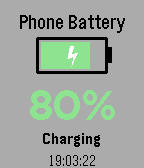
Tools & UtilitiesNever wonder about your phone's charge level again! Monitor your phone's battery directly from your Pebble watch - perfect for when your phone is charging in another room. Key Features: • Real-time battery level display with large, easy-to-read percentage • Visual battery indicator with color-coded status (green/yellow/red) • Animated charging indicator - see at a glance when your phone is plugged in • Instant updates when battery level or charging status changes • Manual refresh with SELECT button • Vibration alert when your phone reaches 100% charge • Current time display • Works on all Pebble models How It Works: Simply install the app and it will automatically connect to your phone. The watch face shows your phone's battery percentage, charging status, and a visual battery icon that fills up as your phone charges. The lightning bolt animation lets you know when charging is active. Perfect For: • Monitoring charging progress from another room • Keeping track of your phone's battery without checking it constantly • Getting notified when your phone is fully charged • Peace of mind when you can't see your phone Requirements: • Pebble watch (all models supported) • Smartphone with Battery Status API support (most modern iOS and Android devices) Stay connected and never miss a charge cycle again!