 27
27Tumble
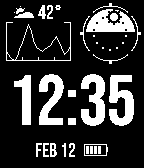
FacesA rugged watchface inspired by the Garmin Instinct. It features a black & white theme with a historical information graph and a versatile miniature window. The current time is prominently displayed on the watch face, and bisects four complication slots that can each be customized to display various combinations of the following data: - Weather (conditions & temperature) via Open-Meteo - Air pressure - Pressure trend - Elevation - Battery - Date - Custom time zone - Steps - Calories - Heart rate - Sunrise/sunset time - Sun position - Moon phase - Watch status
 356
356Treble
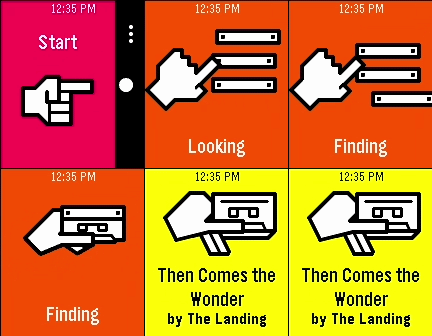
RemotesIMPORTANT: Version 1.0.0 of the Android app will stop working before October 2026. Update it to 1.1.0 before then, or you won’t be able to recognize any songs! A song-finding app using Shazam’s audio recognition. It connects to an Android companion app to listen to nearby sound through your phone’s microphone, securely process it through Shazam’s service, and match it with any known audio signature in Apple’s music catalog. You can install the Android app from the source link at the bottom of the page. After setting it up on your phone, launch the watch app at any point to listen for music. When a song is successfully found, you will feel a short vibration and be presented with the song name and artist (currently, only names with Latin letters are known to display correctly). The previous 10 found songs are saved right on your watch, organized by discovery date.
 99
99Hubble
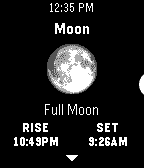
Tools & UtilitiesAn astronomy app for Pebble. It uses the time and your location to obtain the azimuth & altitude of the sun, moon, planets, and various constellations. Eligible bodies will also display their phase, rise & set times, and relative illumination levels. No internet access required. Locate these objects around you using only your Pebble’s accelerometer and compass, simply by holding your watch right in front of where you are looking. The ‘😊’ emoji in the locator reading indicates your compass heading has been corrected for magnetic declination. Keep track of the things in the sky outside of the app too, right on your Timeline: Pin rise/set times, twilight (civil, nautical, and astronomical), solar noon, solstices, equinoxes, eclipses, and more! Visit the app settings to decide what to include.
 76
76Wobble
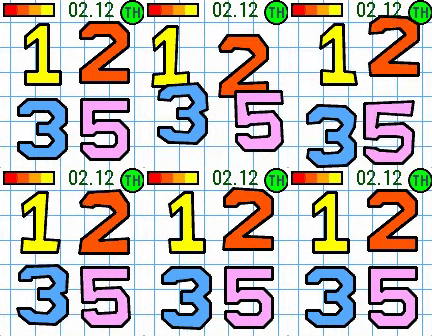
FacesA watchface inspired by the JellyCar game series. It has large numerals that shift gelatinously when the time changes, or when you shake your watch. This watchface also features a battery power bar, date, and day of week indicator styled like the original game’s interface, laid out on a graph paper background.
 253
253Dribble
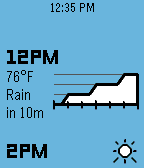
DailyA precipitation & hyperlocal weather app for Pebble. Location access is required for the app to work. When data is loaded, press the up or down buttons to scroll backwards or forwards through the forecast timeline. Hold either one to scroll quickly. There are three main information pages, which can be cycled by pressing the select button: Conditions: Displays the current weather conditions and temperature, along with a graph of next-hour precipitation intensity if applicable. Airflow: Displays wind speed & gust speed, wind direction, and atmospheric pressure. Experiential: Displays the perceived temperature, UV index, and visibility, along with an emoji accessorized with contextual indicators (sunglasses for high UV, umbrella for precipitation, hat & scarf for freezing weather, etc.)