 4
4Aura Cityscape Weather
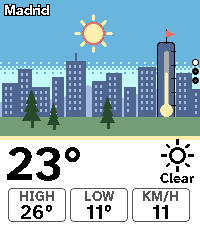
Tools & UtilitiesAura Cityscape Weather turns the forecast into a small town. The sun or the moon rides its real arc over the skyline, and the sky and every layer of the scene change with the hour, from dawn through golden hour to a night of lit windows, computed from the real sunrise and sunset of your location. Clouds drift, rain falls (the scene only moves when you shake your wrist, to spare the battery), snow settles on the roofs and the pines, and a storm brings lightning, so you read the weather before you read a number. The numbers sit on a plain panel under the scene: the temperature now, today's high and low, and the one extra fact that matters, the chance of rain when rain is likely and the wind speed otherwise. The thermometer tower in the scene fills to the current temperature in Aura's colour ramp, and the pennant on top of it streams out as the wind picks up. Press DOWN for the next eight hours, a row of little windows where each tile is painted in that hour's sky, then again for the next six days as a skyline whose buildings grow with each day's high. SELECT asks the phone for a fresh forecast. It fetches its own weather on the phone through Open-Meteo, worldwide, with no account and no API key, so it works on install. In Spain you can switch to the official AEMET forecast with a free key. Search a city, use the phone GPS, or type a latitude and longitude, and pick Celsius or Fahrenheit. The last forecast is stored, so the town is there the moment you open the app, and if the phone is out of reach it says how old the forecast is. The town is one fixed skyline for every place. That is on purpose: the scene stays familiar, so what changes is the weather and the light. Free and open source.
 5
5Aura Sky Weather
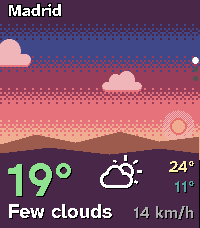
Tools & UtilitiesThe dashboard limit is 1,600 characters (per the official Pebble docs); this text is under it. Aura Sky Weather turns the weather into a sky. The whole screen is a sky painted from the real time of day and the current conditions: indigo at night, magenta at dawn, blue at noon, a warm glow before sunset. The sun rides its arc, the moon shows its real phase, clouds drift, rain falls and snow tumbles, and the sky only moves when you shake your wrist, to spare the battery. Over it sits one big temperature, a condition icon, today's high and low, and the one extra fact I check first: the chance of rain when it is likely, the wind when it is not. Press DOWN for the next six hours, each hour painted as the sky will look then, with the temperature trend drawn across them and a rain-chance bar underneath. Press DOWN again for six days of temperature ranges, coloured by Aura's own temperature ramp, so a cold day reads blue and a hot one red. SELECT refreshes. It fetches its own forecast on the phone through Open-Meteo, worldwide, with no account and no API key. Search a city, use GPS, or type coordinates, and pick Celsius or Fahrenheit. In Spain you can use the official AEMET forecast with a free key of your own. The last forecast is kept on the watch, so the sky is there the moment you open the app, and it is marked as old when it is stale. If the phone cannot reach the forecast, the app says so instead of showing a blank screen. Free and open source. Pebble Time 2 only.
 28
28Aura LCD
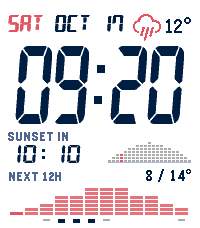
FacesAura LCD is the LCD watch I wanted as a kid, rebuilt for the Pebble Time 2. The time is drawn in sharp, slanted 7-segment digits, the date in 14-segment letters, all rendered pixel by pixel so the edges stay crisp instead of the jagged look you get from a font. Above the time, a small LCD arch shows the path of the sun. Only the current column lights up, so one glance tells you how much daylight is left, next to a countdown to sunset (or to sunrise at night). Below it, the temperature with the day's low and high, and the next 12 hours of temperature and rain chance. After dark the face turns negative with amber digits, so it stays easy on the eyes and quiet on the wrist. Three watchfaces in one! The styles in the settings are three different layouts, from the calm default to a dense one: Quiet, Timeline and Stack. Thirteen colour themes, each with a day and a night look, including one that follows the weather, plus accent colour, date lettering, 12 or 24 hour time and units are all in the settings. Weather, forecast and sun times come from Open-Meteo, with a worldwide city search or your phone's location. No account, no API key, nothing to sign up for. Free and open source. Inspired by the Casio CGW-50 Cosmo Phase; an independent, non-commercial tribute, not affiliated with or endorsed by Casio. Digit rendering is adapted from PT2-LCD221 by Kicou (MIT). Segment shapes come from the 7-Segment font by Jan Bobrowski and DSEG14 by Keshikan, and weather icons from Weather Icons by Erik Flowers (all SIL OFL 1.1). Weather data by Open-Meteo.com (CC BY 4.0).
 65
65Aura Essential
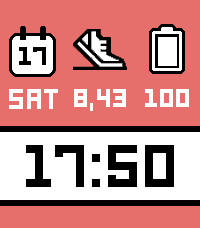
FacesThis face is my homage to Essential by Kiezel, one of my favourite watchfaces on the original Pebble and Pebble Time, the Kickstarter watches I backed, bought and gifted a few of. Essential has been on the appstore since 2015 and unmaintained since 2016, so I rebuilt its three-block idea from scratch for the Time 2: white-icon complications with a black outline over a color block, a large segmented clock in a white band, and a colour strip below. The step-count shoe icon is reproduced from Kiezel's original; credit and thanks go to its developer. All the code here is my own. See the Design origin note in the README.