 5
5FuelWatch
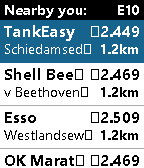
DailyA Pebble nearby fuel station finder for Europe with price check, which kindly and gratefully uses the ANWB© fuel prices api. Watch compatibilty: Basalt, Diorite, Emery and Flint. Features: ⛽ Main screen gets a list of fuel stations with their prices, to a distance up to 3 km aroiund you ⛽ Fuel type can be set in phone setting (E10, Super, Diesel and LPG) ⛽ List setting in phone to cap at 10, 20 or 30 stations. ⛽ On select you get the Details screen with full Address, chosen fuel type Price and Distance ⛽ Select again and a simple map view is shown to give you a rough sense of direction (use actual address for actual navigation). Top is always north ⛽ Map / Detail screen supports advancing to next/previous stations with buttons (or touch on Emery) ⛽ Fully touch compatibel on Emery I have a Time 2, but none of the others. So Basalt, Diorite and Flint were built on the emulator which doesn't support my map (works fine on my Time 2 hardware but also not on Emery emulator). So I'd be delighted if someone could send a screenshot of an actual map view on actual Basalt/Diorite/Flint hardware. Contact me on Fedi: https://social.vivaldi.net/@moaske or via the store link below with your screenshots (do so too when you find the easter-egg in the app). Coverage / credits: Fuel station data by the dutch ANWB (copyright owned by ANWB). Should provide data in and of the following countries (so most of EU): NL, BE, LU, DE, FR, ES, PT, IT, CH, DK, NO, SE, FI, GB, TR, UA, RU. Location by your phone 😏. Map tiles by Open Street Maps. Built on CloudPebble with Claude. Like the app? Give it heart! ❤️ And do check out my other stuff here:
 2
2Scalemates
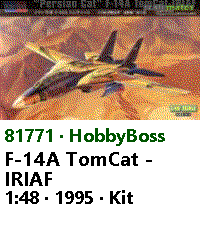
DailyScalemates profile viewer for having your Stash and Wishlist lists at hand when out and about ✈️on scalemodelling events 🛩️ or fairs. #ModelAircraft #ScaleModelling I know, pretty niche; you gotta be a double nerd for this... 😜 Just fill in your Scalemates user ID in the settings in the phone to find your Scalemates profile (see settings screen how to find that). Also select your feeds and cycle through activated feeds on the watch by long-pressing Select. Available feeds: 🛩️ Stash 🛩️ Wislist 🛩️ Started 🛩️ Completed 🛩️ For sale 🛩️ On order Detail page for each item showing the box art and some more info. Supports touch for scroll and select. Time 2 (Emery) only. Check out my other stuff here:
 52
52Sense Time
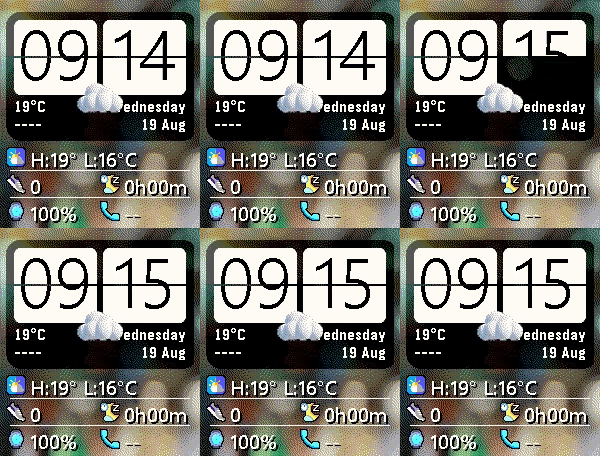
FacesHTC Sense watchface with that legendary Flip Clock widget of the good old days when you could find this on both Android and Windows Mobile phones 🤖🪟 (For Time2 / Emery only) ☀️ Large Flip Clock that follows localisation settings. Font can be setin Semi Light and Semi Bold. Minute and hour cards make a really nice flip animation on the minute/hour which you trigger at any time again with a flick of your wrist (both will then flip). 🌞 Location based weather (Open Meteo) with icon, current temperature and (current) location name below the clock. 🌤️ On the right side of that the Weekday and Date. These follow the watch language settings (supports: en/fr/de/es/it/nl/pt). Below that iconic HTC Sense clock widget there was some room left for some old fashioned 'desktop' icons with more useful info: 🌞 Today's high and Low temperature 🚶➡️ Daily Step total 😴 Daily Sleep total 🔋Watch battery percentage 📱 Phone battery percentage (will append ↑ when charging) Furthermore: ➡️ Six original HTC Sense wallpapers you can set ➡️ Temperatures in C° or F° setting. ➡️ Weather update interval settable at 15, 30 or 60mins. ➡️ Transparant raindrops overlay when it's rainy weather. On by default, but you can turn it off in settings Weather by Open Meteo, Location name by https://api.bigdatacloud.net/data/reverse-geocode-client I Burned a lot of Claude tokens on this one, so give it some love if you like it 😘🩷 And do check out my other stuff here:
 15
15Hackers95
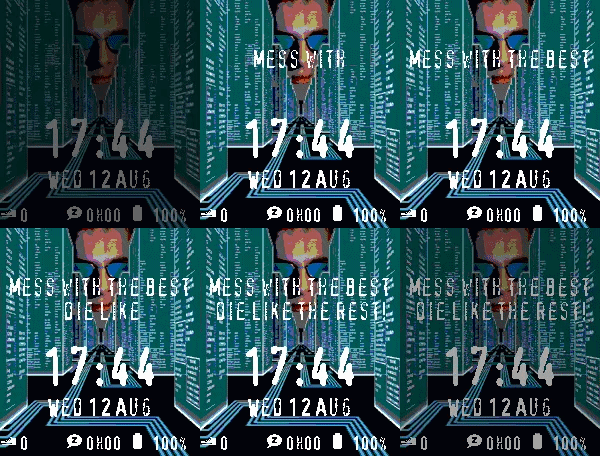
FacesHackers '95 fan watch face featuring nine wallpapers from the movie 😎💾 Hack the planet!! Clock and date follow localisation settings and at bottom: steps, sleep and battery. (Time 2 / Emery only) And the gimmick: ⌨️💾 Flick your wrist or double tap and the watchface will type: "Mess with the best die like the rest!" ...and then dissappear again... 😎 ➡️ 3 messages to choose from ➡️ 9 wallpapers to choose from ➡️ 2 fonts to choose from ➡️ Text colours can be set for the typewriter part and the clock info separately. ➡️ Original font from the movie. ➡️ Extra ND filter setting to balance the look of the wallpaper to the text Like what me and Claude made? Then give it some love in the store 😘🩷 And do check out my other stuff here:
 121
121Metro WP8
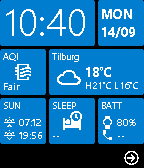
FacesRetro Windows Phone 8 watchface with the original Metro WP8 tiles design! 📱 NEW! Selectable Live Tiles! --- Supports Basalt (Time/Time Steel) and Emery (Time 2). Features: 🔶 Large clock and weekday/date tiles. Clock follows 12/24h setting, and Weekday follows language setting (supports: en/fr/de/es/it/nl/pt). 🔶 Date can be set manually from MM/DD to DD/MM via settings (since pebble supports only en_US) 🔶 Light and Dark mode 🔶 16 accent colours to choose from 🔶 Proper settings screen with a preview of the chosen theme settings and tiles 🔶 Location based Weather tile with current temperature, high/low temps and an icon showing the conditions and location name as tile title. Temperature can be set to °C or °F in settings. Time, date and weather Tiles are fixed, but the other four are now user selectable! Available Tiles: ✳️ Air quality ✳️ Daily steps ✳️ Daily sleep total ✳️ Moon phase ✳️ Rain forecast for coming hour ✳️ Heart rate tiles (Emery only): ➡️ Daily average HR ➡️ Daily resting HR ➡️ Split tile: Current HR (last sample) / Resting HR ✳️ Calories burned today ✳️ Sunrise/sunset times ✳️ Week numbers (ISO and a custom offset week nr). Yeah... an odd one, but a personal need 😎 ✳️ Wind speed and direction ✳️ UV Index ✳️ UV # / Smog (raw Ozone/O3 number) ✳️ Battery tile. Shows battery status of both your Pebble⌚ AND your Phone📞😁 Phone shows 'CHR' when charging 🤩 Have ideas? Find me on fedi: https://social.vivaldi.net/@Moaske Some Tiles will have related settings sections in the Phone settings screen too. ☑️ Two random tiles flip around once every time you flick your wrist or in any way activate the watch, to give it that extra Live Tile feel 😎 with a bit of animation. I Burned a lot of Claude tokens on this one, so give it some love if you like it 😘🩷 And do check out my other stuff here:
 11
11AQI Monitor
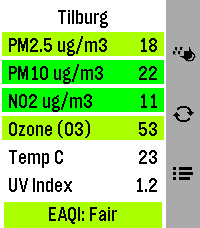
DailyAir Quality and Pollen monitor for Pebble Time 2 (Emery) Features: 🔶 Main screen shows current PM2.5, PM10, NO2, Ozone (O3) polutant values as wel as Temperature in Celsius and UV Index for your current location (shown on top) and at the bottom the general European Air Quality Index. 🔶 Background of polutant cells changes colours according to EU severity threshold values. 🔶 Forecast screen (Down button) with 24hr hourly forecast for each polutant, scrollable with both touch! and buttons. With a sticky header 😊 🔶 Pollen screen (Up button) with general pollen warning atop and 24hr forecast Graph for Weeds, Grasses and Trees. ⚠️ Pollen is Europe only and only during season ⚠️ Data comes from https://open-meteo.com and should provide worldwide coverage. The threshold values for the colouring of the boxes (severity) are according to EU norms, and so is the general EAQI index at the bottom (which is constructed from the other polutants so should again work worldwide, just EU norms). Location resolving to name by BigDataCloud reverse geoloc call. Pollen data is ONLY available in the EU, AND only during pollen season. It will show -No data available at this time- and a blank graph if nothing comes in for your location. This Pebble app needs colours 🏳️🌈 (and mucho pixels space), so that's why I only targeted Emery with this app 😊 Like what me and Claude made? Then give it some love in the store 😘🩷 And do check out my other stuff here:
 17
17WindSock
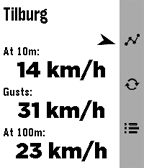
DailyWindSock is a basic location based wind Forecast app that I made mainly for my drone flying. But I'd imagine it being useful for many outdoor activities 🚁⛵😎 Watch: 🔶 Main screen shows current wind speeds at your current location (shown on top) at 10m , gusts and at 100/120m, and a small arrow for bearing 🔶 Forecast screen (down button) gives you a (touch-)scrollable 24hr hourly forecast of all these values (also bearing!). Where a line turns red when either Gusts or 100/120m Winds exceed your set warning threshold 🔶 12hr forecast Graph screen (up button) for all three values (Gusts in red in colour screens). Adapts to km/h, mph, m/s or kts choice. Phone side settings: 🔷 Choose wind speed unit between kilometers per hour (the default), miles per hour, meters per second or knots. 🔷 Choose between wind models 'Global' (the default) and 'Benelux'. 🔷 Choose your own 'Strong wind warnings' speed limts The Benelux KNMI model is slightly more accurate for NL, BE and LX (the model I used as main up to v1.2) but reports the high winds at 100m instead of 120m. The 100m/120m label on main will switch accordingly with your model choice. 👉 Just select Refresh on the watch main screen to apply any changes (or just refetch the data). ☑️ Chosen wind model or wind speed unit are persistent over launches. Data comes from Open-Meteo so should give you a worldwide coverage. Resolving phone's location into location-name done by a call to BigDataCloud. App uses phone location and loads all data fresh every time you start the app. Like what me and Claude made? Then give it some love in the store 😘🩷 And do check out my other stuff here: