Voice for Pebble controls an Android audiobook player from the wrist. One watchapp drives two players: Voice, the open-source audiobook player, and Audible. It runs on Pebble 2 Duo and Pebble Time 2, and needs a small companion app on your phone, available from the project's GitHub Releases.

ON THE WATCH

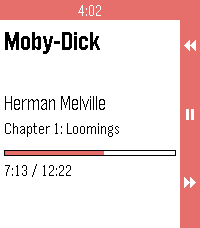
Now playing. Book, author, chapter, a progress bar, and the cover when the player offers one.

Transport. Up / down skip back / forward by the player's skip time. Long-press for the previous / next chapter. Select is play / pause. Long-press select opens the actions menu.

Actions. Browse books, Source (switch between Voice and Audible), Volume up, Volume down.

Browse. The player's library, with a cover thumbnail on each row the player provides a cover for.

ON THE PHONE

Voice: full transport, browse, chapter skip and the now-playing cover.

Audible: grant notification access to "Voice for Pebble" for full control, titles, cover and chapters. Without it the companion sends media buttons (skip, chapter, play/pause) and the watch shows "Buttons only". The companion reads no notifications.

STATUS

Tested on a Pebble Time 2 with Audible in buttons-only mode. The Voice app itself and Audible with notification access are not yet tested on hardware.

REQUIREMENTS

- Voice or Audible on your Android phone
- The Core Devices Pebble app paired to your watch
- The Voice for Pebble companion APK (installed by hand from the project's GitHub Releases, one time)

SOURCE AND SUPPORT

Source and companion APK: https://github.com/P1R4N351/voice-for-pebble

NOT AFFILIATED

This project is not affiliated with Voice, Audible, Amazon or Core Devices. Names are trademarks of their respective owners.
 2
2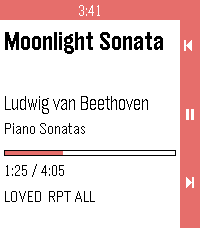 4
4