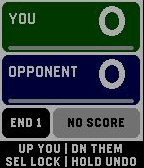
EndWatch turns Pebble Time 2 into a quick, glanceable crown green bowls scorecard.

Use the Up and Down buttons to select the points scored by you or your opponent, then press Select to lock in the end. Scores cycle from zero through the configured maximum, so dead ends, singles, doubles and team matches are all simple to record. Hold Select to undo the most recent end.

EndWatch keeps the running score and current end visible, with a colour-coded summary of the previous end. Charming bowls-and-jack animations warn when either player is one or two points from the result, combine both players' situations when appropriate, and mark a deciding end with a handshake.

Features include:

• Configurable winning score and maximum points per end.
• Custom player names, colours and vibration alerts.
• Automatic saving across app exits and watch restarts.
• Hold-to-undo, including after the winning end.
• Full end-by-end scorecard synchronisation to the phone.
• Spreadsheet-ready scorecard copying with match statistics.
• Five completed matches saved locally on the phone.
• Result, opponent, statistics and weather in Timeline Past.
• Optional match-start weather with Celsius/Fahrenheit and mph/km/h choices.

Weather is optional. When enabled, EndWatch requests the phone's location once near the start of a match and retrieves current conditions from Open-Meteo. Coordinates are discarded after the request; only the weather snapshot is retained with the match.