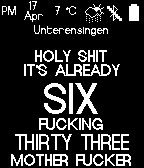
Watchface displays the time in a rude kind of way.
In addition AM/PM, date, temperature, weather icon, BlueTooth Connectivity, battery state and location or steps/average steps are displayed, too.

It's also possible to define a goal for your daily steps. If you enable it in the configuration page, the watchface will display your progress to achieve your goal.
The bar's color will indicate the different steps of achieving your goal.
 - Red: You are below your average
 - Yellow: You are above your average
 - Green: You have achieved your goal

The small white line shows your average steps in reference to your goal.

The weather information is taken from http://openweathermap.org/. It will be updated every 30 minutes.

Changelog:
v1.6: spelling error corrected
v1.5: Added some icons and a progress bar for daily steps
v1.4: Solved BT icon issue
v1.3: problem with configuration is fixes, configuration will not be resetted anymore when watchface is reloaded
v1.2: now able to display daily steps rather than location via configuration page
v1.1: configuration page added, temperature format is  customizable now (choose between °C and °F)
 52
52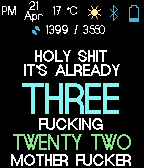 73
73