Required
- Only Japan can be use.
- Set Google API Public Key on settings

Functions
- Set destination station
- How many minutes will you need go out for next train from your location.
- Transit details.
- Last train from your location.

How to setup?
On smart phone configuration
1. Open setting on your smart phone
2. Input Google API key and add stations
3. Submit configuration on bottom of the page.

How to use?
click
up button: previous train
down button: next train
select button: display route details

long click
up button: Back to first train.
down button: Change mode to select destination station
select button: Change mode to last train (back button will be back to normal mode)

Known issues
- Application will crashed when displaying too many Japanese words.

##CAUTION##
This application is under beta version.
Please note that publisher shall not be responsible for any loss and troubles.
 24
24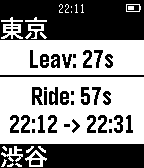 48
48 19
19