 8
8Big Rock Battery
Tools & UtilitiesI can't see any of the built in battery gauges on the default watch while wearing my glasses, let alone without them on. This solves that problem: A giant watch battery gauge that I can see from across the room.. (well, with my glasses on anyway). Configurable thresholds and colours. I have it bound to a quick launch button on the watch to make it easy to get to.
 18
18Alarm Rock
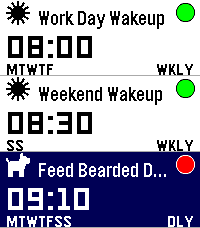
Tools & UtilitiesI was tired of not having a seamless integration between alarms and smart watches on Android. I discovered that unless you had a phone and watch of a matching brand, it seems alarms were either set on the watch or on the phone, and there was no way to control one from the other. I got tired of this, so I built me a better way: Pebble's openness means I can now set and manage my alarms on the Android app published on GitHub (and Obtanium compatible), and control them at ringing time either on either my pebble watch, or on my phone. The pebble watch app is colour, touch and sound enabled (tested on Pebble Time 2) and also made and tested on pebble 2 Duo (minus the touch, obviously)
 14
14Rock Timer
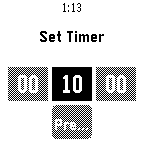
Tools & Utilities• Fork of the official Pebble timer app • Full touchscreen support — inertial drag-to-scroll, long-press / double-tap to select • Configurable timer presets, edited from your phone • Choose your touch activation: long-press, double-tap, or both • Configurable snooze length and alarm vibration • Voice-named timers • Delete confirmation • Developer: snrkl-labs • Built 100% with AI.