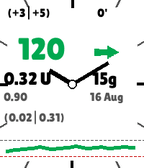
PebbleAAPS is a lightweight, high-contrast Pebble watchface that displays real-time status data broadcast from AndroidAPS (AAPS), including glucose readings, trend arrows, active insulin/carbs, and a 3-hour history graph.

Currently, it requires using an AndroidAPS fork that can be found at:

https://github.com/ssuppe/AndroidAPS-Pebble

That repo maintains parity with the latest master of AndroidAPS at https://github.com/nightscout/AndroidAPS, but adds an additional Pebble plugin to communicate with a Pebble watch.

---

📊 Key Features

- Glucose & Trend: Large BG reading (mg/dL or mmol/L) with dynamic status color tinting and trend arrow.
- Dual Deltas & Age: Displays short-term and 15-min avg deltas (+3|+5) with sync age in minutes (0').
- Insulin Metrics: Active IOB (0.32 U), Basal rate (0.90), and Detailed Bolus/Basal split (0.02|0.31).
- Carbs & Date: Active COB (15g) and calendar date (16 Aug).
- Glucose Graph: 3-hour history curve with dashed High/Low target lines.
- Analog Clock: Bold 12-hour dial ticks with sweeping hour and minute hands.
- E-Paper Light Mode: High-contrast white background designed for indoor & sunlight legibility.

---

⚙️ Setup

1. Install PebbleAAPS.pbw on your watch via Gadgetbridge or the Pebble app.
2. In AndroidAPS, open Config Builder > Sync, and check Pebble.

---

⚠️ SAFETY NOTICE & DISCLAIMER

IMPORTANT: PebbleAAPS (and any associated watchface, watchapp, sync plugin, or communication code) is a passive, secondary visual monitoring display only. It does not calculate or deliver insulin, nor does it control your pump, CGM, or looping algorithms.

Scope: This safety notice applies to the AndroidAPS Pebble sync plugin, this PebbleAAPS watchface application, any alternative or derived watchfaces/watchapps, and all code, libraries, or protocols that communicate with or transfer data between AndroidAPS and Pebble devices.

Hardware & Supplies: The safety of AAPS relies on the safety features of your hardware (phone, pump, CGM). Only use a fully functioning FDA/CE-approved insulin pump and CGM. Do not use broken, modified, or self-built insulin pumps or CGM receivers. Only use original consumable supplies (inserters, cannulas, and insulin reservoirs) approved by the manufacturer for use with your pump and CGM. Using untested or modified supplies can cause inaccuracy and insulin dosing errors, resulting in significant risk to the user.

User Responsibility & Assumption of Risk: By installing, building, or using this watchface, the AndroidAPS Pebble sync plugin, or any code that communicates with them, you acknowledge and agree that:
- You assume full, sole responsibility for your health, medical treatment decisions, and use of this software.
- Watch displays, companion sync plugins, and Bluetooth communications are subject to disconnections, signal loss, stale data, battery exhaustion, or software/rendering delays. Never make medical or insulin dosing decisions based solely on this watchface, sync plugin, or associated code. Always verify current readings on your primary FDA/CE-approved medical hardware or blood glucose meter.
- This software is provided "AS IS" under the GNU General Public License v3.0, without warranty of any kind, express or implied. The developers, contributors, and distributors assume no liability or responsibility for any injury, illness, dosing errors, or damages resulting from the use of or reliance upon this software, watchface, plugin, or associated communication code.