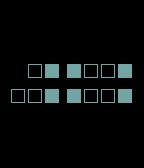
Tell time with squares. Two rows of red squares show the hour on top and the minutes on the bottom. Each square is either filled (on) or empty (off), and you read them like an abacus — each position has a fixed value, and you just add up the ones that are lit.

Reading the hour
===========
The top row has two groups of squares. The first group (on the left) gives you the tens digit of the hour — so either a 0 or a 1. The second group gives you the units digit, from 0 to 9.
Each square in a group has a value: 8, 4, 2, 1 from left to right. Add up the values of all the filled squares to get the digit. For example, if the "4" and "1" squares are filled and the rest are empty, that's 4+1 = 5.
A small square in the top-left corner tells you AM or PM: filled means PM, empty means AM.

Reading the minutes
=============
The bottom row works exactly the same way. The left group gives you the tens digit of the minutes (0 to 5), the right group gives you the units digit (0 to 9).

An example
========
Say the time is 8:35 AM. The top row would show: the first group has no filled squares (0 tens = just "8", not "18"), and in the second group only the "8" square is filled. The bottom row shows the "2" and "1" squares filled in the left group (2+1 = 3), and the "4" and "1" squares filled in the right group (4+1 = 5). The small corner square is empty — AM.

Does it switch to 24-hour time?
====================
Yes. If your phone is set to 24-hour format, the watchface automatically adjusts. The tens-of-hours group gets a second square to handle hours above 19, and the AM/PM dot disappears since it's no longer needed.

Will I actually be able to read it quickly?
==========================
It sounds complicated written out, but after a few days of use your brain stops doing the math consciously — you just see the pattern and know the time. It's a bit like learning to read an analogue clock as a kid: awkward at first, then instant.
 22
22 27
27 404
404 78
78