Inspired by "TrainTime" by otoone_dev:
https://apps.rebble.io/en_US/application/5904a0c90dfc329df8000706
I created this app to improve its usability for my own needs. It is a simple app that counts down the minutes until your train departs. Timetable data is fetched from user-created Markdown (.md) or Text (.txt) files hosted online (intended for use with GitHub Gist "Raw" URLs).
Sample data is also available on GitHub.

Note: Since this was designed for the Japanese railway system, some behaviors may differ from your local transit rules.

Controls:
- [UP / DOWN]: Change train
- [Hold UP / DOWN]: Add to timeline
- [SELECT]: Change station
- [Hold SELECT]: Change current data slot

Features:
- Fetches timetable data only at app launch.
- Customizable limits for the number of trains and the time range to fetch (within stable memory limits).
- Stores up to 5 timetable URLs.
- Supports 3 schedule types per station: Weekdays, Sundays/Holidays, and Saturdays.
- Fallback logic: Sunday/Holiday and Saturday schedules can be omitted; the app will default to the Weekday schedule.
- Uses a 24-hour format from 04:00 to 27:59 (considering 4:00 AM as the start of the day).
- Supports "\n" in the remarks section for up to 2 lines of text (approx. 9 full-width characters per line).
- Optimized for approximately 5-10 stations.
- For color-enabled Pebbles: Background color for the current time and highlight color for post-departure count-ups can be customized.
- Text and background colors for train types are now customizable on Pebble Time 2 and later (Defaults: Text #000000, BG #FFFFFF).
- Japan-specific: Can automatically fetch Japanese public holidays via:
https://holidays-jp.github.io/api/v1/date.json
(Disabled by default). Special thanks to Hiroshi Matsuo.


otoone_dev氏作の「TrainTime」を愛用していたのですが、自分なりに使い勝手を良くしようと思い立ちこのアプリを作りました。
列車の発車時刻まであと何分?をカウントダウンするアプリです。
時刻表データはユーザー自身がweb上にmarkdown(.md)またはtext(.txt)ファイルを作成し、それを参照する方法をとっています
(Github Gistの非公開URL、Rawを想定しています)。
GitHubにサンプルデータを用意しました。

特徴:
- アプリ起動時のみ時刻表データを参照します
- 参照する列車の本数や、向こう何時間まで参照するかは設定で変更できます(クラッシュしない程度の制限をかけています)
- 時刻表データのURLは5つまで記憶できます
- 駅ごとに時刻表は平日、日曜祝日、土曜の3種類
- 時刻表は[平日>日曜祝日>土曜]の順に参照するため、日曜祝日と土曜は省略可
- 時刻表は午前4時を一日の基準とした04:00から27:59の24時間を使います
- 備考部分は改行「\n」が使えるので2行までなら表示できます(全角9文字x2行を想定)
- 5-10駅くらいのデータを想定して作っています
- カラー対応端末は現在時刻の背景色と列車出発後カウントアップのハイライト色を変更できます
- Pebble Time 2以降では列車種別の文字色と背景色を指定できるようになりました(デフォルトで文字色000000、背景色FFFFFF)。
- 日本向けの設定として、自動で日本の祝日を参照できます(デフォルトではdisable)。Hiroshi Matsuo様ありがとうございます。


Data Example:
// Force specific dates as Holidays or Saturdays (Optional)
// 特定の日付を強制的に祝日や土曜として扱えます(省略可)
@HOLIDAYDAY:2026-12-31
@SATURDAY:2027-01-01

// Station Name
// 駅名
# Tokyo

// Icon to the left of the station name (Optional)
// 1:Shinkansen 2:Retro Train 3:Modern Train 4:Bus 5:Clock 6:Monorail 7:Cable car 8:JR Central Shinkansen 9:JR East Shinkansen...
// 駅名の左隣に表示するアイコン(省略可)
// 1:新幹線 2:国鉄風電車 3:現代風電車 4:バス 5:時計 6:モノレール 7:ロープウェイ 8:東海道新幹線 9:東北新幹線 10:国鉄風特急 11:京急風電車 12:L特急 13:寝台特急 14:SL 15:アプリアイコン
## 1

// Schedule Type: weekday, holiday, or saturday
### weekday

// Format: Departure Time, Destination, Type (Optional), Remarks Line 1 \n Line 2(Optional) \n Remarks Line 3 (PT2 or later), Text Color (PT2 or later, Optional), Background Color (PT2 or later, Optional)
// 発車時刻,行先,列車種別(省略可),備考1行目\n備考2行目(省略可),種別文字色(PT2以降のみ),種別背景色(PT2以降のみ)
- 04:00,Kyoto,exp,Dir.\nFirst,000000,FFFFFF
- 27:59,Osaka
 1
1 9
9 21
21 13
13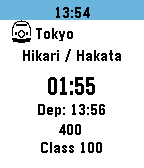 17
17 170
170