 9
Aika
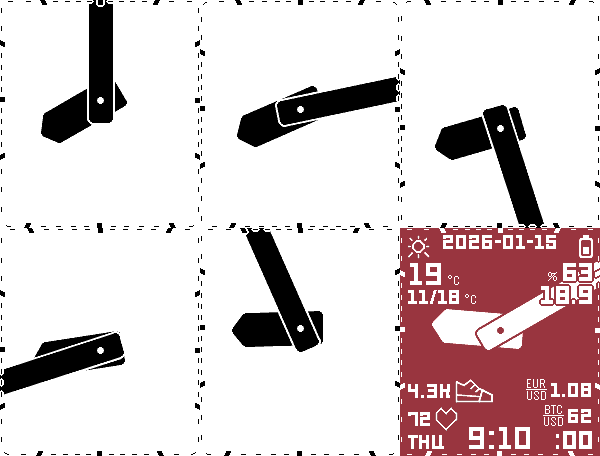
FacesA readable & configurable analog watchface, with bold hands for better low-light visibility. Supports plugins! The analog hands are the biggest component at the center, with the minute hand extending past the edges of the screen, for the highest visibility. Widget values are drawn on top of the clock hands. Values are what counts. Widgets can show their measurement units (°C, %, ...), instead of ambiguous/duplicated icons. Widget units & icons are drawn under the clock hands. It's alright to see them most of the time. The hands are the more important component. The clock center (optionally) "breathes" up & down following the minute hand's direction. This reduces the distortion from the minute hand's changing length, and makes the face feel closer to a square than the rectangular screen really is. Widget fonts, sizes, positions, icons, & units are fully customizable. In addition to "legacy" built-in widgets, any available data plugin can be used as a numeric or icon widget. Built-in widget categories include: - Time - Date - Weather - Rain - Health - Sleep - Battery - Crypto - Currency - Electricity spot price - Tuya sensors & switch states - Bluetooth Other configurable features: - Colors - Night mode - Battery & Bluetooth warning signals (border & widget) - Weather units & data sources (Open-Meteo or FMI) - Rotating widget groups - Language options - Periodic vibrations The comprehensive widget system is adopted from another open source watchface, Sykerö TimeStyle, github.com/Sykero-Software/TimeStylePebble, which is based on TimeStyle by freakified. The analog hands are adopted from an earlier watchface of mine, Nyquist, github.com/truhanen/pebble-nyquist-watchface.
 34
Rain Map
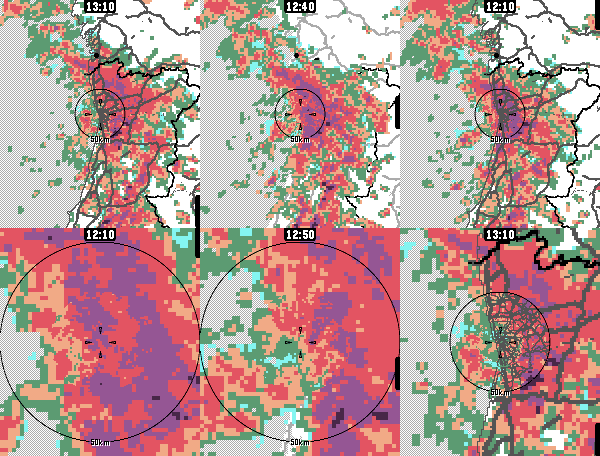
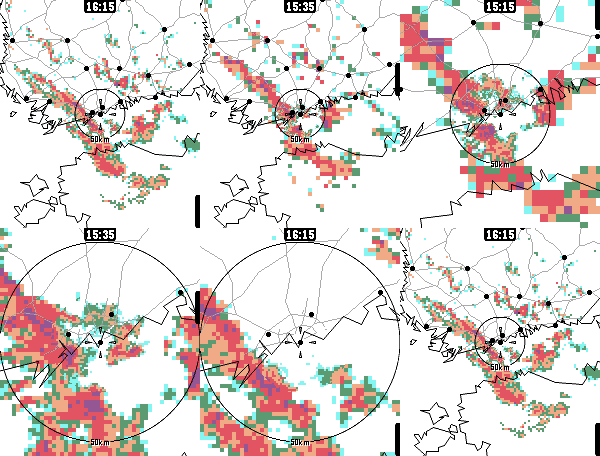
DailyApp for viewing recent rain radar data. For the most accurate near-future rain forecast. The app features proximity-based resolution, to give you the most detailed data closest to your location. Radar data sources: - Rainviewer, https://www.rainviewer.com/ - Finnish Meteorological Institute, https://en.ilmatieteenlaitos.fi/open-data-manual-radar-data - Maybe others in the future Map data sources: - Geoapify for live raster tiles - OpenStreetMap & Natural Earth for static vector maps App controls: - Select timestep: Press up/down or touch the screen - Switch zoom level: Press select/back - Highlight map features: Long-press select - Show legend: Zoom too much Configure units, (free) Geoapify API keys etc. from the app's phone-side settings page.
 41
Another Alarm
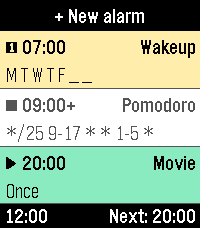
Tools & UtilitiesYet another alarms app, with cron mode for maximum flexibility, and many other (more & less) useful features. Features: - Alarm sound & vibration - Increasing alarm volume - Snooze - Multiple alarms - Labeled alarms - Discreet hidden alarms - Built-in tunes & vibration patterns - Custom tunes (Seriously?? See below.) - Custom vibration patterns - Weekday-based repeat scheduling - Cron-based repeat scheduling - Quick disable / enable / skip next occurrence - Configure alarms on the watch or on the phone - High configurability The alternative cron mode makes it possible to define very versatile alarm repeat schedules. E.g., an alarm can be configured as "*/25 9-17 * * 1-5 *" to fire every 25 minutes between 9-17 o'clock on Mon-Fri for an automated work-time pomodoro interval timer. Cron mode allows scheduling configuration for - minute, - hour, - day of month, - month, - day of week, and - week number (ISO). The tune composing feature uses a subset of the ABC notation, supporting 7 diatonic notes, 10 octaves, sharps/flats, rests, and fractional durations. A helptext is included in the app. Admittedly a bit overkill of a feature for an alarm app, but fun, & makes it possible to distinguish an alarm without even glancing at the screen. The feature is experimental, so don't use it as a tune vault. The user interface follows the design of the Another Timer app. Use them both to feel familiar. Alarms can be labeled, tunes can be composed, and vibration patterns can be defined on the watch using the builtin touchscreen keyboard, or alternatively on the phone's config page, where all the alarms, tunes and vibration patterns can be edited. The on-watch keyboard is adopted from metuuu's brilliant Mölkky Scorekeeper app, https://apps.repebble.com/m-lkky-scorekeeper_bb6ffbee520f4c4cafc2b424.
 72
Another Timer
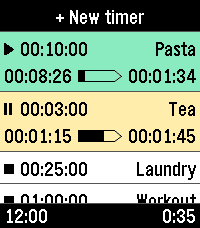
Tools & UtilitiesYet another timer app, built for fast, versatile, & straightforward usage. Features: - Only one touch to create & start new timers - Multiple timers - Reusable saved timers - Run-once timers - Labeled timers - Track remaining time, elapsed time, & overtime - Configure timers either from the phone or from the watch - Optionally start counting from app launch - High configurability The user interface follows the design of the Another Alarm app. Use them both to feel familiar. The app was originally forked from Sykerö Software's Countdown Timer, later mixed with many extra ideas and useful features from other open source apps. The touch dial is adopted from howeaj's Instant Timer, and the label input keyboard from metuuu's Mölkky scorekeeper. Check out also those brilliant apps! Attribution links, Pebble app store: - https://apps.repebble.com/countdown-timer_c1e3e132dae74bbcaf1a8320 - https://apps.repebble.com/timer-instant-timer_1a42bf7ed056404abbdd7bf9 - https://apps.repebble.com/m-lkky-scorekeeper_bb6ffbee520f4c4cafc2b424 Attribution links, GitHub: - https://github.com/Sykero-Software/PebbleCountdownTimer - https://github.com/howeaj/pebble-instant-timer - https://github.com/metuuu/pebble-molkky-scorekeeper
 17
Nyquist
FacesAnalog watchface with bold hands, to compensate your vision's lower Nyquist sampling limit in low light. Configuration options: - Show/hide corner elements (Pebble Time 2 only) - Invert black/white colors - Time format 24h/12h - Temperature unit
 55
Sae Weather Graph
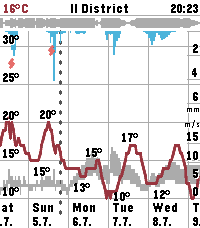
DailyHighly informative weather forecast graph for Pebble Time 2. The only weather app you'll ever need! Sää [ˈs̠æː] is Finnish for weather. Sae is Finnish for rain. The app works globally. The graphs of the different metrics are organized so that there's as little as possible overlap between them. E.g., precipitation rate & humidity scales are inverted, because they're typically inversely proportional to temperature. Precipitation rate visualized as "rainfall" also looks very natural. Displays 10 days of hourly values for: - Temperature, day's min/max - Precipitation - Thunder - Wind speed, gust speed, direction - Cloud cover level - Relative humidity - Air pressure - UV index - Sunrise/sunset times - Golden hours - Dark hours App controls: - Step forward/backward: press down/up - Toggle zoom: press select - Select location: long press select - View hourly values: touch the screen Data sources: - The Finnish Meteorological Institute (FMI) if you're in Finland or nearby - Open-Meteo elsewhere - Possibly others in the future Configuration options: - Units & formats - Data selection - Preset locations Open source. Or open slop. The app is 99% vibe coded.
 13
Rain Map Finland
DailyApp for viewing recent rain radar data in Finland. For the most accurate rain forecast. This is an earlier, Finland-only version of my other app, Rain Map. Rain Map has all the same features, and more. I intend to improve & maintain only Rain Map, but this app should work fine as long as the data providers don't panic. The data is downloaded from the Finnish Meteorological Institute's (FMI) open data service, https://en.ilmatieteenlaitos.fi/open-data-manual-radar-data. The app is optimized for reasonably handling the relatively large amount of radar & map information on the watch. Usage: 0. Go to Finland 1. Open the app 2. Select timestep: Press up/down or touch the screen 3. Switch zoom level: Press select/back 4. Show legend: Zoom too much 5. Move yourself to keep dry or to get wet 6. Thank FMI for open data Open source.