 0
Polaris
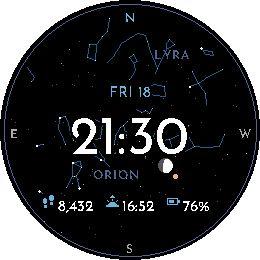
Faces24-hour free trial, then a one-time 2.99 EUR unlock. No subscription. Live star chart watch face for Pebble Round 2: the night sky above you, right now. The centre of the dial is the point straight above you and the edge is your horizon, so what you see is what you'd see lying on your back under the stars. The sky turns through the night: Orion rises in the east, the Big Dipper swings around the pole. • Hundreds of real stars from the Yale Bright Star Catalogue, the brightest ones bigger. • 29 constellations as clear stick figures, named where there is room. • The Moon at its true place and in its real phase, lit from the Sun's side. • Venus, Mars, Jupiter, Saturn and Mercury at their real positions. • The sky follows the Sun: a glow on the horizon at sunset, the blue hour, full night, dawn. By day the constellations stay as faint lines over the blue (or keep the night sky all day). It works in both hemispheres: in the south the chart turns south up. Make it yours in the face's settings in the Pebble app: • Colour: Ice, Gold, Rose or Mint. • Three data fields: steps, next sunrise or sunset, distance, calories, active minutes this week or watch battery. • Orientation: automatic, north up or south up. • Names on the chart: constellations and planets, planets only, or none. • Sky by day: live daylight or always the night sky. The sky is computed on the watch from your phone's location (or a location you type in the settings). Nothing is sent anywhere: the face makes no network requests. The 12/24-hour clock follows your settings. How to unlock 1. After the trial, the face shows a QR code with your watch's code (it's also at the top of the face's settings). 2. Scan the QR code with your phone and pay on the page that opens. 3. You get an email with your unlock code, and the same code is shown on the thank-you page. 4. In the Pebble app, open Polaris's settings and type the code under Unlock. Questions: [email protected]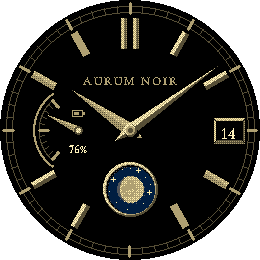 2
Aurum Noir
Faces24-hour free trial, then a one-time 2.99 EUR unlock. No subscription. Black and gold dress watch face for Pebble Round 2, in the manner of a classic analog dress watch. A sunburst dial catches the light from the upper left, bevelled gold batons and dauphine hands are lit on one facet and shaded on the other, and a railway minute track runs around the edge. At six, a gold-rimmed aperture shows the real moon phase over night-blue enamel with gold stars, computed on the watch from the date. A framed date window sits at three. At nine, a recessed gauge in the style of a power reserve shows what you choose in the face's settings in the Pebble app: watch battery (the default), steps (against 10,000 a day) or active minutes this week (against 150), with a gold needle, its icon and the value. Choose None for a classic dial with an hour marker at nine. Nothing is sent anywhere: the face makes no network requests and reads no location. The moon phase is computed on the watch. How to unlock 1. After the trial, the face shows a QR code with your watch's code (it's also at the top of the face's settings). 2. Scan the QR code with your phone and pay on the page that opens. 3. You get an email with your unlock code, and the same code is shown on the thank-you page. 4. In the Pebble app, open Aurum Noir's settings and type the code under Unlock. Questions: [email protected]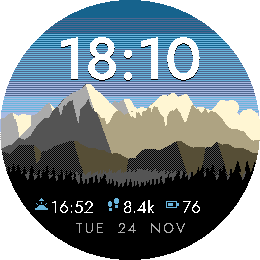 4
Snowline
Faces24-hour free trial, then a one-time 2.99 EUR unlock. No subscription. Live mountain watch face for Pebble Round 2. Snowline puts an alpine range on your wrist and keeps it in step with your day: the sun climbs over the summit and sets behind the ridges at your real sunrise and sunset, the peaks glow gold in the evening and pink in the alpenglow, and after dark the stars come out and the real moon phase rises over the snow. The light falls from the sun's side, left in the morning and right in the evening. The snow follows the season: summits only in summer, deep snow in winter. Make it yours in the face's settings in the Pebble app: • Colour of the time and icons: Glacier, Alpenglow, Sunlit or Lichen. • Three data fields: next sunrise or sunset, steps, distance, calories, active minutes this week or watch battery. • Light: Live (your sunrise and sunset), Always golden hour, Always alpenglow or Always night. • Scene: Clear, Partly cloudy, Snowfall or Fog. • Snow: by season (hemisphere from your location, or set it), Always winter or Always summer. Sunrise and sunset are computed on the watch from your phone's location (or a location you type in the settings). Nothing is sent anywhere: the face makes no network requests. Units and the 12/24-hour clock follow your settings. How to unlock 1. After the trial, the face shows a QR code with your watch's code (it's also at the top of the face's settings). 2. Scan the QR code with your phone and pay on the page that opens. 3. You get an email with your unlock code, and the same code is shown on the thank-you page. 4. In the Pebble app, open Snowline's settings and type the code under Unlock. Questions: [email protected]