 12
12WristList (Index 01 for your watch!)
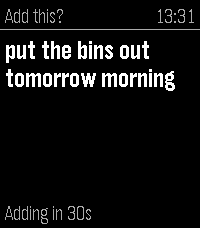
DailyPebble Index for your watch. This app allows you to dictate a message on your watch and publish the dictation to a CalDav server (Nextcloud/Ownecloud etc.) as a Task. Just add the CalDav address into settings along with the user and password to send messages to the server. Map the app to a physical Quick Launch button and adjust the "Quick Launch Action" settings in WristLists watch app to 'Dictate'. This will open the dictation function when the app is launched from a watch button. Speak the Task and either confirm with the select or wait a specified period and it will save automatically. No intermediate processing, uses the Pebble dictation capability and your task is sent direct to your server. Features include: -View your Task Lists -Dictate Task Notes -Edit Tasks (including Task properties) -Mark as Done / Delete Task -Open Dictate on Quick Launch setting option If you like this app please heart it, and if you find it useful feel free to buy me a coffee on Ko-Fi, can say thanks here https://ko-fi.com/ben839721
 42
42BigFace
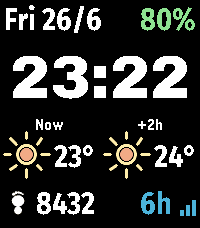
FacesBig Face is a simple clean big bold watch face that's readable at a glance for those who don't want to squint at their watch to know what time it is oh....its free with no paywall! Version 2 added user customisation - User configurable colours for complications, text and backgrounds - User configurable screen, select which complications you want to see on the watch face in all four corners including: Current date, Percentage watch battery remaining, Step Count, Distance Walked, Weather now, and in next 2hrs Next time it will rain, and amount of rain (bars), Humidity, High/Low Temp, Wind Speed, Feels like, Heart Rate (dependent on Pebble for frequency of updates), Bluetooth status. Settings allow: Toggle C/F in settings Toggle Distance Units (km/miles) Toggle Date Formats (US,ISO,UK) Shake to update weather settings Weather supplied by Open Meteo ...it also tells the time! If you like this app please heart it, and if you want to buy me a coffee on Ko-Fi you can say thanks here https://ko-fi.com/ben839721
 18
18BigWeather
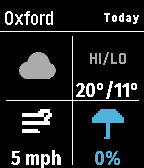
DailyMy eyesight isn't as great as it used to be when I bought the first Pebble watch many moons ago (pesky ageing.......) Anyway it seems like all the weather apps are trying to cram loads of information onto one small screen using tiny icons and small text, so Ive created this app with bigger text which is more suitable for a watch. BigWeather shows current conditions for your location and also any town or city via search, with today, tomorrow, hourly, now/next (+2 hours) and 5-day forecasts with rain, temperature, wind data screens using Open-Meteo (no sign-up, no API key). Features (as of Version 2.0 - August 2026) - Current location, stored and auto-refreshed on open - Improved search with ability to filter preferred location (Phone Settings), - Search any town/city worldwide - Add locations to Favourites - Customisable Today/Tomorrow screens, select which information you want to see (in Phone settings) - Hourly screens (Rain, Temperature, Wind - viewable by pressing Hourly and select to cycle through screens) - 5-day forecasts, per-day detail - Rain forecast (Now/Next) shows next rain, amount and intensity over the daytime, not just the peak % - No API key needed (Open-Meteo); optional OpenWeather with your own key - Units your way: °C/°F, mph/km/h, mm/in, 12/24-hour; large-text mode - Built for the Pebble Time 2 and classic Pebble models If you like this app please heart it, and if you want to buy me a coffee on Ko-Fi you can say thanks here https://ko-fi.com/ben839721
 16
16UK Rail
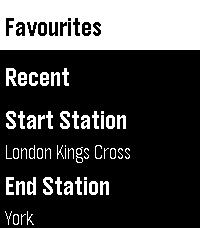
Tools & Utilities**New Version - This now works with no requirement to sign up for a National Rail Data account key, you can use the default UK Rail data source provided in settings to retrieve National Rail Data out of the box with no sign up needed** UK Rail puts National Rail live departure boards on your Pebble. Set your start and destination, then check your watch for the next trains between them with real-time status, platforms, and full calling points. Built for commuters this app allows you to save the journeys you make often, swap direction for the trip home, find your nearest station by GPS, text or CRS code and view all departures for a journey or from one station. Clean, high-contrast, and quick to read at a glance. Features - Live departures between your start and destination (National Rail Darwin / LDBWS) - Next-train-first, with expected times, on-time / delayed / cancelled status, and platform numbers - Tap a train for detail — its arrival time at your destination, every calling point, the operator, and any cancellation/delay reason - Rail replacement buses shown and clearly flagged - Three ways to pick a station — nearest by GPS, a 3-letter CRS code entry with live station-name lookup, or your recent stations - Save favourite journeys and reload them in a tap - Remembers your recent stations and recent journeys - Swap start and destination instantly - Works offline for station lookup (bundled database of ~2,600 stations) - Large-text mode for easier reading OPTIONAL: If you want to use a personal key then this can be added to the app as follows, but the app will now work without one. 1. Create an account at raildata.org.uk (Rail Data Marketplace) 2. Subscribe to the free "Live Departure Board (LDBWS)" product (approval can take ~24h) 3. Paste your key into the app's Settings If you like this app please heart it, and if you want to buy me a coffee on Ko-Fi you can say thanks here https://ko-fi.com/ben839721