Plugins are a dev preview. Enable them first in the Pebble mobile app: Settings → Plugins → Plugins/permissions preview. Learn more
 19
What's Playing
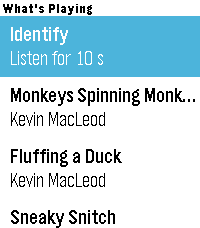
Tools & UtilitiesIdentify the music playing around you. Press Identify and your watch listens for up to ten seconds, then shows the song's title, artist and album. Your last ten matches stay on the main screen. Needs a watch with a microphone (Pebble Time 2, Pebble 2 Duo or Pebble Round 2) and a phone app that streams the watch microphone to the phone. The recording is sent to Core Devices' recognition service, which uses AudD to find the song. No account or setup needed.
 9
Todoist
Reminders & TasksInternal App Store identity for the bundled Todoist Index plugin.
 3
TickTick
Reminders & TasksInternal App Store identity for the bundled TickTick Index plugin.
 4
Stocks
FinanceShare prices for the tickers the user picked in settings. Each ticker is an instance carrying its price, the day's change in cash and the same change as a percentage.
 1
Roam Research
NotesCaptures notes to today's Roam daily note using an append-only graph token.
 3
Remember The Milk
Reminders & TasksCreates Remember The Milk tasks as reminders and exposes the user's lists as reminder destinations.
 18
Obsidian/Markdown Notes
Notes, Reminders & TasksCreates separate Markdown notes or safely appends to a selected existing note in a user-selected folder, with Obsidian-compatible tasks and links.
 1
Notion
NotesInternal App Store identity for the bundled Notion Index plugin.
 7
Muse
AI AgentsSend a message to your chosen Muse chat. Sign in and choose the destination in settings.
 7
MET Norway Weather
WeatherWeather where the phone is, from the Norwegian Meteorological Institute (api.met.no). One location instance (the phone's current position) and the hours ahead of it.
 10
Location Sharing
People & LocationReads the latest locations of people who already share their location with you through Google Maps.
 4
Hue
Smart HomePhilips Hue lights on the user's local bridge. Reads whether a light, a room or the whole home is on and how bright it is; turns them on and off and dims them.
 5
Grok Bot
AI AgentsSend messages to your Grok Bot and read its replies. Sign in and choose the bot in settings.
 15
Google Home
Smart HomeReads and controls existing Google Home devices and household automations. It cannot add or delete homes, devices, or automations.
 22
Google Tasks & Keep
Notes, Reminders & TasksSaves notes to Google Keep and creates reminders in Google Tasks through one shared Google account.