 11
11Feel your time
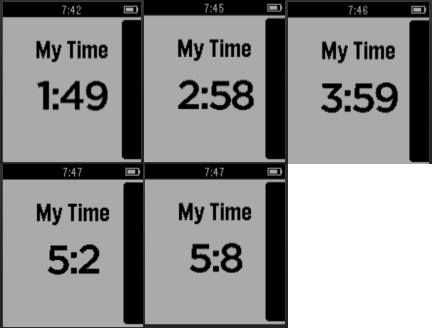
Tools & UtilitiesThis app will give you tactile feedback for the time elapsed so that you can know the time just from the vibration. For Ex: You want to meditate for 20 minutes. You start the app by pressing the quick launch button. The following is the pattern of vibrations. Starts with 5 short vibrations. Vibrates 2 times for even minutes, 2, 4, 6, 8... On the 9th minute, vibrates 10 times. On the 19th minute vibrates 20 times. On the 29th minute vibrates 30 times. Continues up to 60 minutes. So you will know the time just from the vibration count. Press Top button to Pause Press bottom button to Resume.
 410
410Maze
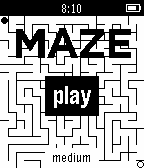
GamesPebbleMaze is a "virtual tabletop" marble maze where you tilt in the direction you want to go to reach your goal. The maze is uniquely procedurally generated each game. The up and down buttons change difficulty.
 5
5Simple Tachometer
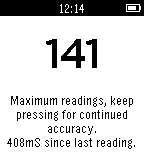
Tools & UtilitiesThis allows you to time RPM or BPM by pressing UP or DOWN in time with the event. The program averages up to ten of the most recent timings. Suitable for RPM/BPM of between 2 and 270. Program was written to allow for simple verification of turntable speeds during development of a new product, but could be applied to many different uses. Be aware that accuracy is dependent upon you ability to press button in time with event! Pressing SELECT starts the program and timing again.
 19
19minutes viber
Tools & UtilitiesThis app tell you the current time by the vibration. The vibration is for hour, for quarter then for minutes. This app will terminate immediately just after the vibration so it is expected to be assigned as the quick launch.
 21
21PebbleHAB
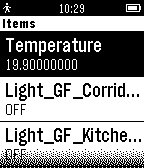
RemotesPebbleHAB is an OpenHAB client for the Pebble. Current capabilities include: -connecting to HTTP servers (no HTTPS) -connecting to my.openhab (only HTTPS) -displaying switch items and state -displaying Temperature items (the name of the item has to contain "temp" or "Temp") -displaying contact items -displaying dimmer items -toggling switch items -toggling dimmer items Please contact me for all issues or ideas on how to improve.
 16
16Jab
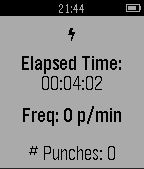
Health & FitnessUntil now, measuring improvement and tracking performance for punch-based athletics were difficult tasks, measured only by the face of your opponents. Now with Jab, an app for the Pebble smartwatch, you can analyze in real time the quality and quantity of your punching game. Through machine learning, Jab identifies when you are making a punch and calculates out a Punch Quality (PQ) value for you.
 23
23MimeStone
GamesA game of gesture based mimicry and dexterity The players stand in a circle and one player starts with the watch in his hand. That player moves the watch in one fluid motion. To signify that the action has been recorded, the watch will vibrate and the MimeStone puts on his game face. The watch is then passed on to the next player. This player has to do the action performed by the player before him, and then add his own action. Performing the right moves makes the MimeStone happy, but getting a move wrong will make him cry and that player will be eliminated. Each successive player does all of the actions of the players before him/her, and then adds their own. When a player is eliminated the list of moves resets, and the other players continue as if they started a new game. The last player remaining is the winner !
 30
30Tiny scoreboard
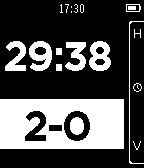
Health & FitnessKeep track of time and score with this pocket sized scoreboard. Whether you're playing Pool with a friend or the referee in a game of soccer, Tiny Scoreboard helps you out. Tiny Scoreboard features everything you would expect from a normal scoreboard: - Stop, start, reset and edit your time - And a score! (duh) - Customize your scoreboard in the settings menu (New!) It also keeps track of time and score when you exit the application! Tiny ScoreBoard controls Don't be discouraged by this wall of text! You only really need to know the first five functions. The rest should become pretty obvious. While time is selected and stopped: - Top: Start time - Middle: Select score - Down: Edit time - Hold Top: Reset time - Hold Middle: Reset score - Hold Down: Enter settings menu (New!) While time is selected and started - Top: Stop time - Middle: Select score While score is selected: - Top: Add 1 to the home team score - Middle: Select time - Down: Add 1 to the visiting team score - Hold Top: Subtract 1 from the home team score - Hold Down: Subtract 1 from the visiting team score While editing time: - Top: Add a minute - Middle: submit the selected time amount - Down: Subtract a minute
 36
36Illuminati Confirm Counter
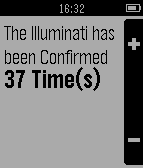
Tools & UtilitiesFor those obsessed with the Illuminati
 12
12HeaterMeter
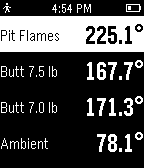
RemotesKeep track of your barbecue and control it without having someone fish around in your pocket for your phone. This Pebble app interfaces with a HeaterMeter BBQ controller through your smartphone to put you in control of your temperature at the grocery store, on the can, at a bar, no matter where you are with Internet access. Application provides a view of all your current temperatures and updates every minute by default. HeaterMeter is an open source / open hardware BBQ controller that you can build yourself with just two hands and a pile of electrical parts in just one evening.
 0
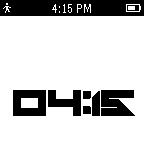
0AppFace
Tools & UtilitiesThis app is an app that shows the time using the FoughtKnight Watch Face.
 3
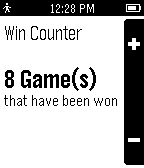
3Win Counter
Tools & UtilitiesKeeps track of the number of games you or someone else has won.
 41
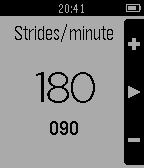
41PaceKeeper
Health & FitnessWhatchapp to help you keep your running cadence. It will vibrate your watch to keep your rhythm. Up and down buttons to set strides per minute. Select button to start/stop rhythm. Long press on select button will switch between black and white background.
 22
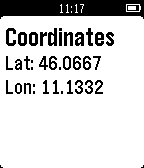
22GPS Coordinates
Tools & UtilitiesA simply watchapp that shows your raw GPS position
 6
6Rutgers Bus and Dining
DailyProvides bus times and dining hall menus for Rutgers New Brunswick.