 94
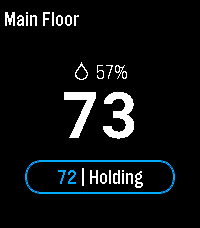
94Hive for Ecobee
RemotesPebble smartwatch app that allows you to control ecobee ( www.ecobee.com ) thermostats.
 10
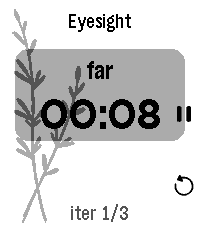
10Thymer
DailyThymer is a highly configurable timer app specifically tuned for Pebble Time 2: moderately big text for my old eyes, touch controls, and... that's it I guess. Timer definitions are written in TOML, processed on the phone, and sent to the watch where they are cached for daily use.
 5
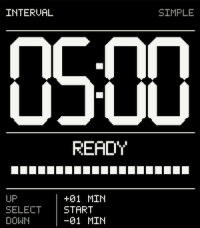
5INTERVAL
Tools & UtilitiesA timer app. Simple, clean, more when you need it to be. (Long-press UP)
 1
1Crohn's Watch
Health & FitnessKeep track of various Crohn's disease symptoms. Report stools, pain, well-being and generate weekly summaries. Check for correlations against common dietary triggers.
 9
9Caltrain.app
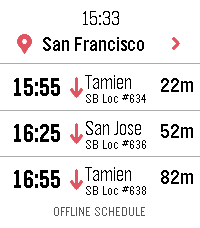
DailyCatch the right Caltrain from your wrist. Features: • Upcoming departures in a fast, glanceable list • Live estimates and delay information • Train details and a scrollable route timeline • Touch gestures and equivalent hardware-button controls • Tailored layouts for Pebble Round 2 and Time 2 ONLINE With a phone connection, Caltrain.app can use a one-time location lookup to select the nearest station. You can also choose and remember a preferred station. OFFLINE When your phone or internet is unavailable, the app retains useful live results and falls back to a compact schedule stored directly on the watch. Scheduled information is clearly distinguished from real-time data. PRIVACY No accounts, ads, analytics, or background location tracking. Unofficial community app. Not affiliated with or endorsed by Caltrain.
 28
28CountUpVibe Timer
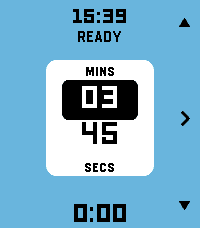
Tools & UtilitiesStay in the rhythm without watching the clock. Fire the timer first and then set time on-the-fly. Fastest way to launch a timer on Pebble. CountUpVibe Timer counts upward and taps your wrist at the interval you set — great for workouts, focus sprints, hydration nudges, posture checks, or any habit that needs a steady beat. It will give a gentle buzz on your wrist when a present time interval passes. Optimized for quick launch and fast adjustment with minimum key presses. Features: - ⏱ Quick-launch count-up timer. Once app is launched, timer immediately starts. Ideal to use with a Quick Launch button. - 🔔 Set vibration intervals while timer is running. Custom vibration interval (15s up to 99:59 — default 5 min) - 🌊 Draining water-fill shows the time to your next buzz at a glance. Change the water-color to your preference - ✏️ Launch the timer with one key press. Adjust later while timer is running - ⏯ Intuitive and minimal key presses to set the timer - 📿 Keeps reminding you in the background after you leave the app. Optimized operation for minimal battery usage - ⌚ Made for Pebble Time 2 and also runs on every Pebble (I only tested it on Pebble 2. Please give me a feedback if you try it on your Pebble) - Settings section in Pebble Smartphone part of CountUpVibe Timer let's you change the default settings/preferences and color palette. - Works with Quiet-Time (Silent Mode) in Pebble. If Quiet-Time is on, timer will run but watch won't vibrate. Set it once and let your wrist keep the beat. Operation Instructions: - Timer automatically starts counting the time upwards when you launch the app. It will buzz every 5 mins by default. App starts in Adjust mode. - Adjusting Vibration (Buzz) interval: In Adjust mode, Press Up and Down key to adjust minutes. Press Central key to highlight seconds adjustment (with UP and Down key). Press Central key again (or wait for 15 secs) to set the buzz time interval. Now you enter Run mode. - Run mode: Top key pauses/resumes timer. Bottom key resets/starts timer. Central key enters Adjust mode. - Timer will keep running in the background and it will keep buzzing/vibrating at the set interval. To stop it, press bottom (reset) key in Run mode. - The app is made to be used intuitively to rapidly launch a timer without too many key presses. - Settings menu in Pebble App changes the default settings/preferences and color palette. You can set the default vibration interval, minimum step of interval change and color of water-animation of you choice
 429
429Drag Racing
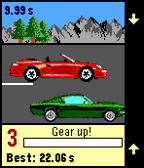
GamesXDA-Pebble Contest Winner It's not easy to create a good game for Pebble that's actually easy to control. Just a very few made this right. But there is a popular game genre that ought to be comfortable and fun to play on your wrist! Three buttons are just about right for this kind of game. Also, there's a zero BS factor. No waiting for gas, no double currency. Just a fair game designed to be fun!
 6
6Cigarette Tracker
DailyAn app to track cigarette smoking. (Vibe-coded and WIP, expect breaks/issues)
 0
0DownTimer
Tools & UtilitiesA looping two-stage interval timer with a running total, cycle count, and a separate on-demand reminder — all on your wrist.
 9
9Omnitrix
GamesJust a simple copy of Ben 10's omnitrix with functions you can play with
 0
0PT2SwimPool
Health & FitnessTESTING APP * PLEASE DO NOT USE IT
 1
1VSA Timer
Tools & UtilitiesA timer to help run VSA calls: every X (Standard 2) minutes, it will vibrate leading up to the call, so the rescuer (Of any level) can do a rhythm analysis and remember drug admin windows.
 5
5Fantasy Band
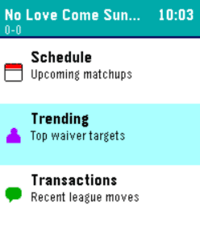
GamesFantasy Band is a Pebble smartwatch app that brings your Sleeper fantasy league straight to your wrist, giving you real-time scores, standings, and matchup data on the go. Think of this app as your window into your league, at a glace! Leave a like if you enjoy! 📋 Lineup & Schedule — View your starters and bench, check upcoming matchups, and monitor live game scores with projected points 📊 Power Rankings & Division — Track your league's power rankings, playoff odds, and division race in real time 🔔 Trending & Transactions — Stay on top of top waiver wire targets and recent league moves so you never miss a roster opportunity
 346
346Navi App
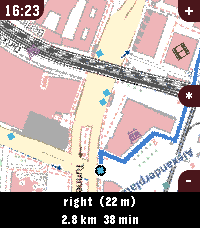
Tools & UtilitiesWelcome to Pebble Navi - Turn-by-turn navigation and a map on your wrist - No companion app needed - Support walking, driving and cycling modes - Destination selection from saved locations - You can dicate a destination to your watch if it has a micro - Save current location - Support for Imperial and Metric units - Added Rotation mode, the map rotates with the user and the route. - Supports every nearly pebble - Dynamic rerouting - Preview routes on your phone - NEW: Vibrate on left and right turns (only in walking and cylicng mode) You can manage locations in the apps phone menu. To people with older pebbles: There are two new options, one is to Enable experimental mode were we maximise sending speed of the map, but that can lead to instability, together with the telemetry option I hope i can make sure the update works fine on ever watch. When im sure it works fine with every watch model, i want to remove the telemtry again. I only could test this on my time 2 but the emulator behavior and hw behavior is different. If you have any suggestions or issues send me a message using the contact developer option or open a issue on github. Rebble Store Listing: https://apps.rebble.io/en_US/application/6a2ec9ab000bc200090963fc
 43
43Patch
DailyHarness the power of iOS Automations to send text messages (including iMessages) from your Pebble! No server required. Patch uses Outlook (yes, Outlook!) to send an email to yourself, which triggers an Apple Shortcuts automation to intercept the notification and send the text message. The whole process takes less than ten seconds and requires no intervention after you hit send on the Pebble. You can also assign emojis to contacts, and program up to 10 canned messages. This app only works if you properly configure the automation on your phone. Be sure to carefully follow the setup guide in the app settings. Official text response functionality on iOS should be coming soon to the EU as a result of Article 6(7) of the Digital Markets Act.