 22
22Meditation Vibrations
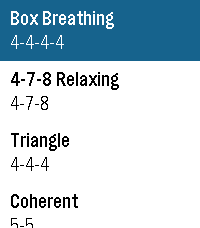
Tools & UtilitiesThis app uses common breathing exercises, using vibrations to signal when to breath in, hold, and breath out. This also allows for the user to add their own custom vibration patterns for breathing exercises.
 8
8TimeTick Watchface
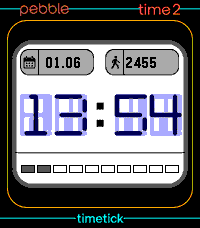
DailyThis is my first attempt at a touchscreen watch face. Here you can view the time, steps, date and battery information, and if you tap the time, a countdown timer opens. Set it using the touchscreen and start it. An alarm sounds when the time is up. Unfortunately, it’s not currently possible to create a watch face with touchscreen functionality; instead, it has to be declared as an app. I’m hoping an SDK update will change that soon. Feel free to give it a go and let me know if you like it.
 7
7ParkTime – Hourly Parking Reminder
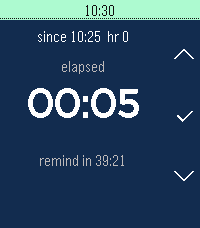
DailyParkTime – Hourly Parking Reminder. Pay parking by the hour? ParkTime reminds you before each hour expires so you can leave (or stay!) before you have to pay for another hour. Set your start time, pick how early you want the nudge, and let the app handle the rest.
 8
8NATO Alphabet Soundboard
Tools & UtilitiesAbsolute MINIMUM Viable Product. All features beyond displaying the NATO alphabet are not implemented. MASSIVE shout-out to Fabio Dutra for putting this together!
 26
26Fluid Sim
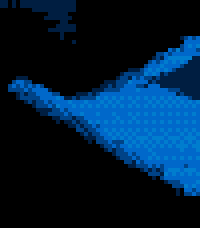
GamesFluid Sim runs a real-time Navier–Stokes fluid solver on your Pebble. Dye is advected through a velocity field with diffusion and incompressible projection, producing continuous swirling, splashing, and mixing that responds to your input. CONTROLS • Hold UP or DOWN to fire two angled jets that collide and mix near the center. • Hold SELECT to add a rotational stir to the whole field. • Tap or drag the screen (Pebble Time 2) to inject a swirling blob of dye at the touch point. • Tilt the watch to apply a gravity force; the fluid flows in that direction with added turbulence. COLOR PALETTES Choose a palette from the settings page: • Water — blue to cyan to white • Fire — red to orange to yellow to white • Acid — deep green to chartreuse to white • Rainbow — full spectrum, mapped to fluid density Color watches use ordered (Bayer) dithering for smooth gradients; black-and-white models render in four-level grayscale. The simulation runs on all Pebble platforms, with touch input on models that have a touchscreen.
 66
66Tube Status
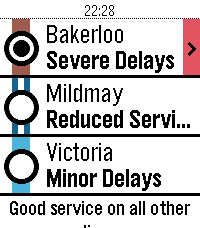
DailySee the line status of the London Underground from your wrist! Unofficial app using the TfL Unified API.
 45
45Marquee
DailyMarquee Got something you need to glance at quickly? Marquee shows any text you want right on your wrist. Always visible, no fumbling with your phone. Perfect for: 🔑 Door and gate PIN codes 📶 WiFi passwords for guests 🅿️ Parking spot or floor number 🔢 Locker combinations at the gym 🗺️ A hotel room number while travelling Different font sizes let you dial in exactly how much text fits comfortably on your screen. Set it once via the Pebble app, and your text stays on your wrist until you change it. Even after a restart. Scroll using up and down, center button jumps to the top. Use this sign ^ for line Feed. Simple. Fast. Always there.
 12
12igitimer
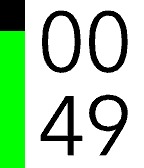
Tools & UtilitiesA simple and functional timer for Pebble smartwatches, featuring a high-contrast interface and quick controls. Button Functions UP Button Single Press: Adds 1 minute to the timer. Long Press: Adds 5 minutes to the timer. Note: Incrementing resets seconds to zero. SELECT Button (Center) Single Press: PAUSES or RESUMES the countdown. Long Press: RESTARTS the timer using the last set total duration. DOWN Button Single Press: Subtracts 1 minute from the timer. Long Press: Subtracts 5 minutes from the timer. Note: If the time reaches zero, the timer stops. User Interface Display: Minutes in the top half, Seconds in the bottom half. Progress Bar: A vertical bar on the left (green on black background) empties as time passes. Status: When paused, a pause icon appears in the center. When time expires, the watch vibrates.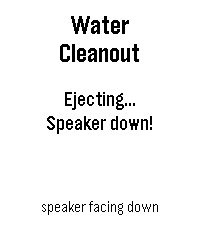 91
91Water cleanout
Tools & UtilitiesWater Cleanout — Eject trapped water from your Pebble Time 2 speaker after a swim. Just got out of the pool? Water Cleanout clears your speaker the same way an Apple Watch does. Hold the watch speaker-side down and press the middle button — it plays a short sweep of low-frequency tones centered on 165 Hz that drive the speaker diaphragm hard enough to push trapped water back out through the grille. How to use it: 1) After swimming, dry the watch and hold it speaker-side down. 2) Open Water Cleanout and press Select. 3) Let the ~7-second tone sequence finish — run it again if audio still sounds muffled. Built for the Pebble Time 2, the first Pebble with a speaker. On Pebbles without one, it falls back to a vibration.
 17
17YakuGo Translate
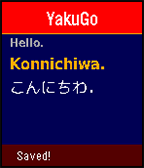
Tools & UtilitiesUse your voice to quickly translate phrases into Japanese (romaji & new hiragana)! Save your favorite phrases! Your last 8 translations can be viewed on your phone.
 31
31Calculator+
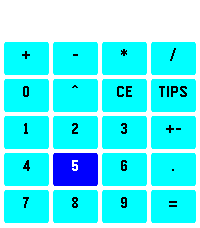
Tools & UtilitiesA simple calculator app for the Pebble Time 2. Features: - Supports addition, subtraction, multiplication, division, and exponentiation. - Native double and uint64 operations for flexible precision (up to 6 decimals). - Touch support for Pebble Time 2, including haptic feedback and a swipe gesture to delete digits. - Pre-Tax and Post-Tax Tips and split calculation: Enter the amount of your bill, press "TIPS", press [UP]/[DOWN] to adjust the percentage, and press [SELECT] to toggle between tips percentage and splits ways. For Pre-Tax tips, enter the pre-tax amount first, press '+', then enter your tax amount, finally press 'TIPS', and your tips amount would be calculated pre-tax. Credit to Michael E. for the original implementation of this app.
 7
7POTA Pebble
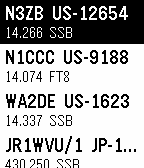
Tools & UtilitiesShows you the latest POTA spots. You can filter by band and mode.
 6
6Deadliner
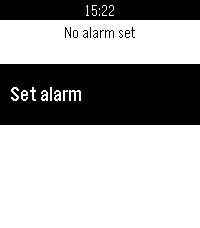
Tools & UtilitiesZeno's paradox for alarms
 15
15Workout Zone
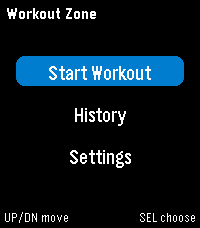
Health & FitnessWorkout Zone is a Pebble heart-rate workout app built for quick readability during cardio. It shows your live heart rate, current zone, and workout time on a simple full-screen display, then saves a summary with time-in-zone stats, a zone-over-time graph, and workout history.
 59
59Health Hub
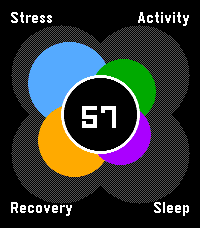
Health & FitnessA hub to view your daily health (stress, activity, sleep and nightly recovery) all in one spot. Designed to be reminiscent of the early Pebble health windows. It uses app glance to give you a quick sense of your overall status (out of 100) throughout the day.