 37
37Count Down
Tools & UtilitiesCustomizable timer with vibration notifications at specified times. Giving a talk? Training in the gym? Want to know how time passes without constantly looking at your watch? Let Count Down help! Hourglass icon by Jamie Rothwell.
 408
408Send Message
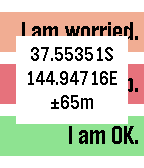
RemotesGPS-aware HTTP client supporting GET and POST requests and server response verification or display. Allows configuration with three sets of label, URL, JSON data segment (if using POST) and string to check for in the response to verify that the server accepted the message or specifying which part of the response to display on the watch (if starting with ~). For example, the label might be 'I am OK." and the URL/data fields contain the string: http://server.domain.com/folder/subfolder {"SenderId":"Peter","Text":"~Lbl", "Lat":~Lat,"Long":~Lon,"Accuracy":~Acc}. The URL and data can be spread across four setting strings to allow for long URL's. In the URL and data, ~Lat will be replaced with the latitude, ~Lon with the longitude, ~Acc with the accuracy, ~Alt with the altitude, ~Spd with the speed, ~Hed with the heading, ~Lbl with the label text, ~Adr with your street address, ~Gmp with a URL to your location on Google maps and ~Txt with your dictated text. If you don't have a server of your own, you could use one of the many public SMS-sending services to send text messages for you, e.g. http://www.smsglobal.com/http-api.php? action=sendsms&user=<user>&password=<password> &from=Peter&to=61456789123&text=~Lbl at ~Adr (see ~Gmp). This app is provided as is - you are responsible for testing this app thoroughly and determining whether it works appropriately and meets your needs. The source code is available if you want to examine how it works or customize it. If you find it useful, please give it a heart.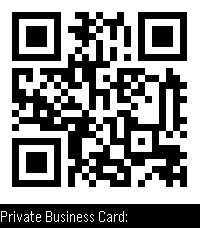 846
846QR Generator
Tools & UtilitiesThis app is open source! If you like my apps heart them in the appstore and consider a donation (link is at the source link of this app). Displays your business card or any string as QR code on your watch! Simply set the string on the configuration page on the phone. The QR code is generated on your phone and sent to the watch. No companion app needed! Works without internet connection. - Long-press select to hide description - Shake to activate background for 10 seconds
 82
82Formula 1
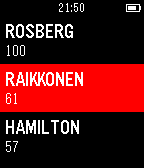
NotificationsWatchapp for all fans of Formula 1. In the application, there is a time counter to the nearest event, so you will not miss your favorite Grand Prix. Also you can watch the position of your favorite driver and team in the overall ranking. Now the season 2016!
 84
84Bike Sharing
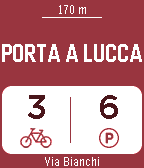
Tools & UtilitiesWith the BIKE SHARING app you'll always have the closest bike sharing station on your wrist with the number of free bikes and free slots. It works worldwide!! Pisa, Paris, New York, Wien, Chicago, London, Barcelona, Milano, Montreal, Miami and many other cities. Use the select button to update the data and the down button to view other nearby stations. NEW: Long press on select button enable/disable refresh with shaking! -> Follow me on twitter @ferra_andre and use #bikesharing4pebble BIKE SHARING is powered by http://api.citybik.es/v2/
 179
179Tesla Control
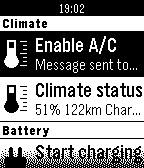
RemotesControl your Tesla Model S or X. Start/stop charging, heat/cool your car, you can check in/outdoor temperatures, see your range... Enter Tesla login on the phone through "Settings". Initially the app was made for myself but got a life of its own. You can buy me a beer or help me save for my Model 3: https://www.paypal.me/EdeBruijn :)
 42
42toodlebble
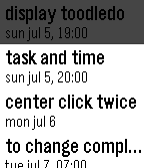
Daily"toodlebble" is the first simple toodledo client app for pebble. it can display set "duedate" or "duetime" and uncompleted tasks. select task and press center button for call actionbar, and press canter button again to "completed" (up/down button to cancel). also set "repeat" task will reschedule automatically.
 19
19Task Checker
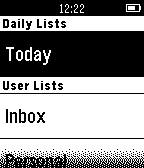
DailyQuickly view, complete or postpone your Remember the Milk tasks from your Pebble. Based on Pebble.JS, so requires an online connection to your phone. This product uses the Remember The Milk API but is not endorsed or certified by Remember The Milk.
 2.5K
2.5KSnowy
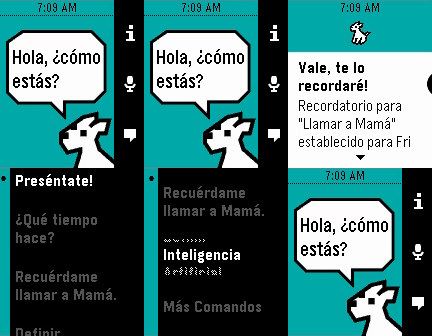
Tools & UtilitiesSnowy is the most popular personal assistant for Pebble Time. Set reminders, translate sentences, control your home through IFTTT - you name it, and chances are Snowy can help you out. For just $2.99 through KiezelPay, you can have the app voted "Most Creative Project" at the 2015 Pebble Developer Retreat, and one of Eric Migicovsky's (Founder and CEO of Pebble) favorite apps! Download Snowy and follow the onscreen instructions for obtaining a license. No companion app, no hassle, all awesome. The Pebble smartwatch just got a little smarter... --- For more information, visit MyDogSnowy.com, and if you love Snowy, remember to give him a ❤️! === DANSK (Beta): mydogsnowy.com/da DEUTSCH: mydogsnowy.com/de ESPAÑOL: mydogsnowy.com/es FRANÇAIS: mydogsnowy.com/fr ITALIANO: mydogsnowy.com/it PORTUGUÊS (Beta): mydogsnowy.com/pt Tags: Siri, Cortana, Google Now, Personal Assistant, Voice, Dog, pmkey.xyz
 342
342Get Up, Stand Up
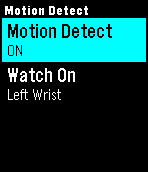
Health & FitnessSitting still for long periods of time can be detrimental to your health. This app reminds you to stand up and move around to keep you happy and healthy. It's ideal for those of us who work at a desk all day. Features: * Scheduler so you only get reminders when you want * Motion detection to track when you've been stationary too long * Snooze to pause reminders if not convenient (if you're at lunch or in a meeting, for example) * NEW: Configurable vibration strength Once the schedule and motion detection are set then there's no need to do anything more - the app works automatically. IMPORTANT: * If using the motion detect feature be sure to tell the app which wrist your watch is on.
 1.1K
1.1KWatchie-Talkie
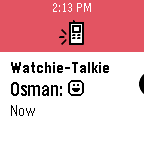
DailyPebble to pebble communication done right. Pebble is for awesome people and awesome people should stay in touch. Watchie-Talkie provides the best way to communicate to other pebblers all over the world. Send Emojis, Texts and even Voice messages straight from your watch.
 27
27Serrano Middle School
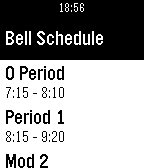
DailySupports English As a middle school student, I sometimes find it hard to find my way around. So, I made this app for Serrano Middle School. It tells you the bell schedules for normal days, PLC days, Early out, and rainy days. It also shows all the non-school days and the lunches for the entire lunch. If you like it, don't forget to leave a 'heart'. If you need support, use the email below to contact me. Version 1.1 - Now with the rotating periods. Version 1.2 - Nicer Homescreen w/ seahawks emblem. Also, the emblem is now on the main menu of your watch. Version 1.3 - Now the items in the lunch section expand into an entire card, so you can see all of it. Version 1.4 - Thanks to johannesn, there is now date and time on the home screen. Version 1.5 - Thanks to johannesn again, for making an end of school countdown!
 35
35Get Bus - HSL stops
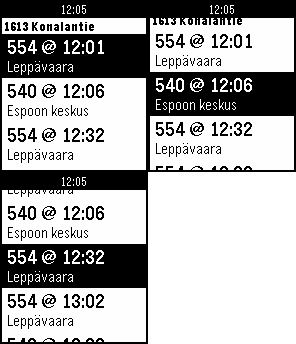
DailyNäe silmäyksellä lähimmät pysäkit ja seuraavat lähdöt. Lisää pysäkkejä suosikkeihin. Tarkastele pysäkkiaikatauluja. Katso kävelyohjeet pysäkille. English summary Find nearest bus stops and departures in the Helsinki area. The app will find the 10 nearest stops (using your phone's GPS) and the next departures from those stops. You can easily see how much time you have to get to your bus.
 35
35wifi status
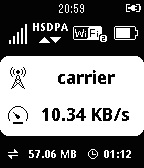
Tools & Utilitiesdisplay mobile rooter status for huawei e585 (myfi) and hw-01c, gl10p it can display: ・signal level ・network type ・connecting device number ・battery level ・carrier name ・current transfer speed ・total transfer volume ・connecting time ・microSD status
 12
12Enigma
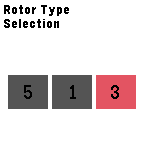
Tools & UtilitiesThis application is emulator of the 3-rotor Kriegsmarine M3 Enigma machine, which is used during the World War II. The Enigma machine has a series of settings that determines how it encrypts each letter. The settings include rotor wheel position, rotor type, and plug-board settings. The settings window can be accessed by holding any of the Up, Select or Down buttons. On the main screen, the input letter can be shifted by pressing the Up or Down button. The button left circle contains the input text and the upper left circle contains the output text. Pressing the Select button adds the input letter to the input message and the corresponding output letter is added to the output message.