 31
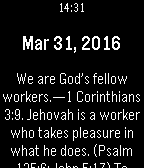
31Daily Text 2016
DailyEnjoy the daily text on your wrist... Donate: cktv8822@gmail.com https://www.paypal.com/myaccount/transfer
 22
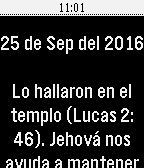
22Texto Diario 2016
DailyMuchos quisieramos tener un texto bíblico para meditar en él, durante la escuela o el trabajo. Ahora podrás revisar el Texto del Año, Texto del Día y el comentario de la Atalaya desde tu Pebble Watch además podrás volver al pasado y revisar los textos leídos anteriormente. (Pines Pasado, Futuro) Solo basta con abrir la WatchApp y ver el texto bíblico correspondiente para ese día. (La información fue tomada del Examinando las escrituras diariamente 2016 de la JW.ORG) Donaciones Paypal: cktv8822@gmail.com https://www.paypal.com/myaccount/transfer/buy
 10
102C: Double Counter
Tools & UtilitiesMinimalistic double counter with persistent storage. Short press up key to increase the upper counter. Long press up key to decrease the upper counter. Short press down key to increase the lower counter. Long press down key to decrease the lower counter. Long press select key to reset both counters. Use config to define custom colors for background and counters or enable status bar. Works without connection to the phone.
 29
29Simple Pomodoro
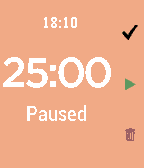
Tools & UtilitiesThis pomodoro app in pebble can: Customize time (work, rest, long rest and long rest frequency) and UI Screen Color Ability to take a long break after several iterations Shows the time and status Easily to set the intervals in pebble app under setting Count the number of pomodoro Use the setting under Apps tab in pebble to customize this app Direction: Top button: Skip to the next iteration Middle button: Play and skip Bottom button: Clear everything Courtesy: this app is based on POMO D'ORO by Lucas Conceicao. I wrote this app to cater my needs. Enjoy :)
 14
14511NY
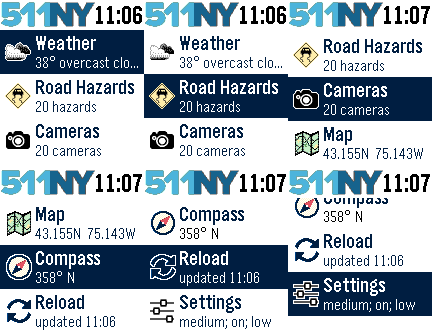
DailyThe 511NY app displays weather and traffic information to help you navigate the roadways of New York State. When launched, you can view your local weather by selecting the first menu item. The closest recorded road hazards are displayed when you choose the Road Hazards item. The roadway hazard list is sorted by distance from your location. Your location is based on your smart phone GPS, so make sure Location Services are enabled for your Pebble Time smart phone app. A list of traffic cameras is next in the main menu, also sorted based on your location. When viewing a traffic cam, the UP button displays the camera name, the MIDDLE button refreshes the camera image, and the DOWN button displays the distance to the camera. The Compass and Map features are next. The compass may need you to rotate your Pebble in a figure eight motion a few times for calibration. When viewing the map, use the UP and DOWN buttons for zooming, and the MIDDLE button to refresh your location. There are custom settings for text size, automated reloading of information, and GPS accuracy. This app was originally created for the DevPost HackFrost competition in February, 2016.
 14
14pSprites
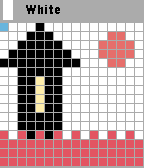
Tools & UtilitiesFirst sprite editor for pebble. You can draw small images on pebble and phone. Free trial for 24 hours. Usage:back button go to the toolbar with color, long press back button-exit. Up-go to forward, Down-go back, select-draw, long press select -menu
 11
11Pickle Pal
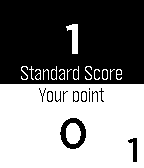
Health & FitnessPickle Pal is the score keeper especially designed for Pickleball. - Easily tracks score, server position and number (1/2) - Works for both regulation and rally scoring - Simple and easy to view display - Simple interface with error correction Display Layout: - Layout matches court - Opponents score is always on top - Your teams score is always on bottom - Serving team is highlighted in white - Current server (1 or 2) and position is indicated at the corners of the display To Start Pickle Pal Application: - Click [Select] button - Click [Down] button until Pickle Pal application is highlighted - Click [Select] button Button Quick Reference: - Double click [BACK] button - Starts a new game - [Select] button - Toggles the starting server position between your team and opponent's team (at start of new game only) - [UP] button - Increments score when your opponent wins the rally - [DOWN] button - Increments score when your teams wins the rally - Holding the [UP] button - Decrements your opponent's score - Holding the [DOWN] button - Decrements your team's score - [SELECT] button - Changes the server position - Holding the [SELECT] - Changes the server number (1/2) - [BACK] button - Exit game or exit setting menu (with confirm)
 99
99Reminder Pro
NotificationsProfessional way to make reminders My first app Leave your feedback at forums. (App's website link) If you've found any issue, contact me
 870
870Ventoo - GPS sports tracker
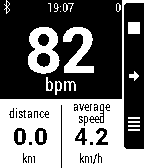
Health & Fitness(formerly known as Pebble Bike) Ventoo is a GPS sports tracker for your Pebble. It uses your phone's GPS to send speed, distance and altitude data to your Pebble. You can automatically upload your track to Strava or Runkeeper at the end of the track. If you got a Bluetooth LE Heart Rate Monitor (HRM) or Cycling Speed and Cadence (CSC), you can display heart rate (and zones with alarms) and cadence on your Pebble. Ventoo also has an innovative auto start feature which will auto start the bike computer on your watch when it detects you are riding a bike (it uses low battery technology, you can leave this switched on all day). Ventoo has a Live Tracking function that sends your position every 30 seconds to the internet. You can receive your friends'positions and display them with your own track, directly on your Pebble. Features: * GPS cycle computer (instant speed, average speed, distance, altitude, positive ascent, ascent rate, slope) * If available, use pressure sensor to improve altitude accuracy (Galaxy S3+, Nexus 4+...) * Tracks can be saved as GPX and exported to compatible services (Strava, Runkeeper...) * Multiple units (metric, imperial, nautical, pace...) * Bluetooth Smart (BLE) Heart Rate Monitor (classic bluetooth HRM are not supported) and Cycling Speed and Cadence (CSC) * Watchapp in english, german, spanish and french * Customizable screens with built-in configuration or with Canvas plugin * OruxMaps integration This app has no affiliation with the Swiss rights holder named Ventoo GmbH.
 5
5Light-Controller (BETA)
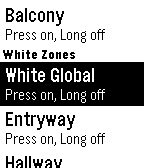
RemotesControl your LimitelessLED, milight or EasyBulb lights with your pebble! This is currently the BETA build, so only has basic functionality working (on/off) but there is colourful UI to come! (This was built and tested with a physical aplite watch) This will also require you to participate in the beta program for the companion app. Please head over to the Google+ page to sign up https://plus.google.com/communities/117265785994204078301 On first install, you will need to go into the settings of the companion app and turn on pebble functionality. Features: * Single click select button to turn on, long press to turn off * Rename your zones in the app, and they will show on the watch! Coming soon: * Colour in the UI (including coloured zone menu items based on the colour of the lights) * Optimise for round devices * Options to change how you turn lights on/off. Choose between toggle (single click once to turn on, then once again for off), single/long click or suggest a method that works for you! Feel free to drop by the github page too, to request some feature, or report a bug! (https://github.com/eliotstocker/Light-Controller/issues) Enjoy
 16
16Catcher
GamesIt's a simple catcher game. You have 2 modes of play : time mode and lives mode. In time mode you will play until time goes to 0. In lives mode you will play until no lives left. You have to catch tears (black and white). In time mode you can catch a clock for adding time. Black tear add two points to score, white add four points. Added animation of objects crashed. In lives mode there are five lives and for the moment there weren't added none while playing. It saves the 5 hightest score to pebble for every mode : 5 for lives mode and another 5 for time mode. Menu and messages are shown in 4 configurable languages : spanish , english , tagalog and waray. Waray language already not yet, waray for the moment is the same as english. Tagalog language with the help of google translate, not revised. Default language is spanish.
 42
42Grosh for Pebble
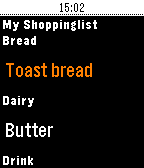
Tools & UtilitiesTry grocery shopping with your Pebble, it's perfect for keeping your hands free when you're shopping and speeds up the proces - and minimises the risk of dropping your phone! Grosh is the first commercial grocery app that adds Pebble support. Grosh is like no other grocery shopping app you have seen, it comes with intelligent suggestions and orders your list according the the store layout. How to get started: 1) Download the normal Grosh app on your phone (iOS, Android or web version) to get a FREE account that your watch app can connect to. Use the normal Grosh app to update and share your list before shopping. 2) Download Grosh for Pebble 3) Enter your Grosh account credentials by hitting the settings icon next to Grosh in your list of Pebble apps 4) Launch Grosh for Pebble. The list will be sorted, if your're in a store according to the layout. 5) Click the select button to mark items as purchased. 6) Shake the watch to check for updates to list, eg if partner added something to the list after you left home. 7) Long press select button to change list or modify quantity (set to 0 to delete item) 8) Use ""+ Add item"" to dictate a new item (requires microphone), including quantity eg. 5 milk Grosh supports stores in 31 countries and 18 languages. Grosh is built by a small team dedicated to bring you the best shopping app ever. We publish frequent free updates and would love your feedback. Get in touch via our homepage groshapp.com, our Facebook and Google+ pages called Groshapp or tweet us @groshapp.
 1
1MRHA
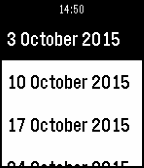
DailyEasily view Fixtures & Results, League Tables in MRHA.
 1.2K
1.2KMiniDungeon
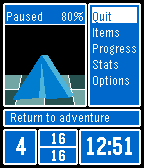
GamesExplore a dungeon as you go about your day. Exploring is randomized and time based, so you only act when an event is triggered. Encounter random monsters and chests. Survive, and you can advance deeper into the dungeon. Controls: Use the up, down, and select buttons to activate the menu options on the right of the screen. The back button will exit sub-menus, and exit the app when you are at the main adventure screen. If you are in battle and need to exit in a hurry, holding the back button will force exit the game. Features: * Support for Pebble, Pebble Time, Pebble Time Round, and Pebble 2. * Automatically saves progress on exiting, including the state of combat in the case of a force exit. * Optional vibration when an event happens. * Optional fast mode to speed up events. It does not change the relative frequency of event types, but makes the game faster if you have some dedicated play time. * Optional background app to explore while you use other apps and watchfaces. The background app can interrupt you when an event happens or save it for the next time you want to play. * Option to revert to original graphics Full code is available on GitHub. Additional Contributors: * BlackLamb * Belphemur
 11
11Logo quiz
GamesLogo Quiz is a fun game based on the best-known logos. Choose the correct logo among the four proposed to increase your score...but be careful: you have only ONE chance!