 19
19Bibble
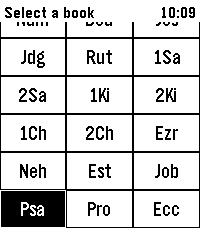
DailyA Bible app for Pebble with modern features Hold Select to dictate a Book, Chapter, or Verse, e.g. "Psalms 23". Or dictate a word or phrase, e.g. "God so loved the world" to jump to John 3:16
 19
19Crazy Game
GamesFlick your wrist around and watch bubbles fly everywhere. Made using pebble SDK
 19
19WikiRadar
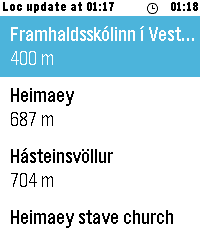
Tools & UtilitiesWikiRadar shows you Wikipedia articles about the places around you. SCAN — a list of nearby articles with distances, refreshed automatically as you move around. READ — full article intros on your wrist, cached for offline reading. NAVIGATE — a live compass arrow points at the place you picked, with the distance counting down as you walk. Long-press any place in the list to jump straight to the compass. Shake to refresh. Configurable Wikipedia language (13 languages), search radius, and metric or imperial units. Should work on every Pebble, but only tested on the Pebble Time 2
 19
19Dictate
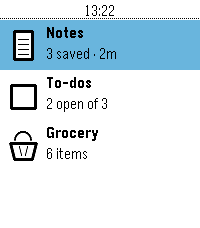
Tools & UtilitiesNote taking app built in the theme of the Pebble OS Stock weather app. Ability to store Note, To Do List, and a built in Grocery list.
 19
19Nicolas Cage Quotes
Tools & UtilitiesAn app to show quotes from Nicolas Cage movies, chosen randomly from a list. Made at Northwestern University's WildHacks. This app is open source and freely available on GitHub.
 19
19Heartrate2Pebble
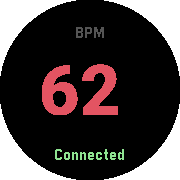
Health & FitnessTurn any Pebble watch into a heartrate monitor. This app is designed for owners of Pebble watchs without builtin heart rate monitor but own standalone Bluetooth wearables and want to view their heartrate without constantly checking their phone. The Android companion app can be found at: https://github.com/meerkat42/heartrate2pebble/releases Please dont hesitate to report Bugs and Feature Requests at: https://github.com/meerkat42/heartrate2pebble/issues
 18
18watchbot
RemotesPebble watch app to control robots using Artoo, Cylon.js, or Gobot frameworks
 18
18Metronome
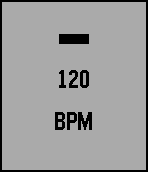
Tools & UtilitiesA simple metronome that provides visible and haptic feedback through vibration. It was made with the intention of being non-distracting while still noticeable.
 18
18TidePebble
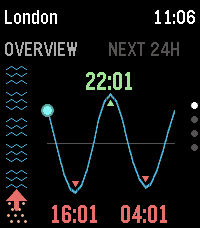
Tools & UtilitiesTidePebble puts the local tide forecast on your wrist. It uses your phone’s location to find the nearest available marine forecast and displays the next 24 hours as a clear tide-height chart on your Pebble. See how much beach is there right now with the "beachometer" on the overview and now pages. See the current tide level and direction at a glance, check the next high and low tides, and browse the full daily curve directly from the watch. TidePebble also shows current swell height and sea temperature, using Metric or Imperial as appropriate. Prefer another spot? Open the settings page to search for a location manually or switch back to phone GPS at any time. Forecast data is provided by Open-Meteo. TidePebble is intended for general planning and should not replace official local tide tables or safety information. Feedback and ideas are welcome - please contact me using the link below …
 18
18Pacelet
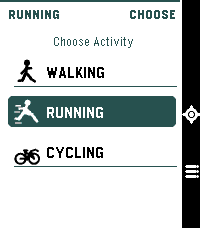
Health & FitnessA simple activity tracker, using phone GPS
![Swiss Transit [BETA]](https://assets.repebble.com/screenshots/55fecf6c4d083d7dea000086-0.png) 18
18Swiss Transit [BETA]
DailySwiss Transit saves you the hassle of pulling out your phone to check which public transport connection you need to take. With one click, it checks connections from stations near you to stations near your destination. If you are enjoying the app, please consider buying me a drink paypal.me/GMateo You can do the following: -Add stations near you to the favorites -Edit how far you are willing to walk to your destination or delete the favorite (long-press select on a favorite) -Scroll through connections -Press select on a connection to see where you need to transfer (green screen) Before using the app, you need add your favorite stations by visiting them and adding them from nearby stations. The app uses the SBB API so it shows connections from SBB and all local public transport providers in Switzerland Don't hesitate to contact me if you have an idea for an enhancement or a problem.
 18
18Baseball Pitcher
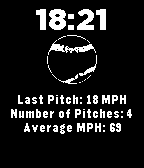
Health & FitnessAre you looking to improve the speed and consistency of your pitching? Strap on your Pebble, open your Baseball Pitcher app and start pitching! Get your most recent pitch speed and your average pitch speed over your entire practice.
 18
18WindSock
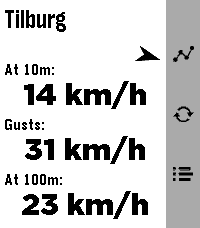
DailyWindSock is a basic location based wind Forecast app that I made mainly for my drone flying. But I'd imagine it being useful for many outdoor activities 🚁⛵😎 Watch: 🔶 Main screen shows current wind speeds at your current location (shown on top) at 10m , gusts and at 100/120m, and a small arrow for bearing 🔶 Forecast screen (down button) gives you a (touch-)scrollable 24hr hourly forecast of all these values (also bearing!). Where a line turns red when either Gusts or 100/120m Winds exceed your set warning threshold 🔶 12hr forecast Graph screen (up button) for all three values (Gusts in red in colour screens). Adapts to km/h, mph, m/s or kts choice. Phone side settings: 🔷 Choose wind speed unit between kilometers per hour (the default), miles per hour, meters per second or knots. 🔷 Choose between wind models 'Global' (the default) and 'Benelux'. 🔷 Choose your own 'Strong wind warnings' speed limts The Benelux KNMI model is slightly more accurate for NL, BE and LX (the model I used as main up to v1.2) but reports the high winds at 100m instead of 120m. The 100m/120m label on main will switch accordingly with your model choice. 👉 Just select Refresh on the watch main screen to apply any changes (or just refetch the data). ☑️ Chosen wind model or wind speed unit are persistent over launches. Data comes from Open-Meteo so should give you a worldwide coverage. Resolving phone's location into location-name done by a call to BigDataCloud. App uses phone location and loads all data fresh every time you start the app. Like what me and Claude made? Then give it some love in the store 😘🩷 And do check out my other stuff here:
 18
18DICE QUEST
GamesDICE QUEST — A Dice Dungeon RPG Roll your way through six stages of an ancient dungeon and face the Abyssal Dragon King at its heart. Every battle comes down to three dice — read the roll, then decide how to act. Combat Land a Pair or Triple, then press SELECT to attack Triple — critical hit, plus a bonus potion and a full heal, instantly when the dice stop Pair — a solid hit Straight (any three numbers in a row, any order) — an automatic full dodge, resolved the instant the dice stop Roll anything else, and SELECT triggers a guard attempt instead: roll over 10 and you halve the damage ("GRD"), roll 10 or under and you take it all Items Potion — heals 15 HP, tucked away in dungeon dead ends, and one of your Triple rewards ★ Triple Item — guarantees your next roll comes up Triple (one per stage) ■ Pair Item — guarantees your next roll comes up Pair (one per stage) How to Play Dungeon: UP / DOWN to turn, SELECT to move forward or confirm a prompt Battle, 1st roll: UP to start rolling, UP again to stop Battle, reroll: DOWN to start rolling, DOWN again to stop SELECT to confirm your roll and act Hold SELECT to open your item bag — UP / DOWN to choose, SELECT to use How far can you roll?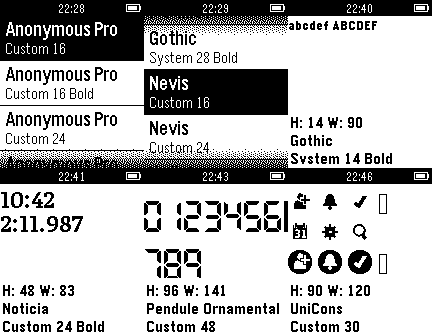 18
18Fontastic
Tools & UtilitiesPreview how fonts are displayed on the Pebble. Aimed at developers with the goal of helping them decide if their app should use a built-in font or one of the more popular custom fonts. Includes monospaced, digital (LCD / 7-segment display), and sans serif families. Most are clear and readable when sized down to be small or even extremely tiny. Open source repository on GitHub so you can see how this was done and use the fonts in your own project.