 13
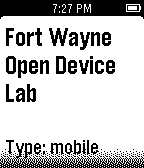
13Device Lab Locator
DailyLooking for an Open Device Lab to test your web site or mobile app. Now you can easily locate the closest Open Device Lab with your Pebble Watch!
 13
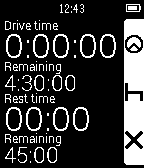
13Driver Timer
Tools & UtilitiesDriver Timer keeps track of your HGV driving hours for UK truck/lorry drivers. It should also be compatible with other countries that adhere to the EU Driving Laws. As of version 1.1, the application now supports EU domestic rules too for van drivers etc. This option can be enabled in the settings page. This app is very basic and only keeps track of driving hours on a daily basis. It has vibration alerts for when you are getting close to approaching your driving rest periods. I made this app as part of my dissertation project for my university degree and I would appreciate any and all feedback. It is based on the original code from https://github.com/Katharine/pebble-stopwatch
 13
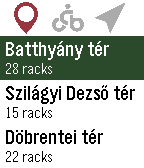
13MOL Bubble - MOL Bubi for Pebble
Tools & UtilitiesUnofficial Pebble app for MOL Bubi, the Budapest public bike-sharing system. It lists the docking stations, closest first, showing the distance, number of available bikes and the total number of racks for each. By selecting a station (using the select button), the approximate distance and direction are displayed, conveniently guiding you to the station. Works in Budapest, Hungary only.
 13
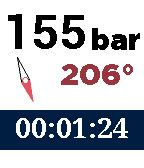
13Scubawatch
Health & FitnessA companion to scuba divers. This app can help you time your dives, and record your air consumption and compass heading. Simply press the up and down buttons to change the air pressure, and it will be recorded and time-stamped. To record the compass heading, press the middle button. You can see a log if you long-press on the select button. To reset the timer and clear the log, double-press the select button. Every five minutes it will vibrate to remind you to log the air pressure.
 13
13thumpa
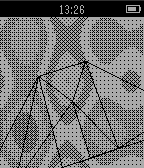
Gamesplasma and spinning 3D wireframe
 13
13ZWay Control
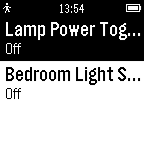
RemotesPLEASE NOTE: I no longer have a Z-Way system, I cannot verify whether this app still works. If you have one and want to take over maintenance, please reach out. --- New in 1.2: Fixed compatibility with Pebble Classic Control your Z-Wave light switches from your wrist! This unofficial app integrates with your Raspberry Pi-based Z-Way system. Currently this app only supports on/off switches, more support to come in the future. Please be sure to run Settings - a username/password can be set via http://<raspberry-pi ip-address>:8084/ if you haven't already. This app requires a Raspberry-Pi based ZWay system (http://www.z-wave.me/) to function, and also requires your phone be on the same local network as your Z-Wave system. Not compatible with other ZWave systems such as Vera. Questions or feedback welcome: pebble@radicand.org Contribute to the app at: https://github.com/radicand/PebbleZWay
 13
13Nieuw Currency Converter
Tools & UtilitiesBEST Currency Exchange Rates App Updated! Custom amount, to and from currency selection. Get accurate and instant currency exchange conversion between any two currencies right from your wrist! NO companion app required, and you can use the Pebble App to modify settings. Enjoy!
 13
13NYTimes Top Stories
DailyTrending news on your wrist. This news app lists Top 10 stories from NYTimes.com. Select a story to see an abstract. Shake/move your wrist to refresh news.
 13
13Randomizer
Tools & UtilitiesCalculate random number by pressing Select button. Receiving number from 0 to 99 and show sum of digits.
 13
13QuickTodoist
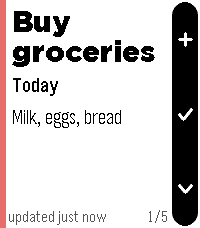
Tools & UtilitiesI wanted a Todoist app that starts instantly, so QuickTodoist caches your tasks and shows them the moment you open the watch. No spinner, no waiting on your phone. It refreshes quietly in the background after that. It's meant for a quick glance at your top tasks and to jot down a new one. Everything else is faster on your phone or desktop, so it's deliberately left out here. FEATURES - Today at a glance: each task is a fullscreen card with due time, project, priority color and description - flip through them with up/down - Instant startup from cache; auto-refresh every time you open the app - Add tasks by voice on watches with a mic (Todoist quick-add understands "buy milk tomorrow p1"); other watches refresh manually instead - Shows Today's tasks, or any Todoist filter you choose - Mark tasks done from your wrist (hold select) - Timeline pins for tasks scheduled at a specific time today - Configure once on your phone: API token, filter, and sort order (Todoist order, priority, or due time) - Text size follows your watch's own Text Size setting No token yet? The app shows sample tasks so you can try it right away. Add your free Todoist API token when you're ready (Todoist: Settings -> Integrations -> Developer). Not affiliated with Doist. Todoist is a trademark of Doist Inc.
 13
13Nice Timer
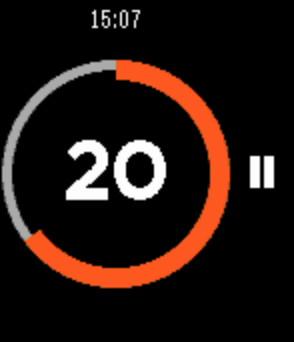
Health & FitnessNice Timer is a simple to use fitness timer. No need to set duration every time. No risk of deleting your timers. Just select the desired interval, and start your training. Useful for crossfit, or any other intensive training that consists of short intervals. You can select one of three intervals: 10 seconds, 30 seconds and 1 minute. After your timer begins to tick, you can pause or completely reset it. Go back to the menu to select another interval. The timer will vibrate shortly a few times to let you know that it stopped.
 13
13RingView
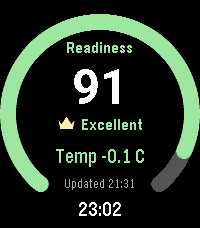
Health & FitnessRingView brings selected Oura readiness, sleep, activity, heart-rate, and stress/recovery summaries to Pebble in a focused native watch app. Move between full-screen metric overviews with the hardware buttons or touch gestures. Each overview shows the latest value, a glanceable progress or range ring, and the last successful update. Open a detail view for seven-day score history, last-night sleep stages, an intraday heart-rate graph, or recent stress and recovery durations. RingView connects directly to Oura from PebbleKit JS on the paired phone. The access token remains phone-side and is never sent to the watch. API failures retain the last valid display, and refreshes are intentionally conservative. RingView has no backend, accounts, advertising, analytics, or trackers. An Oura account and compatible Oura data are required. RingView is an independent companion and is not affiliated with or endorsed by Oura Health Oy. It is not a medical device and should not be used for medical decisions.
 13
13timer
Tools & Utilitiessimple stopwatch
 13
13Shot & Recoil Counter
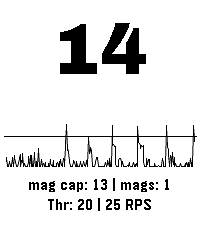
Tools & UtilitiesThis app uses the accelerometer to measure recoil (as spikes in acceleration) in order to count the number of shots taken in sports shooting. Settings: - Color Theme (default: Dark Mono) - Recoil threshold, set this to adjust for different calibers or other physical activities - Maximum rate of fire, set this to suppresses events happening after an initial detection to avoid false positives. (default: 3 Rounds Per Second) - Show Mags, toggle to display how many magazines have been spent (default: on) - Debug Energy Overlay, enable this to show the spikes relative to the current threshold setting, for easy adjusting. Usage instructions: - Short press up or down to change the threshold setting - Long press up or down to change magazine capacity - Short press select to reset count - Long press select to cycle through the color themes NOT A SAFETY DEVICE THE SOFTWARE IS PROVIDED FOR ENTERTAINMENT, TRAINING, AND/OR DATA RECORDING PURPOSES ONLY. IT DOES NOT DETECT OR CONFIRM ANY FIREARM SAFETY CONDITION AND DOES NOT PROVIDE ANY SAFETY GUARANTEE. THE SOFTWARE’S OUTPUT IS NOT A RELIABLE INDICATOR OF WHETHER A FIREARM IS LOADED, UNLOADED, OR SAFE TO HANDLE. THE SOFTWARE MAY BE INACCURATE OR MAY FAIL TO COUNT PROPERLY DUE TO SENSOR LIMITATIONS, CALIBRATION, USER HANDLING, WEAR OR ORIENTATION OF THE DEVICE, ENVIRONMENTAL CONDITIONS, OR OTHER FACTORS. USERS MUST NOT RELY ON THE SOFTWARE’S OUTPUT TO MAKE DECISIONS REGARDING LOADING, UNLOADING, FIRING, OR SAFE HANDLING PRACTICES. IN NO EVENT SHALL THE COPYRIGHT HOLDER OR CONTRIBUTORS BE LIABLE FOR ANY PERSONAL INJURY, BODILY INJURY, DEATH, OR PROPERTY DAMAGE ARISING OUT OF OR RELATING TO THE USE OF OR RELIANCE ON THE SOFTWARE OR ITS OUTPUT, EVEN IF ADVISED OF THE POSSIBILITY OF SUCH DAMAGES, AND EVEN IN CASES ALLEGING NEGLIGENCE, STRICT LIABILITY, OR OTHER TORT OR LEGAL THEORIES TO THE MAXIMUM EXTENT PERMITTED BY LAW.
 13
13PebbleSky Detail
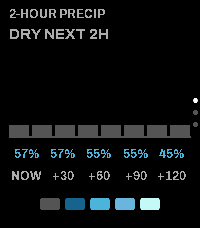
Tools & UtilitiesCompanion app for the PebbleSky watchface. Three screens, cycled with the Up and Down buttons: - 2-hour precipitation: bar timeline, rain countdown, and precipitation probability - 5-day forecast: condition icon with daily high and low - Now: location, temperature, feels-like, wind, and humidity Opens from the watchface via Quick Launch. Configurable: - Weather source: Open-Meteo (no API key) or Tomorrow.io (API key) - Temperature units (°F / °C) - Accent and warning colors