 7
7Techzei!
DailyTechzei is an online publication which publishes carefully crafted and curated articles from the world of evolving technology and gadgets.
 7
7iAnGi
Tools & UtilitiesiAnGi is a location based app and was developed and dedicated to all food lovers in Vietnam.
 7
7Ultimate Frisbee Timer
Tools & Utilities70/20 second timer for Ultimate Frisbee
 7
7UR Buses
DailyGet real time arrival estimates on your watch for the University of Rochester bus service. Pick any 5 route and stop combinations to view on your Pebble. Changelog at urbuses.tjstein.me/changelog
 7
7UIUCUMTD
DailyThis app will get the 6 nearest bus stops near you and tell you when the bus is coming at each stop. Please email issues/bugs to me! I am always looking to improve the app. Added loading screens (v1.4) Improved algorithm by a bit to speed up loading data (v1.3) Fixed some location errors (v1.2) Updated to improve on getting location (v1.1) Initial release of the CUMTD bus app (v1.0)
 7
7Uni Konstanz Mensa
DailyApp für die Mensa der Universität Konstanz
 7
7RennesPark.
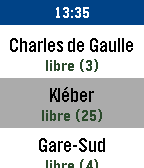
Tools & UtilitiesRennesPark, la seule application dédiée au parkings de Rennes, sur Pebble ! RennesPark liste les parkings à proximité. RennesPark indique, pour chaque parking : - Le nombre de places libres et totales. - La distance vous séparant du parking. *** bientôt : - Horaires et tarifs des parkings.
 7
7What Diocese Am I In?
Tools & UtilitiesEver needed to know or wondered what Catholic diocese you're in or the name of the local bishop? This app can tell you! United States only.
 7
7SGDtoINR ExchRate
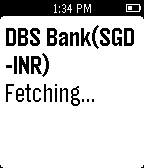
Daily"SGDtoINR ExchRate” App allows you to get exchange rate by launching it.Currently the App supports SGD(Singapore Dollar) to INR(Indian Rupees) from Banks in Singapore.
 7
7Fit Tracker
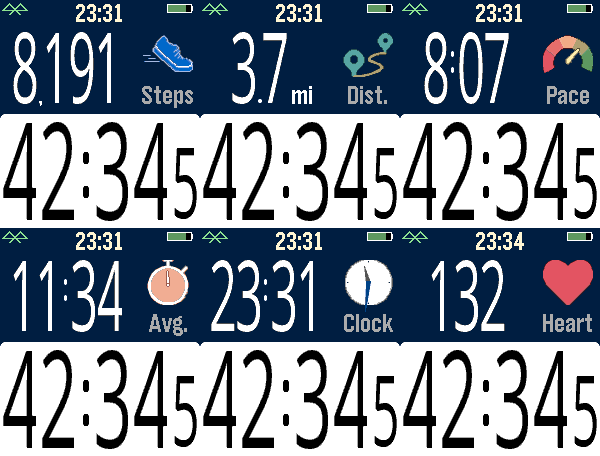
Health & FitnessExercise app that records elapsed time, heartrate, and distance. Exports FIT files for Strava and other online applications. The bottom button is used for starting and stopping. The top button switches the top line mode between steps, distance, current speed, average page, current time, and (if available) heartrate. Device-dependent features are heartrate, speaking, and touchscreen. There are custom settings for the watch to speak the interval distances or times (Pebble Time 2, Pebble Duo). The touch screen can be used to switch between the modes, similar to the up button. A touch over 0.2 seconds is recognized, and the left and right side of the screen change the mode forward or backward. Use the middle button to activate the menu for custom feature. These include showing tenths, bluetooth, battery, metric/imperial. Interval notifications by time or distance are supported, and the notifications can be by vibration or (if available) the speaker announcing the interval. You can see your mapped workouts at https://fit.setpebble.com. In order for your activity to be linked to your account, you will need to enter your Pebble serial number both for your account and when you adjust the app settings using the Pebble companion app. After a workout, do a long press on the up button to either Save or Delete your workout. If saved and you have a SetPebble account, you can see your workout at https://fit.setpebble.com. There is a Strava limit of 10 users (including me!), and I am not allowed to request an increase until we reach 10 users.
 7
7Hourly Chime
NotificationsA PebbleOS watchapp that chimes on the hour with the speaker and/or the vibration motor. Runs on Pebble Time 2 (emery) and Pebble 2 Duo (flint) — the two watches with a speaker.
 7
7Hourly Steps
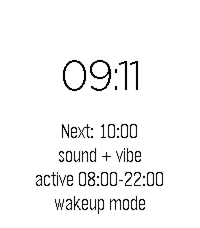
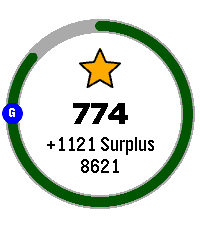
Health & FitnessHourly Steps mimics Fitbit's "Reminder to Move" functionality but with way more user control. Through App settings you can adjust: - What hour to start getting reminders - How many minutes before the end of the hour to get reminded to move - How many hours you want to be reminded to move - The minimum steps you want to be reminded to do each hour - What your daily step goal is - What days of the week you want to receive reminders - All the colors used in the app's visual appearance Hourly Steps will even help you reach your daily step goals by splitting that goal by your active hours and showing it as a stretch goal after hitting the minimum. For example: if you want to do 10,000 steps a day and be active for 10 hours a day, it'll show a stretch goal of 1,000 steps each hour after finishing the minimum steps. That stretch goal will automatically adjust if you get closer to that goal or fall behind, creating a "deficit" or "surplus" value that shows how on track you are. You'll even get a Fireworks show upon completion of daily steps. Please allow an hour after installing for the app to establish steps at the start of the next hour. It may show an incorrect hourly steps value until then. Note: Due to Pebble limitations around tracking steps within a specific time frame, this app uses a background worker to get steps at the start of each hour and determine when to open the app for reminders. You can optionally turn this off if you need the background worker for something else. This will cause Hourly Steps to use wakeup timers instead, however that has some limitations. Since there can only be one Foreground app at a time, it'll close down any other app you have open even if it doesn't need to remind you of steps. This will happen once at the start of an hour and once during active hours at the reminder minute you set (but not outside of active hours). It may also fail to use the timers entirely if another app has scheduled a wakeup for the same minute This should not happen with background worker active. Because of this I highly recommend keeping the background worker active. Fireworks code adapted from: https://apps.repebble.com/fireworks-particle-effects-glancing_5592dc3e53d39fc50500006b
 7
7TTC Subway & Bus
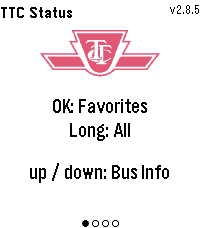
Tools & UtilitiesTTC Subway & Bus — Toronto transit at a glance, right on your wrist. Get real-time bus and streetcar arrivals for up to 5 saved locations (4 routes each), with countdowns that keep ticking between refreshes. Set a per-stop walk time and the watch buzzes the moment you need to leave to catch your bus. Check subway status for Lines 1, 2, 4, 5 and 6. Pick your favourite stations to filter alerts to just the ones that affect your commute, or long-press for all active outages. Features: Live arrival countdowns with "Arriving" and data-freshness indicators "Leave now" vibration based on your walk time to each stop Smart auto-refresh that speeds up as your bus gets closer Subway alerts filtered by your favourite stations Light and dark themes Easy setup from the phone settings page, just enter the route and stop numbers from any TTC bus stop sign
 7
7Cykelstationer Göteborg
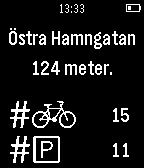
Tools & UtilitiesThis is an app to quickly check the status of the public bicycles of Gothenburg. Just run the app and it will check how many bikes/stands are available at your nearest station. Uses the open data from the City of Gothenburg available at http://data.goteborg.se. The header image was created using the "Pebble UI Photoshop Kit"-template (https://github.com/mcongrove/PebbleUI) by Matthew Congrove (http://www.mattcongrove.com/) licensed under CC BY-SA 4.0 (http://creativecommons.org/licenses/by-sa/4.0/deed.en_US).
 7
7DogeRain ALPHA
GamesEARLY ALPHA. This may crash, make your watch explode and kill all your shibes. Press the button to create a dogecoin rain. Others nearby having the app open can collect. #makeitrain Tweet @sodoku for issues or recommendations