 5
5Storyline
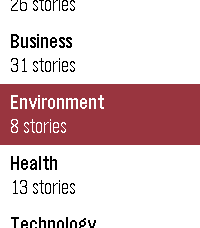
DailyShows what news outlets are reporting, grouped by event rather than by publisher. When several papers cover the same story you get one card, not eight near-identical headlines. When a story runs for days the watch keeps the thread: press SELECT on a card marked "N updates" to walk back through how it developed, one day at a time. - Eleven publishers, refreshed daily - Stories grouped by event, not repeated per outlet - Multi-day timelines for stories that keep running - Browse by category: world, politics, sport, culture, business, technology, science, health, education, environment and UK - Works on every Pebble, from the original through to Pebble Time 2 Where sources disagree on the facts or the framing, cards are marked so you know the story is contested. A fuller explanation of how they differ is coming to the web. Coverage is currently UK publishers, with other regions planned. Collects anonymous usage statistics: how often the app is opened, which categories are read, how far down the feed you scroll, and whether story timelines are opened. This includes your country and a random per-watch identifier so repeat use can be counted. It does not include your name, your location beyond country, your IP address, or which individual stories you read. Not affiliated with, endorsed by, or a publication of any news organisation. Headlines and summaries are generated from publicly available RSS feeds.
 5
5Allure
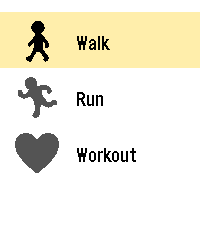
Health & FitnessBETA - Allure is an activity tracker for the Pebble Time 2 that turns your heart rate into color. Pick an activity, start, and glance at your wrist: the screen color shows your effort zone, and the current time stays visible. Inspiration Allure is directly inspired by the official Pebble Workout app. It reuses its idea of a simple, glanceable workout screen, and adds color-coded heart rate zones. It is an independent community project, not affiliated with or endorsed by Pebble. Features - Three activities: walk, run and workout. - Live heart rate with 5 effort zones, each with its own color. - Large numbers, easy to read while moving. - Walk and run: switch between duration, steps, distance, pace and speed with one button. - Workout: a simple view with duration and heart rate only. - Session summary: average and maximum heart rate, plus estimated calories. - Zones and calories adapt to your age, sex, height and weight, set from the settings page on your phone. - Available in English and French. Requirements A Pebble Time 2 with the heart rate sensor enabled. Beta notice This is an early version. Heart rate zones, distance and calories are estimates, and Allure is not a medical device. Feedback and bug reports are very welcome on GitHub. Open source (MIT): https://github.com/WayeMelse/allure Author: WayeM
 5
5ZWay Time
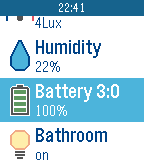
RemotesZWay Time application allows you to control your RaZberry based smart home. It supports controls: - on-off switches; - dimmers; - RGB switches; and sensors: - motion; - humidity; - light; - temperature sensors. It can activate scenes as well. Devices are grouped into locations and can be filtered. Do not hesitate to email me to add support of new device types.
 5
5Taxi Santander
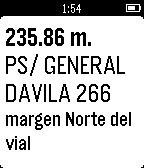
DailyTaxiSan help you to find taxi stops around you directly on your Pebble when you are in Santander city (Spain). It uses the open data provided by the city: http://datos.santander.es - Ayto. Santander
 5
5outrun
Health & FitnessOutrun is a running pacer built for Pebble: your phone tracks GPS pace and distance, your watch shows how you’re doing and buzzes when you drift off target. It’s wrapped in a horror “skin” — a stalker on your tail, a killer bar that empties when you fall behind, and a chase heartbeat when you’re in danger. Pair your watch with the Pebble app on your phone. Start a run on the watch and GPS kicks in on the phone; current pace, distance, and target are sent to the watch over Bluetooth. Pace is smoothed for a steadier read, and the watch shows “Acquiring GPS” until a real fix arrives instead of faking live data. When you stop at a light or for water, the run auto-pauses and resumes when you move again.
 5
5BORK
GamesBORK! BORK! BORK! (BORKs when a button is pressed. Also BORKs when opened via quick launch for faster BORKing! Bork sound from https://pixabay.com/sound-effects/nature-dog-bark-effect-382711/)
 5
5Change Counter
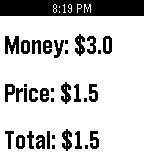
Tools & UtilitiesThis basic change counter helps you calculate how much change you will have left. Up - Increase Your Money Down - Increase The Price Select - Calculate Change Long Press Select - Clear
 5
5Next NASCAR Race
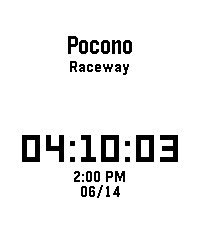
Tools & UtilitiesThis app shows you when and where the next NASCAR Cup Series race is in your local time. In addition, it also features a dd:hh:mm countdown until the next race. I made this app for myself because I wanted a super basic app that just shows the place, time, and date of the next NASCAR Cup Series race. Note: Race times and dates may change. Delays and schedule changes will not appear in the app.
 5
5Verse
DailySimple app to get a verse of the day Powered by ourmanna.com API
 5
5DVB
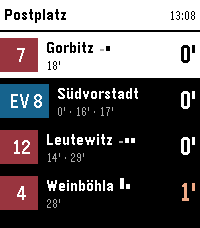
Tools & UtilitiesNavigate Dresden's public transport network from your wrist. This app shows you upcoming departures for stops around you. You can also view and follow a specific trip. On opening the app it shows you a list of stops around you, hold Select on a specific stop to mark it as a favorite and it will always be shown. Select a stop to view upcoming departures. Aside from the next departures, you can also see later ones for the same line and direction right below. If available, the app also shows occupancy data for all upcoming departures, so you can know if it might be worthwhile to wait for a later connection. If you select a departure, you can see the entire trip and the current position of the specific vehicle. This updates live, just keep it open to watch it along the route. The app supports three distinct styles of the departure, change it by long-pressing Select, then up/down and Select again to choose one.
 5
5Friture App
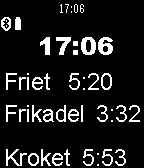
Tools & UtilitiesHoud bij hoe lang de frites, frikandellen en kroketten in de friture zitten. Als ze klaar zijn trilt de app.
 5
5Signet
Tools & UtilitiesSignet is a web3 authenticator for Antelope networks, created by AtomicHub. Log in to atomichub.io using Signet as your seal. Currently supporting WAX and XPR Network. Vaulta, EVM, and Bitcoin versions coming soon. Any app can integrate using the Signet Wharfkit plugin! Secrets are generated on your watch, and password-protected with encryption, in case you lose it. With Signet, you can access an ecosystem of art, games, and more. Unleash your creativity! This is an Alpha release. Please do not use this wallet to store valuable assets (yet).
 5
5Musetrap
Tools & UtilitiesMusetrap is a tool to provide prompts to ignite your inspiration. This watchapp is a stripped-down version of the musetrap.org web application.
 5
5HTTP Call-ur
RemotesLaunch the app to make a http call (get/post/etc) to a user definable url. Add headers or a body and set up authentication.
 5
5Estimate EV Charging Time
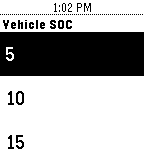
Tools & UtilitiesEstimate the time it will take to charge your Electric Vehicle (EV) and get notification when it is to be charge complete. The estimate is based upon knowing/setting the vehicle battery size and the vehicle initial SOC (State Of Charge) when you start charging. Estimates are made for Level 1 ( L1 @ 1.4 kW) and Level 2 (L2 @ 3kW & 6kW) capacity chargers. You can exit> the application after you advance through the screens and you will be notified with vibration at the time when L1 or L2 is at 100%. You can reset> if you want to cancel this reminder or start with a new charge cycle estimate. For these estimates to be accurate you will need to know and configure your initial battery capacity and set the initial SOC when you start your charging cycle.