 3
3Garoa Status
Tools & UtilitiesApplication in Portuguese This application shows if the famous hackerspace "Garoa Hacker Clube" is open or closed. Portuguese: Esse app mostra se o hackerspace "Garoa Hacker Clube" está aberto ou fechado.
 3
3BasicOpenHab
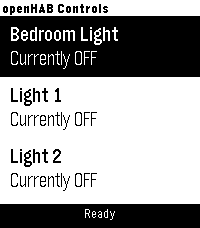
RemotesA simple app for toggling OpenHAB items. You can configure your OpenHAB server address and port, along with item display titles and exact item names. Item names must match those defined in your OpenHAB setup. Max of 10 items currently The app controls items by sending HTTP POST requests to the OpenHAB REST API, for example: http://192.168.1.69:8080/rest/items/bedroom_light body: "ON" or "OFF" Designed for use on a local LAN only (no OpenHAB Cloud support). no automatic discovery of OpenHAB items (yet?) Hope it works for you! Like the watch face? Help by buying me a coffee Support the project: https://ko-fi.com/chrishardwick17402 Every contribution, big or small, is greatly appreciated.
 3
3Ruter Departures
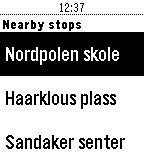
Tools & UtilitiesRuter Departures is an app for finding the departures of bus, tram, train and boats managed by the company Ruter. The app will locate the closest stops from your current location and when selecting a stop, show the departes ordered by time.
 3
3Bitcoin / CNY
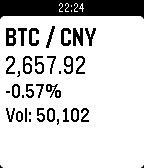
DailyShow Bitcoin / CNY
 3
3Pest Stop
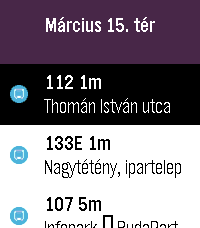
DailyYour wrist-sized companion for the Budapest Transit system Data source: BKK Zrt., CC BY 4.0 The full license text is available here: https://creativecommons.org/licenses/by/4.0/deed.en
 3
3Huckleberry
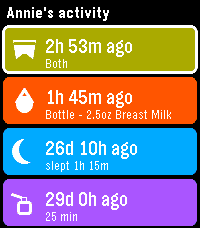
DailySee your children's latest logs from Huckleberry so you can always stay on top of diaper changes and upcoming bottle feedings. In order to use this app on your watch, you will need to generate an access token to authenticate with Huckleberry. I have created a simple dashboard for using Huckleberry on the web, as well as generating tokens here: https://huckleberry-dashboard.bfmw-dev.workers.dev/ * This project is an independent, unofficial integration. It is not affiliated with, endorsed by, or connected to Huckleberry Labs, Inc.
 3
3Pool Monitor
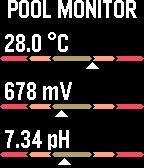
Tools & UtilitiesThis application enables the use of the IoPool pool probe API to extract data on water temperature, oxidation level, and pH.
 3
3NextSkyssBuss
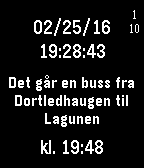
Tools & Utilitieswhen is the next buss from my house to work
 3
3EMRTS RSI Checklist App
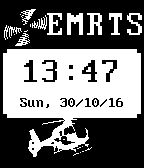
Tools & UtilitiesWritten for (but not on behalf of) the Wales Air Ambulance's Emergency Medical Retrieval and Transfer Service (EMRTS). Features: -Watchface with Date and Time including WAA logos. -Access to Immediate Rapid Sequence Induction (RSI) checklist. -Access to the Standard (Full) RSI Checklist. -60 second countdown timer at checklist completion, vibrates to warn of time to intubate. -Local weather conditions, including time of 'Official Dark' (30 mins after sunset as provided at your location by OpenWeatherMap - please note, OWM can deliver limited numbers of API calls per hour, so may not work every time if app becomes popular). Press Select (Middle Right) button from the watchface to access the menu. Please check the checklists meet your needs, the developer accepts no responsibility for errors in clinical management as a result of using this app.
 3
3Jadwal Sholat Indonesia
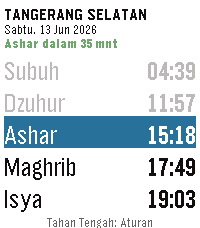
DailyPantau waktu sholat langsung dari pergelangan tangan Anda. NEW - On-watch settings. Long-press the center button to configure reminders, hide sunnah prayers, and set early reminder timing. No phone required. - Live countdown. The header now shows time until the next prayer (e.g. "Ashar dalam 23 mnt"), color-coded green → orange → red as it nears. - Past prayers are dimmed so the current and upcoming prayers stand out. - Day offset indicator. Browsing ahead shows "[Besok]" or "[+2 hari]" in the date line so you always know which day you're viewing. IMPROVED - Much larger text by default. Sunnah prayers (Imsak, Terbit, Dhuha) are now hidden by default, giving 5 rows instead of 8. The app automatically uses a larger font with the extra space. - Font size scales dynamically: larger watches and fewer visible rows means bigger, easier-to-read text. - City names are cleaned up (strips "Kota" / "Kabupaten" prefixes) so they fit the header without truncation. FIXED - Prayer reminders now trigger correctly when the app is launched by a wakeup alarm (previously silent on cold launch). - Network errors are shown on screen instead of leaving the app stuck on the loading message indefinitely. - Refreshing no longer causes a brief flash of stale data. Jadwal Sholat Indonesia menampilkan waktu sholat lima waktu — Subuh, Dzuhur, Ashar, Maghrib, dan Isya — langsung di smartwatch Pebble Anda. Data jadwal mengacu pada sumber resmi KEMENAG, mencakup seluruh kota di Indonesia dari Sabang sampai Merauke. Tidak perlu buka ponsel — cukup lihat jam tangan Anda.
 3
3Tesla Quick Actions
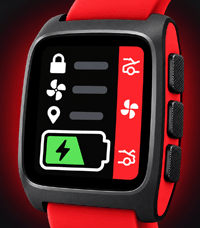
DailyRe-mappable quick actions for your car!
 3
3My Steps
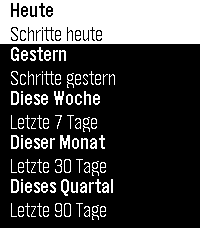
Health & FitnessMy Steps shows your Pebble-tracked step count and walked distance (calculated) right on your wrist: today, yesterday, and rolling totals for the last 7, 30, and 90 days — each with a full day-by-day breakdown. Step tracking itself is handled by the watch's own firmware; My Steps is a fast, easy-to-read viewer for that data. No settings, just as it is. It's done with the skill (see https://repebble.com/blog/spring-2026-pebble-app-contest) using Claude. --- My Steps zeigt deine mit der Pebble-Uhr erfasste Schrittzahl und zurückgelegte Strecke (berechnet) direkt am Handgelenk: heute, gestern sowie rollierende Auswertungen für die letzten 7, 30 und 90 Tage – jeweils mit einer vollständigen Tag-für-Tag-Aufschlüsselung. Die Schritterfassung selbst übernimmt die Firmware der Uhr; My Steps ist ein schneller, übersichtlicher Viewer für diese Daten. Keine Einstellungen, einfach wie es ist
 3
3Groove
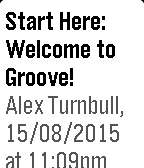
Tools & UtilitiesYou've always wanted to check your Groove status right on your wrist without grabbing your phone or starting up your computer? With Groove for Pebble you finally can. • See all your mailboxes, unread and open tickets • Show details and the latest message for every ticket • Mark tickets as read or completely close them (push select when you're viewing a ticket) With Groove for Pebble you'll immediately know whether you have to react or can continue relaxing at the pool. You don't have an account yet? Just visit groovehq.com and start your 30-day free trial.
 3
3GB Grid Monitor
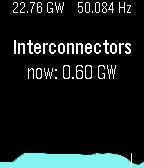
DailyOverview of the previous 24 hours of Great British electrical power generation, using data from http://www.bmreports.com/. The present grid frequency and (known) generation output is shown at the top. The up and down buttons can be used to scroll through each generation type. Midnight is shown by the white vertical line.
 3
3Get Bearing
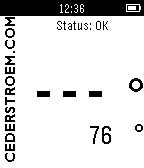
Tools & UtilitiesUse the compass to get your bearings. Take a sighting along the side of your pebble, wait for the signal, snap your fingers on your watch-hand (or click the set-button) and the bearing is shown with large numbers in the display. If the compass needs calibration, GetBearing asks you to shake. Dance, if you feel like it. After initial calibration, GetBearing shows the compass heading. The calibration continues in the background and the status message "Optimizing!" is shown. Visit www.cederstroem.com for more info.