 0
0BogeyCount
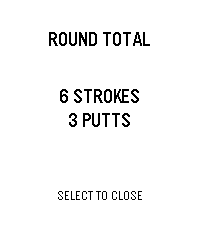
Tools & UtilitiesSCORECARD — Golf Misfit Edition Tally your round on your wrist. No fairway distractions, no app switching. Just strokes, putts, and the course. Track 18 holes with per-hole breakdowns. Tap up to add strokes, down for putts. Long-press to correct. Shake your wrist when you're done—instant total shows all strokes and putts for the round. Press down on summary to clear the round. Features: Full 18-hole scorecard Separate stroke & putt tracking Persistent storage (rounds saved locally) Haptic feedback on every input Quick summary view with 5-sec auto-dismiss Back-button navigation
 0
0PebbleCube
Tools & UtilitiesSimple speedcubing app.
 0
0UOR Queues
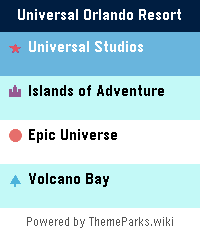
Tools & UtilitiesSkip the guesswork. UOR Queues brings live Universal Orlando Resort data straight to your Pebble — no phone-fumbling, no app-switching, no squinting at a tiny map. What you get: - Live wait times for every attraction across Universal Studios, Islands of Adventure, Epic Universe, and Volcano Bay. - Show schedules for every performance, with the next start time highlighted. - Opening and closing hours for each park, shown right on the park picker so you know at a glance where's still open. - Favourites — long-press any ride to pin it to the top of the list, kept in sync across park switches. - Launcher glance: park hours count down live in your app launcher, up to a week ahead, without even opening the app. - Sort by wait (ascending or descending) or alphabetically. Built for the watch: - Readable at a glance. Traffic-light colour coding (green / amber / red) means you don't need to read numbers to know if it's a walk-on or a two-hour queue. - Times follow your watch's 12/24-hour clock setting. - Works on both Pebble Time 2 (rectangular) and Pebble Round 2 (circular) — with native layouts for each. - Auto-refreshes every five minutes while open, without ever losing your place; pull the latest on demand from settings. Powered by ThemeParks.wiki — the community-maintained open API for theme-park wait times.
 0
0Osteo Recall
Tools & UtilitiesRecall app for osteo students
 0
0PT2SwimPool
Health & FitnessTESTING APP * PLEASE DO NOT USE IT
 0
0s0lrider
RemotesThis app allows you to control s0lrider (solar Knight Rider) robot via voice commands. The robot can be charged by sun and even has the cool red scanner lights! :) more details here: https://s0lrider.blogspot.com or here: https://www.youtube.com/watch?v=vYFRg15Gf5g
 0
0EMF Club Mate Stock
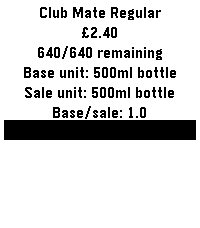
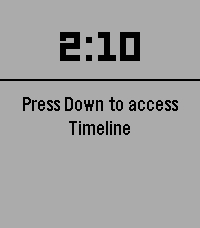
DailyGet the remaining Club Mate stock at EMFcamp (https://www.emfcamp.org/). Loads regular Club Mate stock on startup. Hold UP to refresh regular Club Mate. Hold DOWN to refresh Club Mate Granat. This was very quickly hacked together the day before EMFcamp while I should have been packing, and is my first pebble app. Probably mostly works. Only tested on my Time 2. YMMV.
 0
0Audio Cues Remote
Tools & UtilitiesApp to control Audio Cues
 0
0TrackGlance
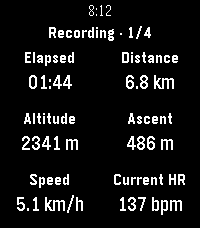
Health & FitnessView and control Locus Map track recordings from a Pebble Time 2 or Pebble Round 2. TrackGlance brings an active Locus Map track recording to your wrist. Choose the metrics shown for each Locus activity, switch between up to four pages, pause or resume recording, stop and save, and add waypoints. Pebble Time 2 also supports dictated waypoint notes and can send watch heart-rate readings to Locus. ⚠️ Important Setup Information: This watchapp requires both the Locus Map app and the TrackGlance Android Bridge companion app to function. Currently, the Android Bridge is not available on the Google Play Store and must be sideloaded manually. You can download the latest Bridge APK directly from the GitHub releases page here: https://github.com/ChristianHerget/trackglance/releases/latest
 0
0ZURICH-Railway-Datum
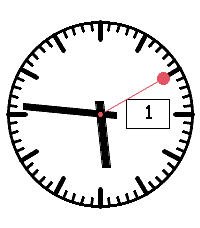
DailyAnaloges Swiss-Railway-Watchface mit größerer Datumsanzeige
 0
0Amber Electric Devices
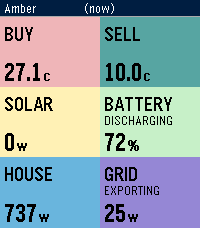
Tools & UtilitiesLive Amber Electric prices and home battery, solar & grid status. Right on your wrist! See what your power is actually costing you — or earning you — without pulling out your phone. Amber shows live buy/sell prices alongside your home's solar, battery, and grid activity, pulled straight from your Amber Electric account. **On your watch:** - **Buy / Sell** — current wholesale-linked import and export price, in cents/kWh - **Battery** — charge level and whether it's charging, discharging, or holding - **Solar** — current generation - **House** — current household consumption - **Grid** — current import/export power, and whether you're a net importer or exporter Data refreshes automatically when you open the app, and you can force a refresh any time with a long press on Select. **Requirements:** - An Amber Electric account (Australia only) - An Amber API key — generate one free at https://app.amber.com.au/developers/ and paste it into the app's settings on your phone No account data is stored on the watch itself — your API key lives in the Pebble app on your phone only. NOTE: This App is unofficial and unsupported by Amber Electric.
 0
0Watch Beer
Health & FitnessAn app to estimate number of drinks
 0
0TG send 2 Bot
Tools & Utilitiessending payload to TG bot
 0
0TransitRadar Tallinn
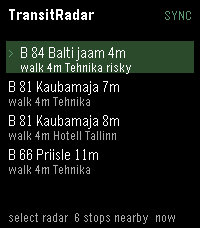
Tools & UtilitiesA small application to check the departure times of buses and trams from the nearest stops
 0
0BatMon
Tools & UtilitiesDraws a battery graph by recording the level ad midnight.