 59
59Events 365
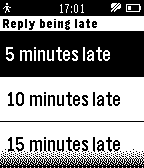
NotificationsThe app retrieves Office 365 Outlook events and displays them as a list, which you can then browse and see details of each event. Events are cached so they can also be browsed offline (even when Pebble is not connected to phone). Sync interval can be configured so that app checks for new/updated events periodically. The app will issue reminders 15 minutes prior to events (if you enable this in app settings). Additionally, if you're late to a meeting, you can reply with an "I'm being late" message. In this case you can select approximate delay (5, 10, 15, 20 or 30 minutes) and send the message. The message is configurable via app settings. Notice: Only Office 365 Outlook events are supported, but not Live calendar events. No companion app is required. The app is opensource, source code available on github. P.S. This app was NOT developed by Microsoft and is not affiliated with Microsoft. Office 365 is trademark and Outlook is registered trademark of Microsoft Corporation.
 59
59Chess Puzzles
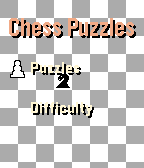
GamesNow with touch screen support! Sharpen your chess instincts from your wrist. Chess Puzzles brings real, rated tactical puzzles from Lichess directly to your Pebble watch. No phone staring required. Just press a button, think, and play. ## Features - **Real puzzles, live from Lichess** — every session pulls a fresh rated puzzle from the world's largest free chess server - **Offline-ready** — your last fetched puzzle is cached on-watch; 7 fallback puzzles ensure you can always play, even without a phone - **7 difficulty bands** — from Easiest (~600 Elo) to Expert (~2400 Elo) - **Wrong-move feedback** — a short vibration and "Wrong! Try again" keep you honest without giving the answer away ## Future features [ ] **Puzzle solved counter** — your lifetime solve count is tracked in persistent storage [ ] **Solve calendar** — daily puzzles mark the calendar so you can track your streak [ ] **Support for round screens** - Chess puzzles on any Pebble
 59
59SP Settings
Tools & UtilitiesThe SetPebble Settings app is for controlling your custom settings all from your Pebble watchface. To use this utility app, enter the same serial number that you use to store your custom settings for SetPebble-enabled apps. You will next see a list of all your SetPebble apps that are linked to your serial number. Select and app and then select the setting to change. SetPebble apps include Fair Weather, Big Weather, Maptastic, Earth, Pocket Glider, Blue Marble, Cool Weather, Night Sky, Camoodle, Medical ID, Radar, and many more. Visit SetPebble.com for the full list. If you don't have SetPebble apps, then this utility app is not for you. However SetPebble users will enjoy the convenience of changing their watchface and app settings without pulling out their smart phone!
 59
59Smart Audio Recorder
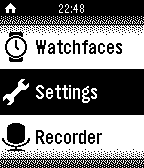
RemotesRecord Meeting, Lecture and anything interesting/funny where ever you are with a touch of a button on the pebble watch, in a most elegant and discreet manner.
 59
59Squash Scorekeeper
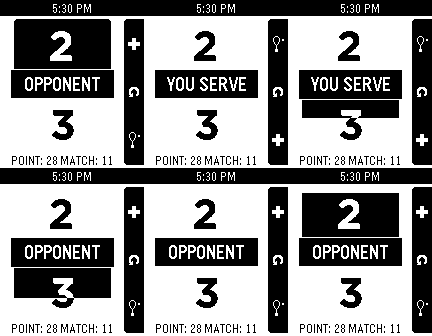
Health & Fitness"What was the score?" "Whose serve is it?" Keep track on your Pebble! Includes timers to solve the "did I already press the button?" scenario. Reset by long-pressing the middle button. Now winning scores & scoring type are configurable so it can be used for other variations of squash and similar games (racketball / raquetball)!
 59
59Autoinsult for Pebble
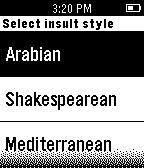
DailyWhenever you need an unorthodox insult line - this app will be there for you. Select insult style from - Arabian - Shakespearean - Modern - Mediterranean. Based on autoinsult.com
 59
59MyLOL
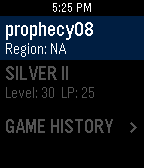
DailyMyLOL is the latest and greatest League of Legends Companion app for Pebble! Features: * Profile and Game History Data * Current Game data with images * Free Champion Rotation * Built in Pebble to Pebble Messenger Getting Started: * Download the app to your Pebble Time and/or Pebble Time Round. * Open configuration page: > Choose a MyLOL messenger username > Enter a summoner name > Select summoner's region > Enjoy MyLOL! For more information visit: https://github.com/MitchellRoy/MyLOL-Pebble-App MyLOL isn’t endorsed by Riot Games and doesn’t reflect the views or opinions of Riot Games or anyone officially involved in producing or managing League of Legends. League of Legends and Riot Games are trademarks or registered trademarks of Riot Games, Inc. League of Legends © Riot Games, Inc.
 59
59RunPee for Pebble
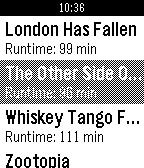
NotificationsDon't miss out on the best parts of a movie because you had to go to the bathroom! RunPee for Pebble shows you the best times to run to the bathroom, right on your timeline. Just select a movie and start the app when you start the movie. Be a whiz-kid, use the app. (This app is third-party from RunPee and is unaffiliated with RunPee.com. I love the app and thought it would be great as a Pebble app. Definitely go buy the Runpee application!)
 59
59Yamaha AV Remote
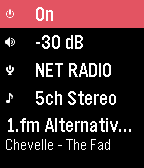
RemotesA simple control watchapp for the basic functions of your network-enabled Yamaha AV receiver. Never look for the remote again! Tested on a RX-V479 but should work on all models compatible with the official AV CONTROLLER smartphone app using the YNC/A protocol. This watchapp is unofficial and not endorsed or supported by Yamaha. Features: - Power toggle - standby/on* - Volume control & mute - 2-click preset scene launch, or manual input selection (HDMI, Spotify, Pandora, Airplay, Sirius, Net Radio, USB, Bluetooth, UPnP, Tuner...)** - DSP program selection - Basic playback control & info - previous track, next track, play/pause (if supported by the source) - Near real-time status updates, no need to refresh manually Not supported: - Multiple devices or multiple zones - Source browsing (menus) - Advanced sound & video settings * Ensure the 'Network Standby' feature is activated to be able to control/turn on the device when in standby mode. ** The available scenes & inputs are retrieved from the device configuration and may differ depending on the settings, the model and market availability.
 59
59Timetable
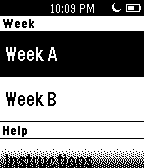
DailyTimetable is a bi-weekly representation of daily schedule designed for school. It can store a max. of 6 items per week day with small descriptions for each.
 58
58home assistant pebble
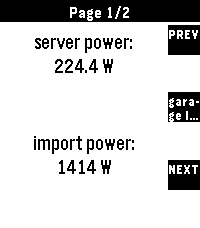
RemotesTransform your Pebble into the ultimate smart home remote Home Assistant for Pebble is a professional-grade integration designed for speed, reliability, and universal compatibility. Whether you're on a classic Pebble, a Pebble Round, or the high-res Pebble Time 2, this app provides a seamless, responsive experience. Setup Instructions: 1. Open the settings for this app in the Pebble mobile app. 2. Enter your Home Assistant URL and a Long-Lived Access Token. 3. (Optional) For the best experience, add `cors_allowed_origins: - https://joshsg3.github.io` to your Home Assistant `configuration.yaml` to enable the "Load Full List Now" button. - If you don't want to do this, save the config page, and open it again, the first 350 entities will be preloaded 4. Configure your dashboard pages and sync! Not affiliated with home assistant If you like this and want to support me: https://buymeacoffee.com/joshsg
 58
58Pillbox for Pebble
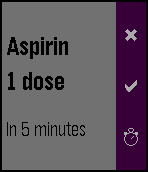
Health & FitnessThis application will ensure that you or the people around you never forget to take the prescribed medication. Define what to take, when and how often, and forget about it. Pillbox for Pebble will issue reminders in time and remember if you confirm, cancel or delay the consumption.
 58
58Breathe
Health & FitnessTake a moment to breathe. In the hectic life that we have now, take a step back and take a moment to collect our thoughts. Features ‣ A soothing circle animation with gentle pulses to indicate inhale/exhale ‣ Reminders to breathe: Choose when they start and how often reminders appear ‣ A slew of settings: Choose what colour the circle and background are, how fast the breathing pace should be, and many more! Download now and enjoy breathing. Français On vit aujourd'hui dans une société qui nous demande beaucoup, toute la journée. C'est pourquoi il faut prendre un moment pour respirer et réfléchir. Fonctions: ‣ Une animation relaxante et des vibrations légères pour vous indiquer d'inhaler/exhaler ‣ Des rappels pour respirer: Choissisez quand commencent les rappels, et la fréquence à laquelle ils surviennent ‣ Beaucoup de réglages: Choissisez la couleur du cercle et la couleur de fond, ainsi que la vitesse des respirations, et encore plus! Téléchargez maintenant et respirez maintenant! Español Vivimos hoy de manera muy conectada a todas horas; por eso, es necesario tomar un rato para relajarse, y respirar. Esta app te ayudará a descansar. Características ‣ Una animación relajante con vibraciones ligeras para indicar una inspiración/exhalación ‣ Recordatorios para respirar: Puedes escoger cuando empiezan los recordatorios, y la frecuencia de éstos ‣ Varios ajustes: Escoge el color del círculo, el color de fondo, la rapidez de las respiraciones, y ¡mucho más! Descarga ahora y ¡respira ahora! tags: breathe, respire, exhale, inhale, mindful, meditate
 58
58PTV Schedule
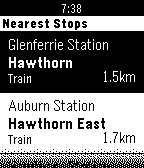
DailyView the latest schedules for public transport in Melbourne. Currently supports arrival times for scheduled Trams, Trains and Buses. The app is based on PTV's latest up-to-date schedule data. For live Tram arrival data, use the TramFinder app also from this developer.
 58
58Snow - Deprecated
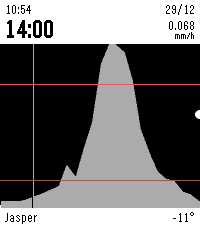
DailySnow is a Pebble app that shows you a graph of the upcoming snow for your location for the next 24 hours (per hour), and for the next 72 hours (per 3 hours). This is very useful when you want to go skiing or snowboarding! Upcoming snow is drawn as a light grey filled graph. Other upcoming precipitation is drawn as a light blue line. This app has a trial of 24 hours and costs only $0.99. Payments are handled via KiezelPay. Features: - Snow and other precipitation forecasts - Temperature in °F or °C - Multiple locations - Choose your own refresh rate - 24h (per hour) and 72h (per 3 hours) forecasts - Vibrate when refreshed - Adjust the scale of the graph Use the updated Rain app instead, this has all precipitation types. Please give it a ❤️ if you like it :) Keywords: snow, forecast, rain, hail, weather, ski, snowboard, skiing, snowboarding, winter